

Measuring full-schema and curated-tool loading with Microsoft Foundry, APIM and GitHub MCP.
Introduction
I recently came across an Uber engineering blog on X about how Uber operates its ‘software factory’. What caught my attention was its discussion of MCP tool overhead and the CLI tool-resolution pattern described in Running a Software Factory Efficiently at Uber Scale: avoid loading a large catalogue of tool schemas into every agent session and resolve only the tools needed for a task.
So I thought, what would the same idea look like in Azure? In this post, I use Azure API Management to expose a curated GitHub MCP surface, compare it with a full GitHub tool catalogue, and measure the token and AI credit trade-offs.
Tool context overhead
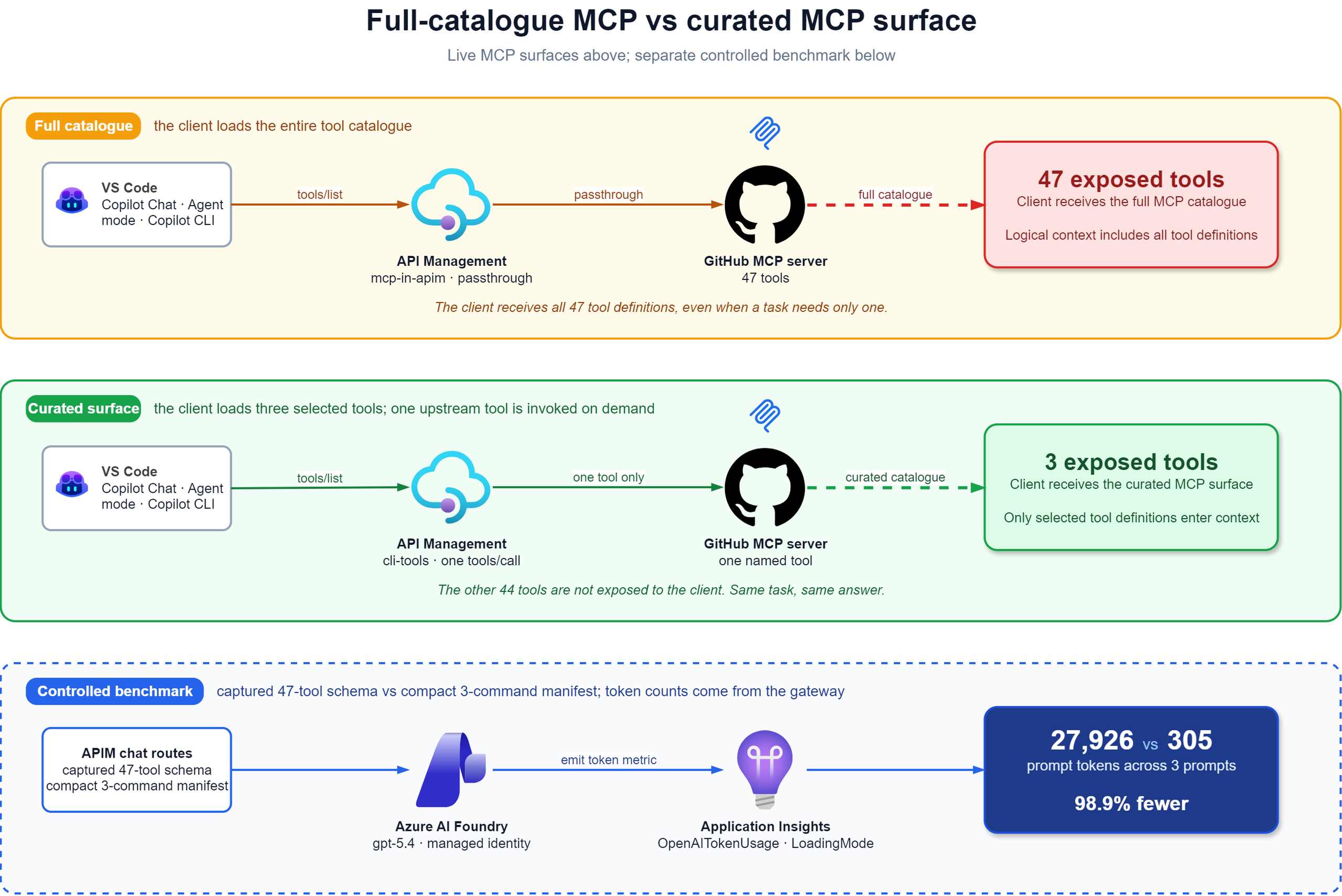
My captured GitHub MCP configuration exposed 47 tools, although most tasks may only need a handful of them. The catalogue will change over time, but those definitions become part of the model’s logical request context and are typically included again on subsequent model turns, even when the client calls tools/list only once.
Uber described the same impact in Running a Software Factory Efficiently at Uber Scale:
Note
Standard MCP loads all tool schemas directly into every session, regardless of whether an engineer will ever invoke them in that session or not.
For example, with over 100 tools installed, this pre-loading added approximately 50K-70K tokens of schema overhead to the initial prompt, which was subsequently re-sent on every context turn.
Their solution is CLI tool resolution: expose a small command-oriented surface and resolve tools at call time. My Azure implementation tests a narrower principle with a small MCP server projected from APIM REST operations. I do not reproduce Uber’s CLI or code-execution environment, though, as I wanted to validate what the foundations of that concept could look like in an Azure environment (and APIM was going to be perfect to help me validate this).
How I set up the comparison
I used the same gpt-5.4 model for both comparisons, but not the same deployment. The controlled benchmark used my Microsoft Foundry deployment, while Copilot CLI provided the practical validation inside a separate agent harness.
Deployment overview: the Azure resources used by both comparison paths.
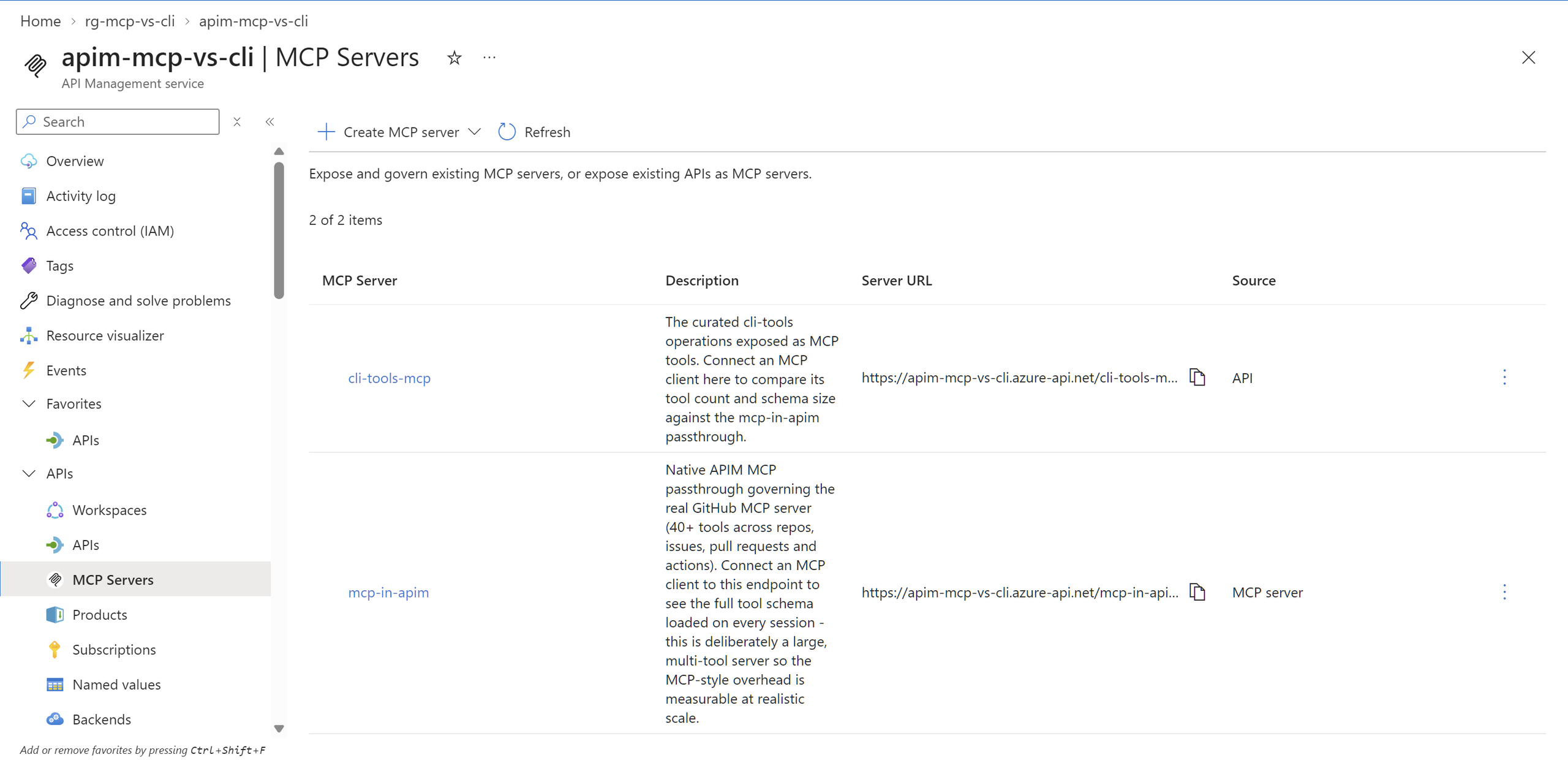
My APIM instance fronts the Microsoft Foundry deployment and GitHub MCP service:
| Route | What it does |
|---|---|
mcp-in-apim | Native MCP passthrough to the real GitHub MCP server, 47 tools |
cli-tools-mcp | Three curated REST operations projected as a GitHub MCP server, used by the Copilot CLI run |
openai-mcp-style | Full-catalogue GitHub MCP benchmark route to Foundry GPT-5.4 |
openai-cli-style | Curated GitHub MCP benchmark route to Foundry GPT-5.4 with a three-line manifest |
The live GitHub MCP server remains a protocol-preserving passthrough, while the curated surface projects three REST operations as MCP tools. The Foundry routes compare the captured 47-tool schema with a compact three-command manifest using identical prompts and the same model. mcp-in-apim is a native APIM MCP API backed by the GitHub MCP service. This uses APIM’s MCP
resource surface, so its schema and telemetry attributes are version-sensitive.
My corresponding Bicep snippet below maps exactly three existing REST operations into MCP tools.
resource curatedMcpServer 'Microsoft.ApiManagement/service/apis@2025-09-01-preview' = {
  name: 'cli-tools-mcp'
  parent: apimService
  properties: {
    type: 'mcp'
    displayName: 'Curated tools (MCP view)'
    path: 'cli-tools-mcp'
    protocols: ['https']
    subscriptionRequired: true
  }
}

@batchSize(1)
resource curatedMcpTools 'Microsoft.ApiManagement/service/apis/tools@2025-09-01-preview' = [
  for tool in [
    { name: 'search_code', operationId: 'search-code' }
    { name: 'list_issues', operationId: 'list-issues' }
    { name: 'pull_request_read', operationId: 'get-pull-request' }
  ]: {
    name: tool.name
    parent: curatedMcpServer
    properties: {
      operationId: resourceId(
        'Microsoft.ApiManagement/service/apis/operations',
        apimServiceName,
        'cli-tools',
        tool.operationId
      )
    }
  }
]
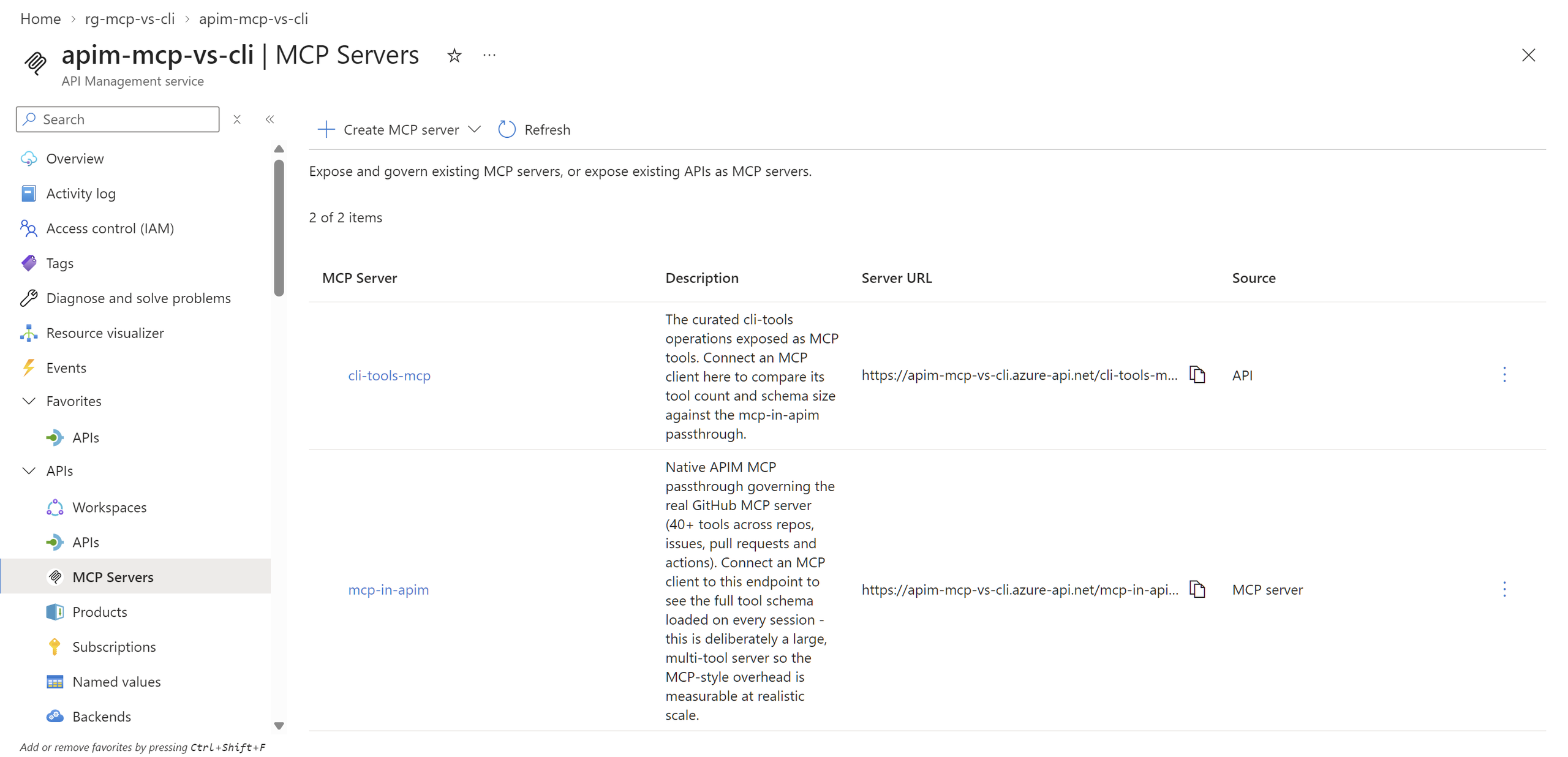
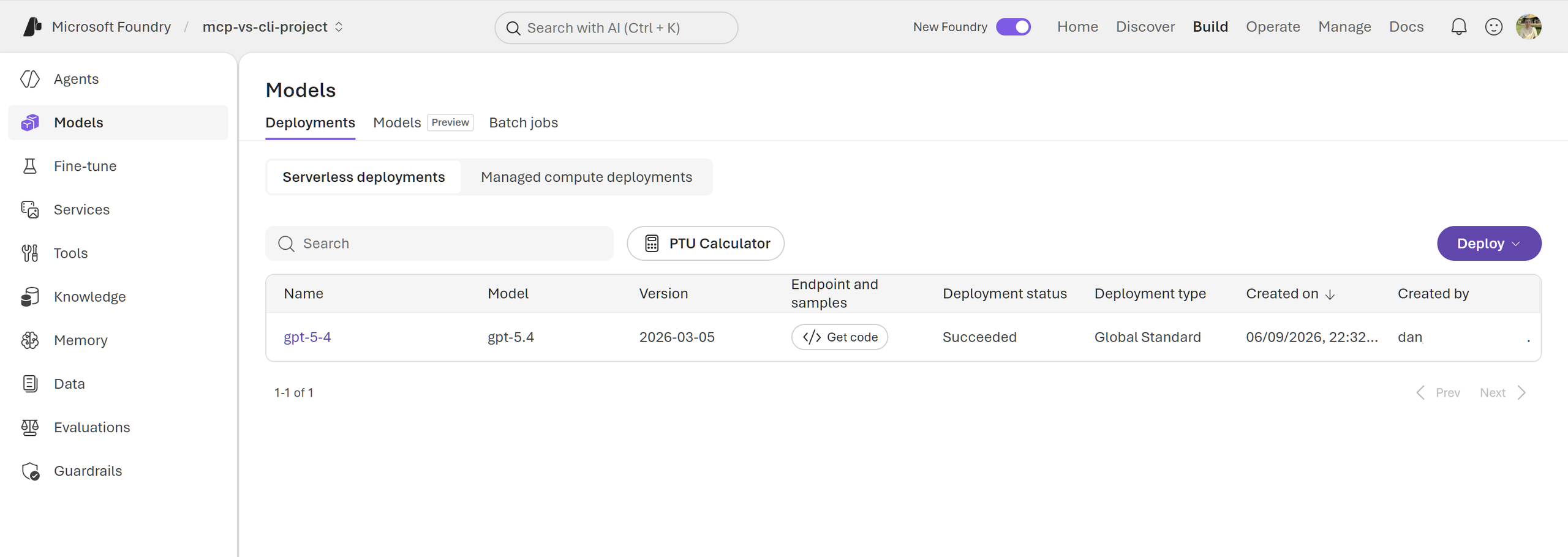
Both chat routes hit the same gpt-5.4 deployment via managed identity, with the same model and prompts and only one MCP variable.
The policy excerpt shows how azure-openai-emit-token-metric tags every call with a LoadingMode dimension, so the token counts
come from the gateway hits. The full-catalogue route includes the captured schema fragment and emits mcp-style; the curated Microsoft Foundry benchmark route uses the slim manifest fragment and emits cli-style:
<include-fragment fragment-id="mcp-tool-schema-injection" />
<set-backend-service backend-id="foundry-openai-backend" />
<authentication-managed-identity
  resource="https://cognitiveservices.azure.com"
  output-token-variable-name="msi-token"
  ignore-error="false" />
<azure-openai-emit-token-metric namespace="OpenAITokenUsage">
  <dimension name="LoadingMode" value="mcp-style" />
  <dimension name="RunId"
    value="@(context.Request.Headers.GetValueOrDefault("X-Comparison-Run-Id", "unspecified"))" />
  <dimension name="API" value="@(context.Api.Id)" />
</azure-openai-emit-token-metric>
Controlled comparison
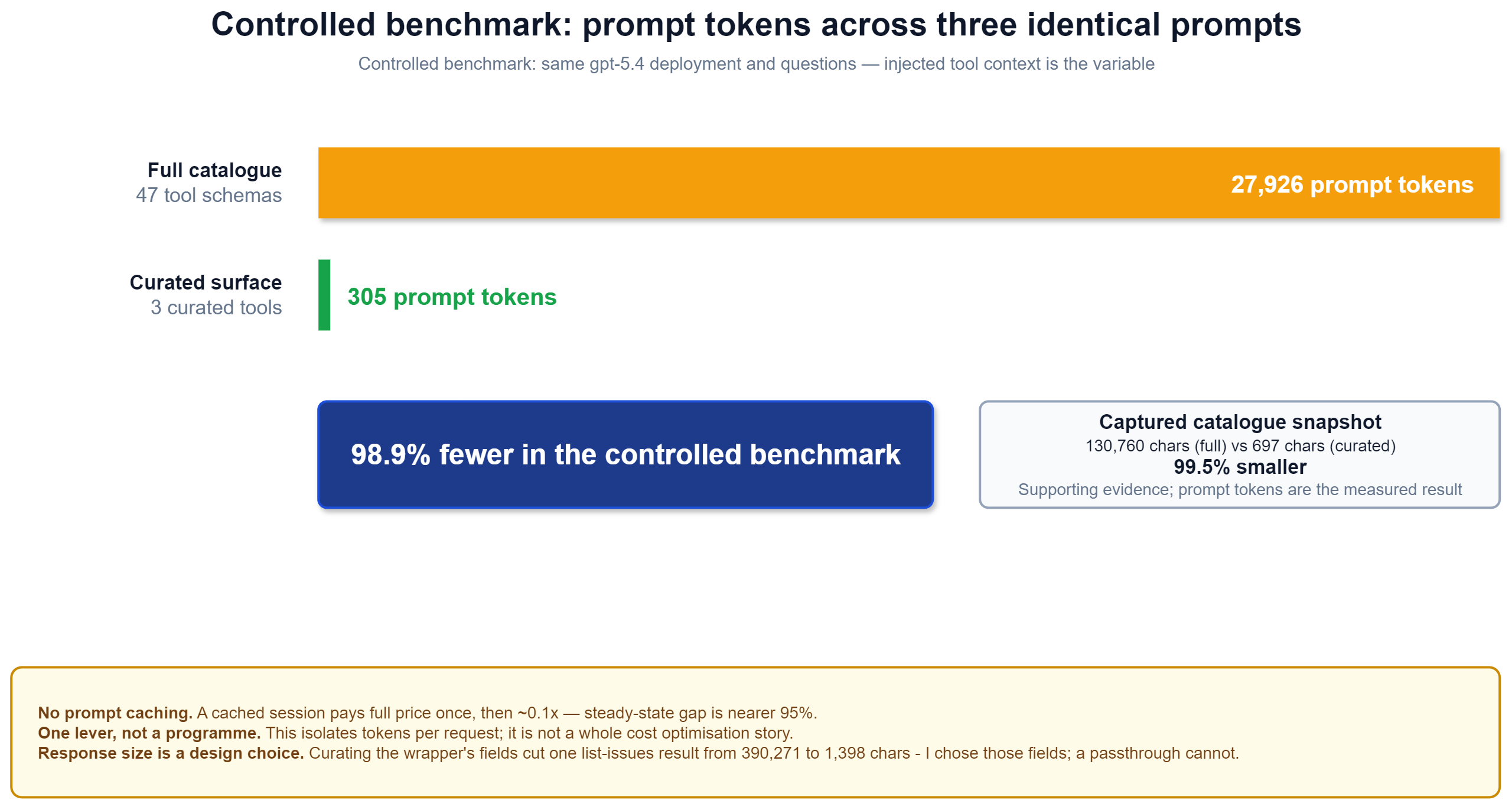
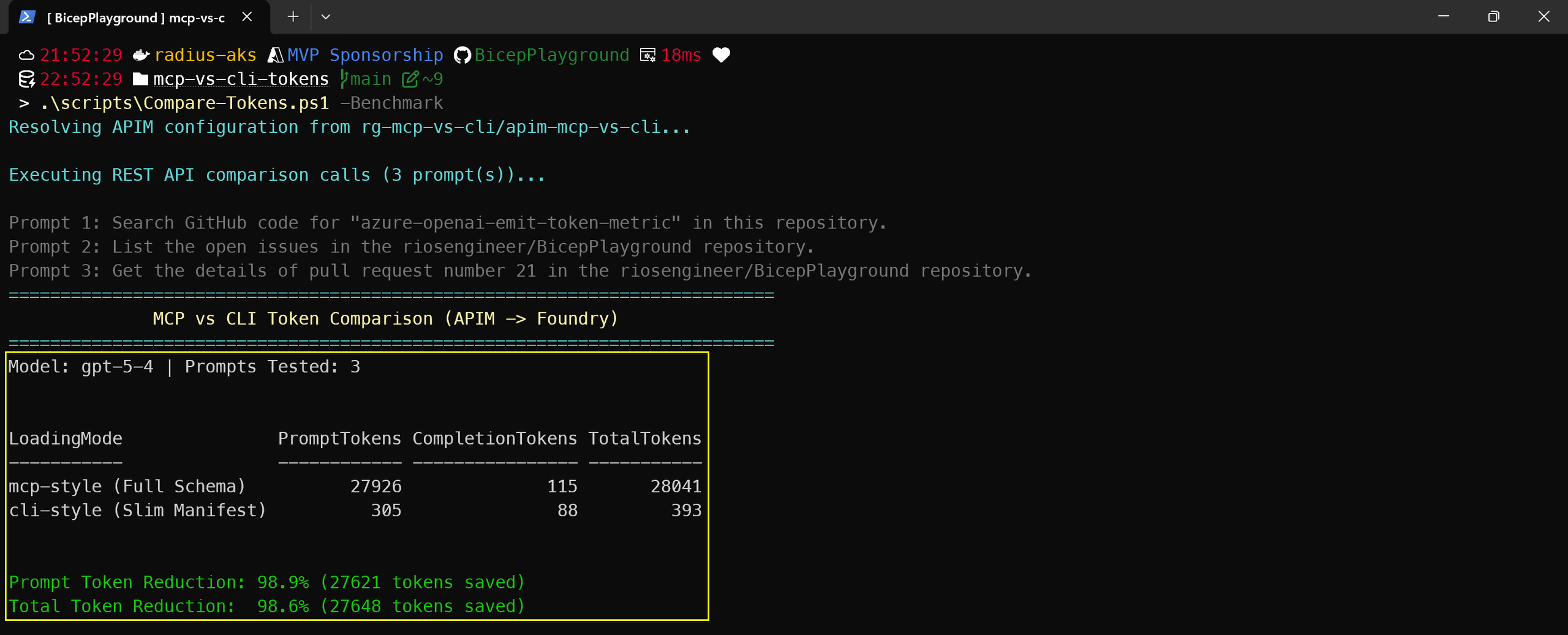
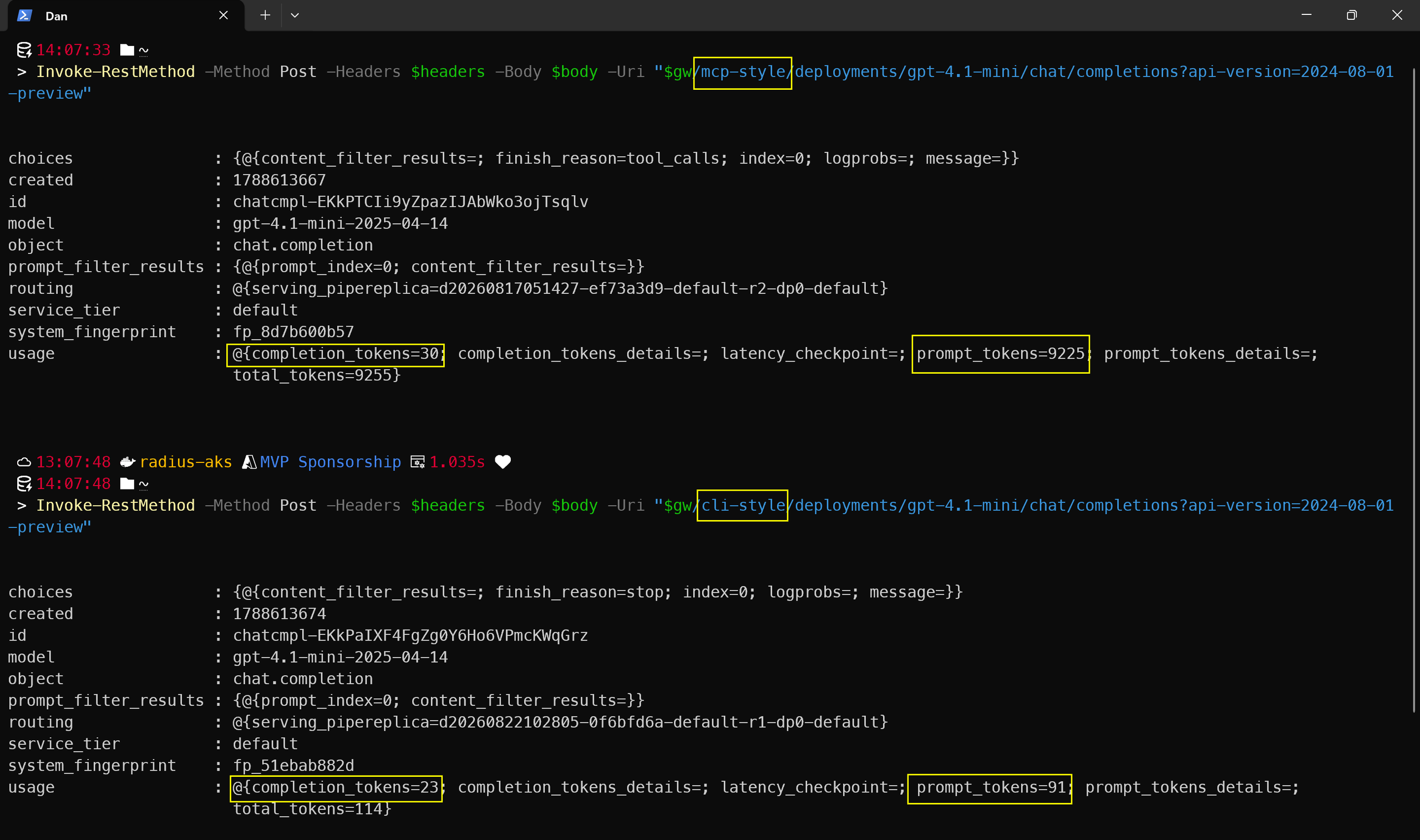
LoadingMode.This run uses the same gpt-5-4 deployment and three prompts on both routes. It doesn’t invoke a tool, so the 98.9% result measures only the context removed by replacing this captured schema with the compact manifest. It isn’t a universal comparison between every 3 tool and 47 tool server.
Note
This measures logical prompt-context size, not cache-adjusted billing. Providers may
price reusable schema prefixes differently after the first write. The Copilot CLI runs provide the practical comparison inside a real harness.
APIM reported the real Foundry token counts under the mcp-style and cli-style dimensions. The script didn’t estimate tokens from characters or use a local tokenizer.
Copilot CLI validation
Both MCP servers are registered in my local VS Code .vscode/mcp.json, so Copilot Chat shows them side by side:
github-mcp-tools→ 47 toolsgithub-cli-tools→ 3 tools
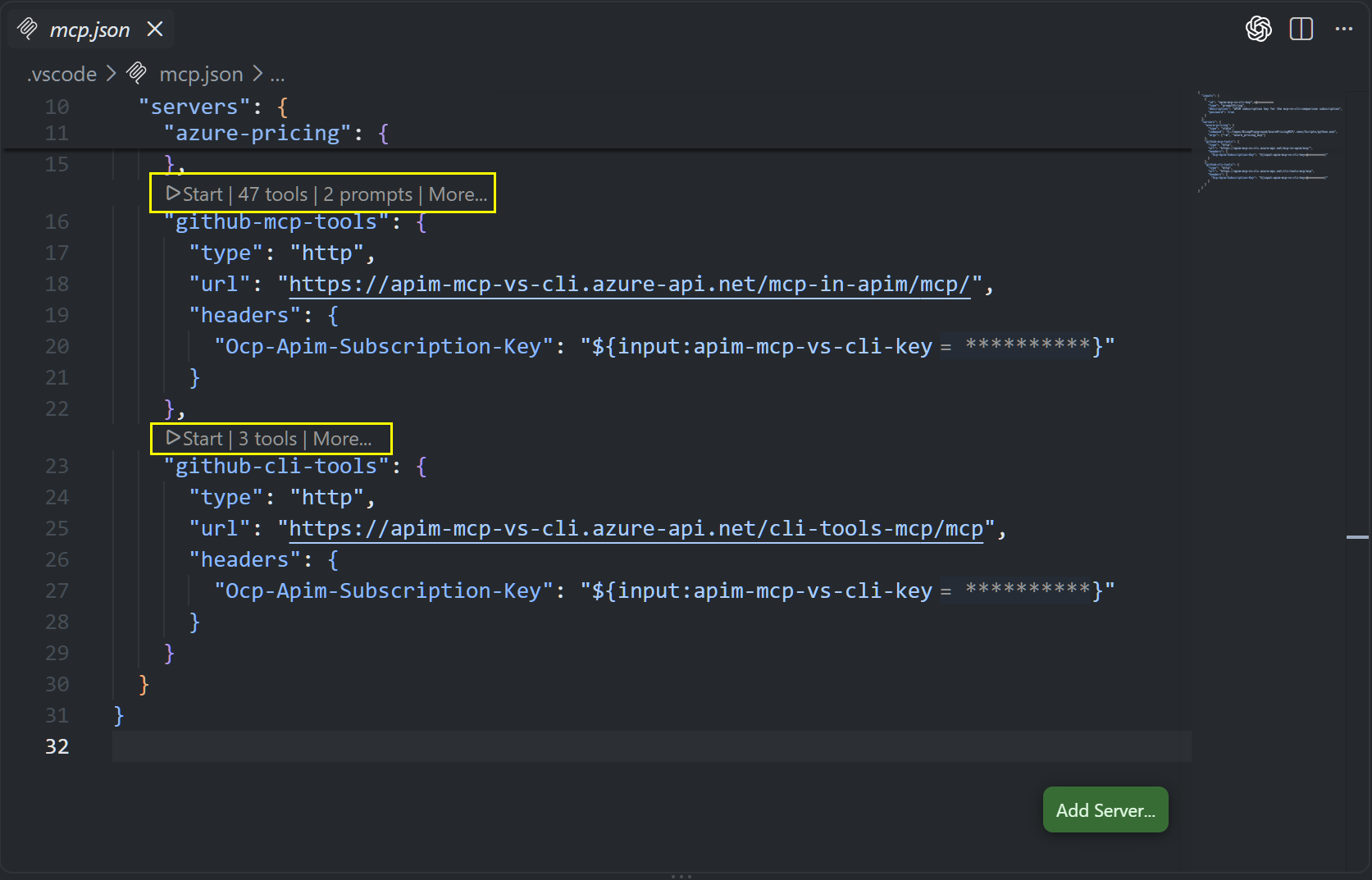
With the 47-tool GitHub MCP server disabled and the curated three-tool MCP server enabled, I asked “list the open issues in riosengineer/BicepPlayground”. It returned the same answer for this task, showing that curation need not remove the capability being tested.
Measuring the real agent context
My APIM Microsoft Foundry chat completion benchmark isolates schema context. For a second signal, I used the Copilot CLI’s own usage report.
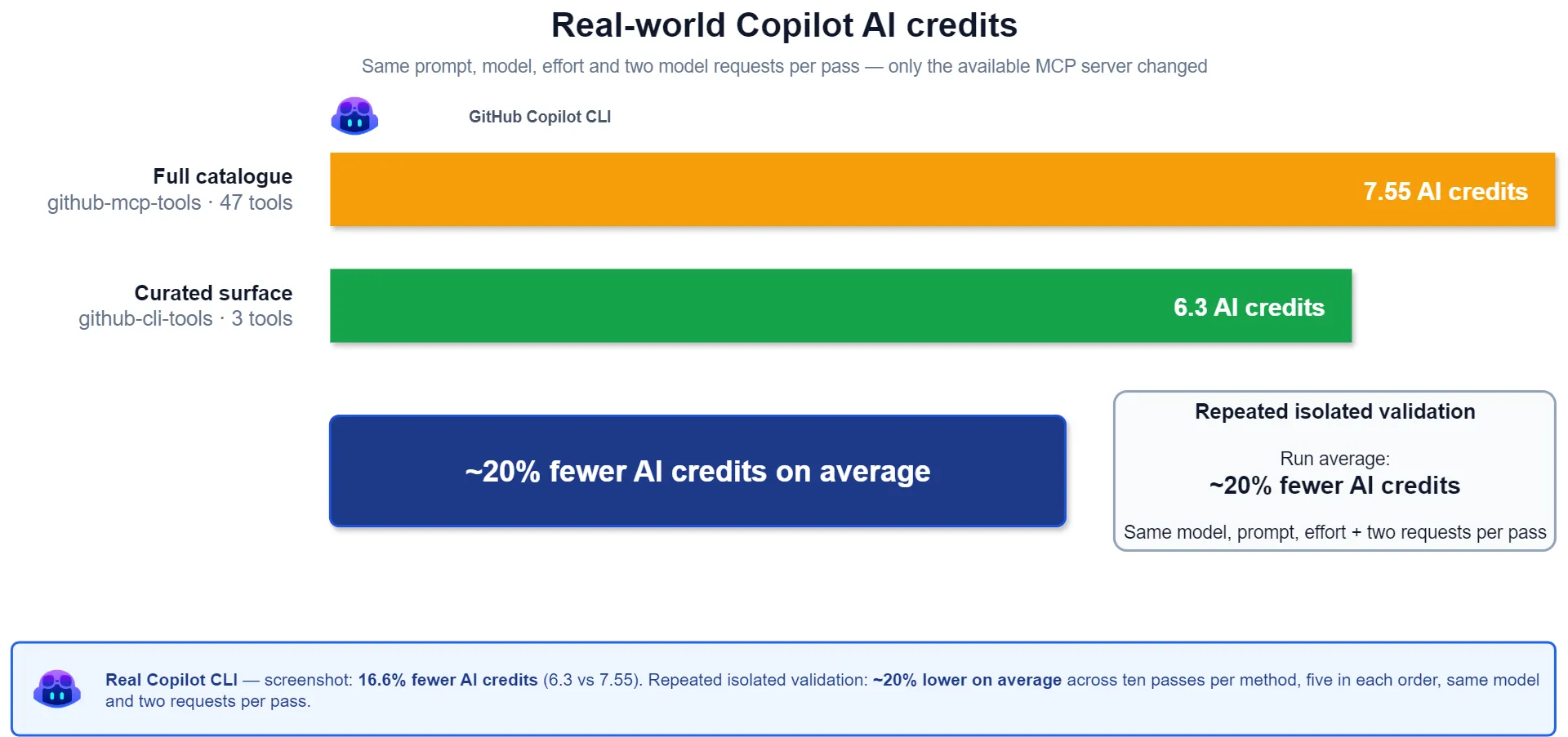
I ran ten passes for each method with gpt-5.4, medium effort, the same prompt, and exactly two model requests. Each session disabled the other server, with five pairs run in each order to expose cache and ordering effects.
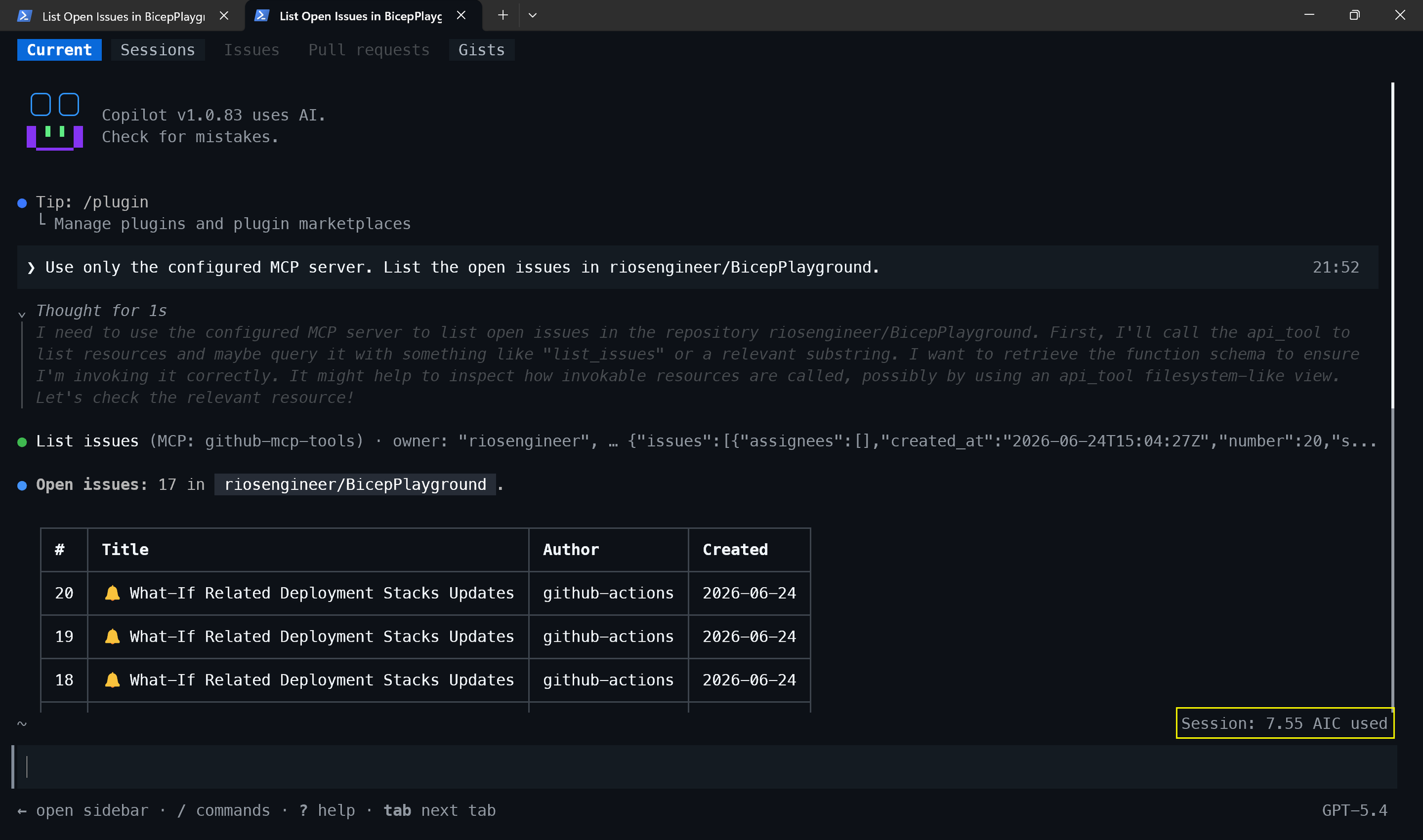
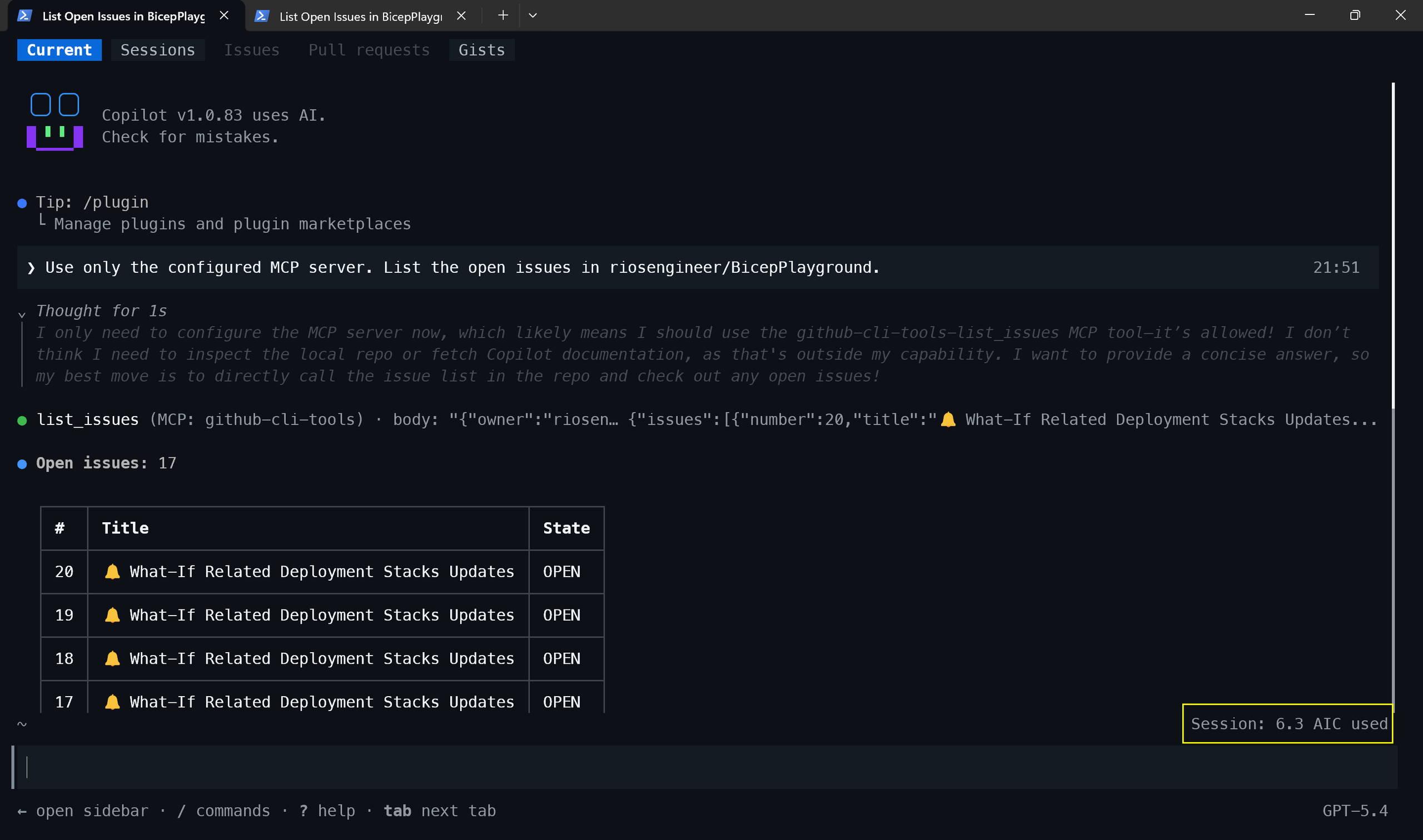
This isolation is easy to get wrong: disabling built-in MCP servers doesn’t disable user-configured servers. Without the explicit switch, a curated run could still load the full catalogue. I also pinned the model and effort so routing didn’t become another variable.
The run shown above used 16.6% fewer AI credits with the curated surface. Across the repeated warm runs, the saving was about 20% on average. I excluded one cold-cache result from the curated run, so treat that average as what I observed in this setup, not a statistical result.
The cache data showed roughly the same 9,200-token difference. In the earlier usage-file sample, both
runs made two model calls, so the prompt was counted twice, once written, once read:
| cached | written | per call | |
|---|---|---|---|
| Curated surface | 18.4k | 18.8k | 18.6k |
| Full catalogue | 27.6k | 27.8k | 27.7k |
| Difference | 9.2k | 9.0k | 9.1k |
The extra schema cost is roughly the same in both tests. The percentage changes because Copilot CLI also carries its own baseline context. APIM measured the 47 tool schema at 9,212 tokens.
How I isolated the CLI test
Both servers can remain registered, but each session must expose only one. I used --disable-mcp-server for the curated run in a pwsh terminal:
copilot `
  --no-custom-instructions `
  --disable-builtin-mcps `
  --disable-mcp-server github-mcp-tools `
  --model gpt-5.4 `
  --effort medium `
  --allow-all-tools `
  --allow-all-urls
For the full catalogue run, I changed only the disabled server to github-cli-tools. The native tool also exposed pagination and field selection, while the curated wrapper did not. The native path still cost more despite trimming its response, but the trade-off remained that curation exchanges flexibility for cost.
Response size matters too
An early Copilot CLI run showed how a large tool response could remain in context and trigger another
model call. Before I fixed my APIM response policy, the curated path spilled the result to disk:
● list-issues (MCP: github-cli-tools)
  └ Output too large to read at once (381.2 KB). Saved to: ...
● Extract first three issue numbers and titles (shell)
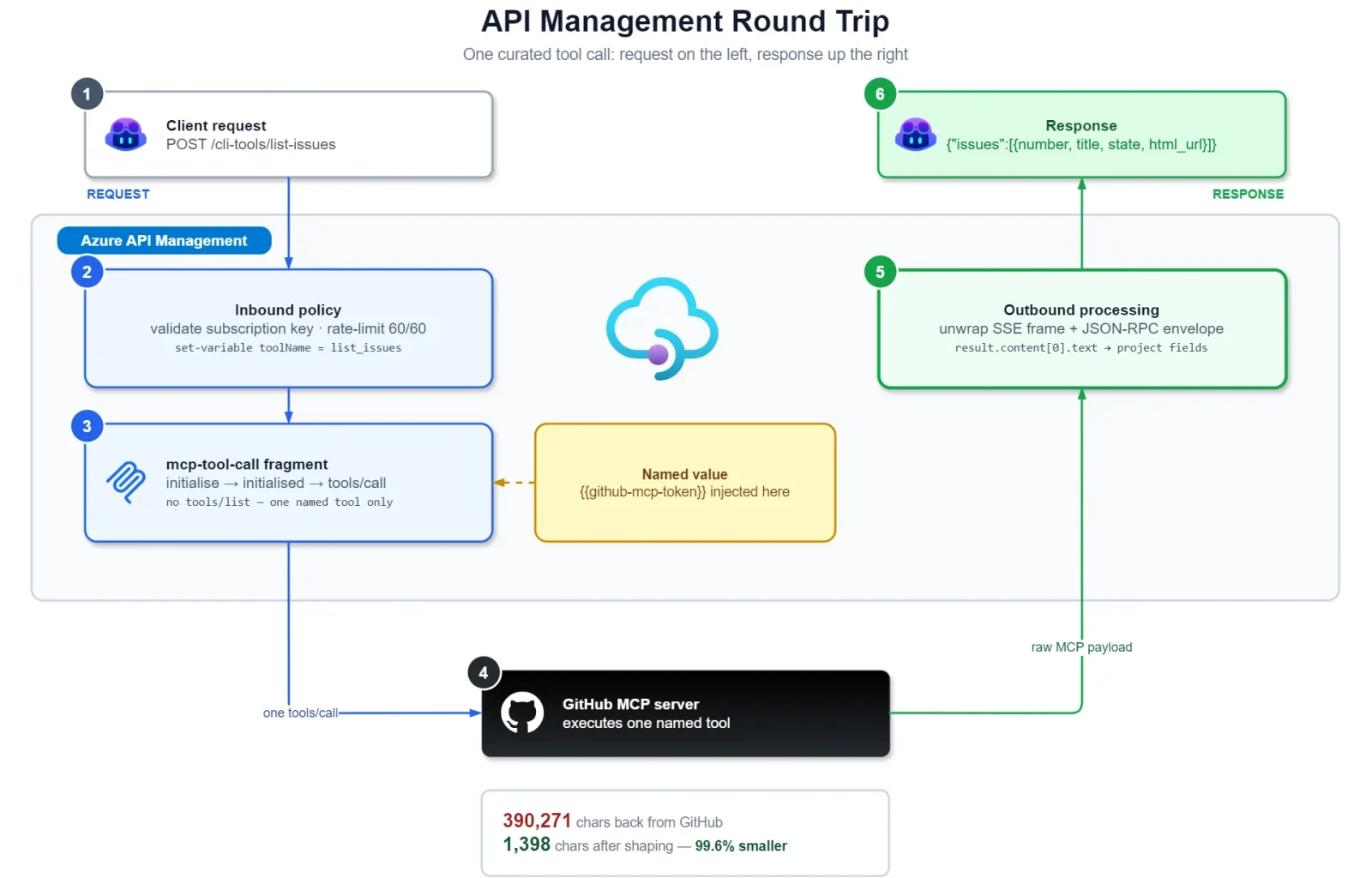
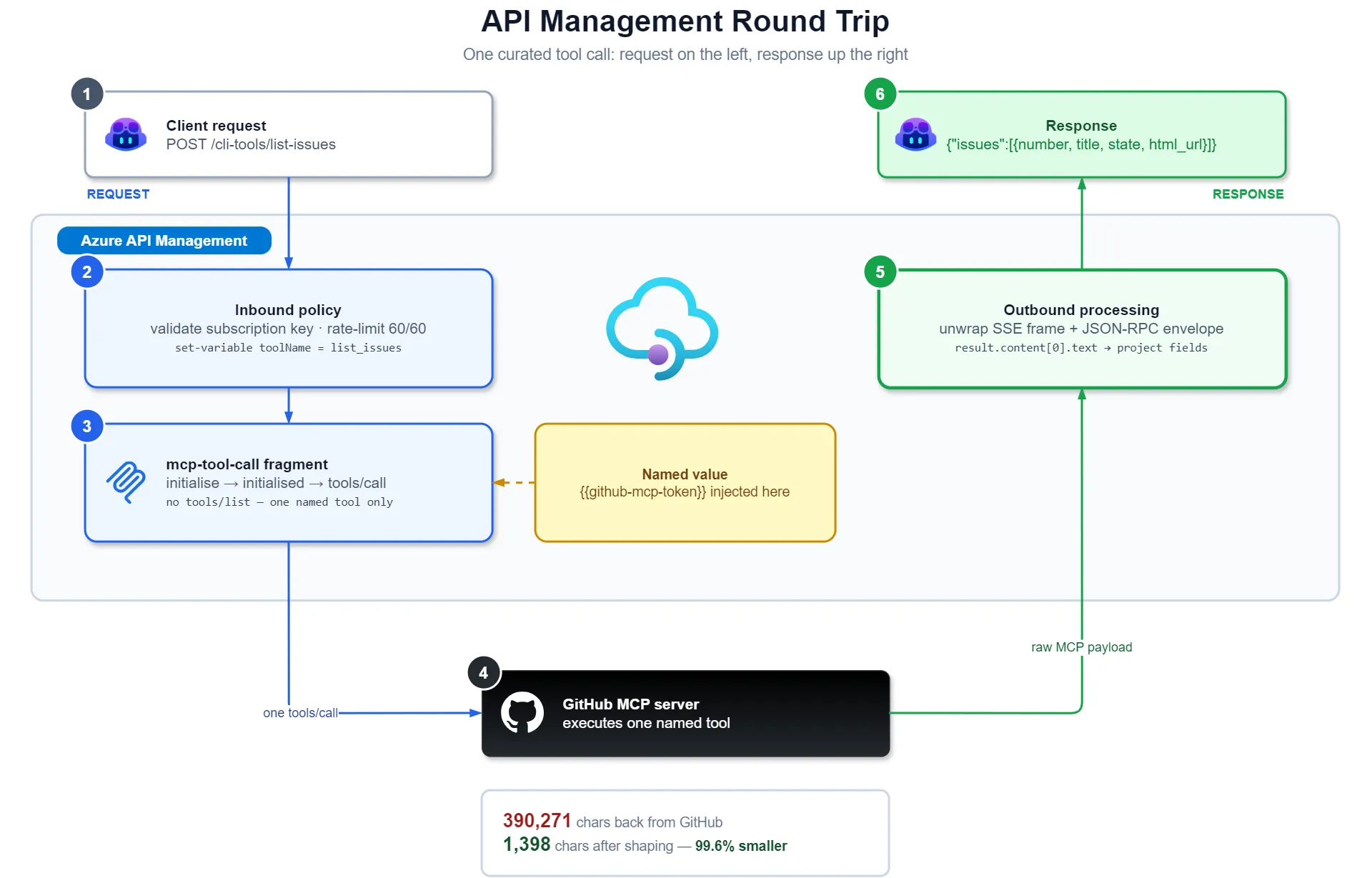
The wrapper was returning the raw SSE frame and JSON-RPC envelope, so I received protocol noise instead of the result I was after (or expecting). Below is a proof-of-concept policy that extracts result.content[0].text for the captured single-message, text-only response; it is not a general SSE or MCP parser though:
<return-response response-variable-name="mcpCallResponse">
  <set-body><![CDATA[@{
    var raw = ((IResponse)context.Variables["mcpCallResponse"])
      .Body.As<string>(true);
    var marker = raw.IndexOf("data:");
    var payload = marker >= 0 ? raw.Substring(marker + 5).Trim() : raw.Trim();
    var rpc = Newtonsoft.Json.Linq.JObject.Parse(payload);
    return (string)rpc["result"]["content"][0]["text"];
  }]]></set-body>
</return-response>
Most of the response size came from the full issue bodies: 390,271 characters for a question that only needed three (GitHub) issue numbers. The wrapper therefore projects each item to:
number, title, state, html_url| API Operation | Before | After |
|---|---|---|
cli-tools/list-issues | 390,271 chars | 1,398 chars |
99.6% smaller!!
I chose those four fields. Response shaping is a design decision, so this comparison is deliberately not like-for-like:
Note
A curated wrapper can deliberately shape its responses. A protocol-preserving passthrouggh generally should not, because rewriting or buffering the vendor response changes its behaviour and can interfere with MCP streaming.
For this test, that difference was intentional. The passthrough remains untouched because the MCP proxy should not rewrite the provider’s responses unless you like pain.
Why APIM
APIM isn’t what reduces the context. I used it to control which tools were exposed, shape their responses and measure the difference:
- Governance. Authentication, authorisation scopes, rate limits and products can be applied consistently to both MCP and REST surfaces.
- Observability. Token metrics and tool usage pass through one boundary, so I can measure whether curation is actually reducing context and see which tools are used across MCP servers.
- Curate. I can promote high-value tools into a smaller surface with argument normalisation and response shaping, while leaving the protocol-preserving passthrough unchanged.
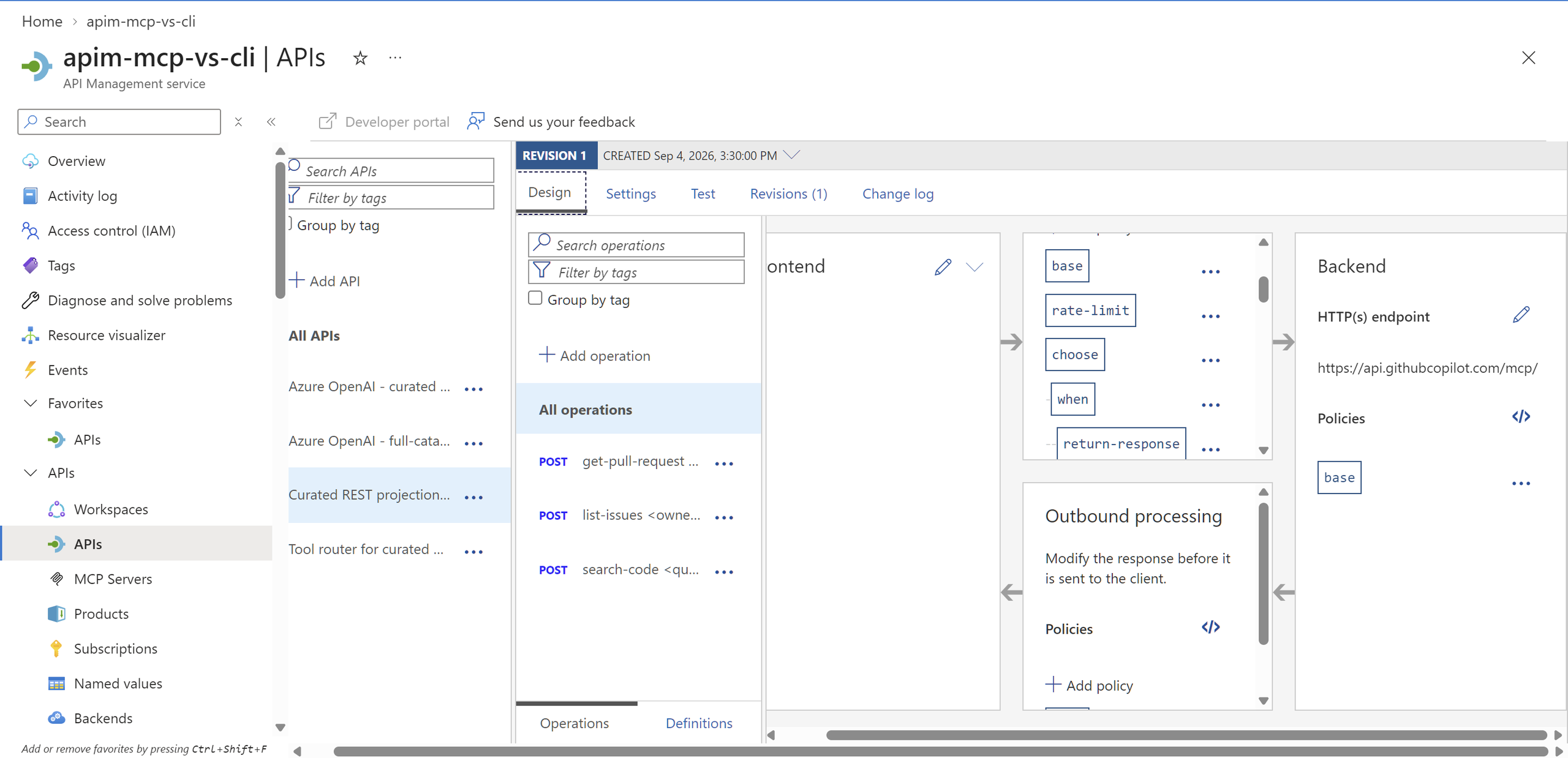
The API policies validate and normalise arguments, then share one policy fragment for the MCP handshake, invocation and result handling.
The client is authorised to call APIM, while APIM separately authenticates to GitHub. In this demo the comparison subscription spans all APIs, including the passthrough; a production deployment should place curated and passthrough surfaces in separate products or authorisation scopes.
Curating the tool surface
The next problem was deciding which tools should go into the curated surface. Put the provider server behind APIM and each tools/call produces a dedicated log record without custom policy or body logging. Enable GatewayMCPLogs, then you can query which tools are being called and see which ones are being sent to the curated path:
ApiManagementGatewayMCPLog
| where TimeGenerated > ago(30d)
| where Method == 'tools/call'
| extend WrappedAs = case(
    ToolName == 'search_code',       'cli-tools/search-code',
    ToolName == 'list_issues',       'cli-tools/list-issues',
    ToolName == 'pull_request_read', 'cli-tools/get-pull-request',
    '')
| extend Status = case(
    ApiType != 'pass-through-mcp', 'n/a - is the wrapper',
    isnotempty(WrappedAs),         'wrapped',
    'PROMOTE - not wrapped')
| summarize Calls = count(), Sessions = dcount(SessionId), LastSeen = max(TimeGenerated)
    by Status, ApiType, ToolName, WrappedAs
| order by Calls desc
The PROMOTE row surfaced get_file_contents, which I’d called earlier and forgotten about. It wasn’t one of my three curated tools, making it a clear candidate to evaluate next.
ApiType separates the pass-through-mcp provider server from the mcp-backend REST projection. dcount(SessionId) helps distinguish broad adoption from one noisy session:
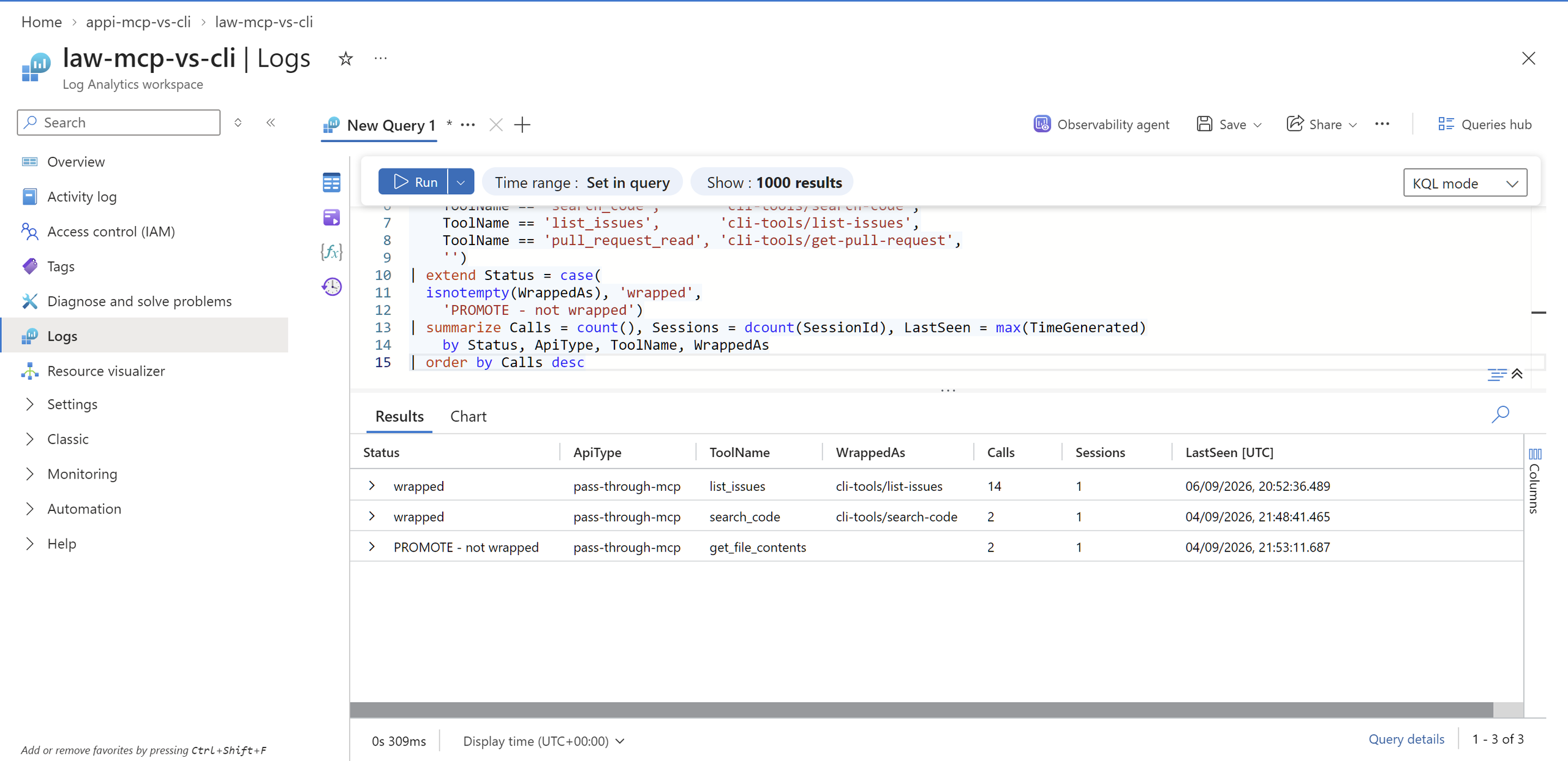
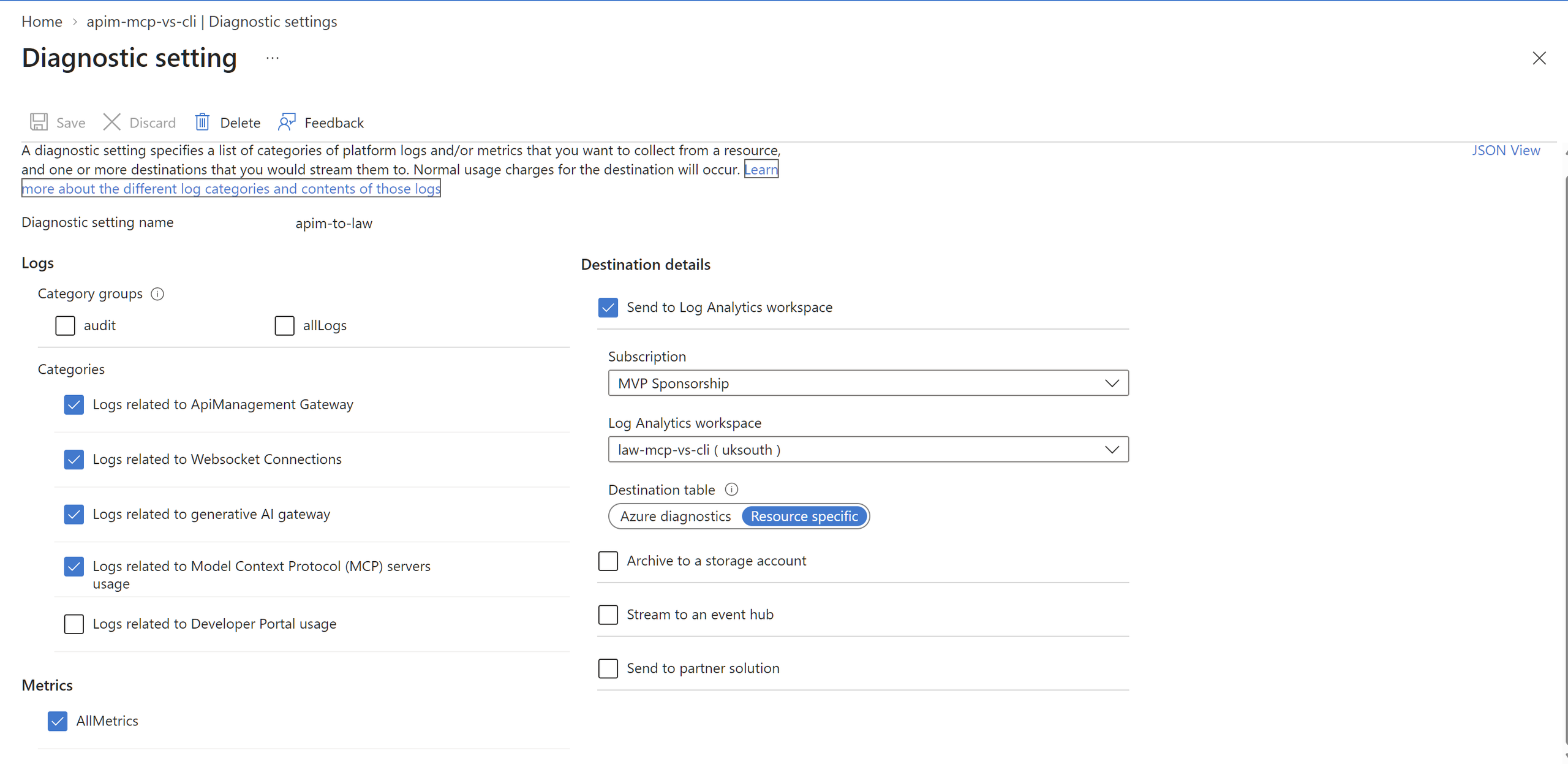
ApiManagementGatewayMCPLog.APIM uses two telemetry paths: Azure Monitor diagnostic settings send gateway logs to Log Analytics, while service/diagnostics sends metrics to Application Insights. This AVM configuration enables the Log Analytics path:
diagnosticSettings: [
  {
    name: 'apim-to-law'
    workspaceResourceId: logAnalyticsWorkspace.outputs.resourceId
    logAnalyticsDestinationType: 'Dedicated'
    logCategoriesAndGroups: [
      { category: 'GatewayLogs' }
      { category: 'GatewayLlmLogs' }
      { category: 'GatewayMCPLogs' }
    ]
    metricCategories: [ { category: 'AllMetrics' } ]
  }
]
The second resource connects APIM to the Application Insights logger created by the APIM Bicep module:
resource apimAppInsightsDiagnostic 'Microsoft.ApiManagement/service/diagnostics@2024-05-01' = {
  name: 'applicationinsights'
  parent: apimService
  properties: {
    alwaysLog: 'allErrors'
    loggerId: '${apimService.id}/loggers/appinsights-logger'
    metrics: true
    verbosity: 'information'
    logClientIp: true
  }
}
Dedicated selects resource-specific tables rather than AzureDiagnostics. Mine took roughly half an hour to appear after the first record.
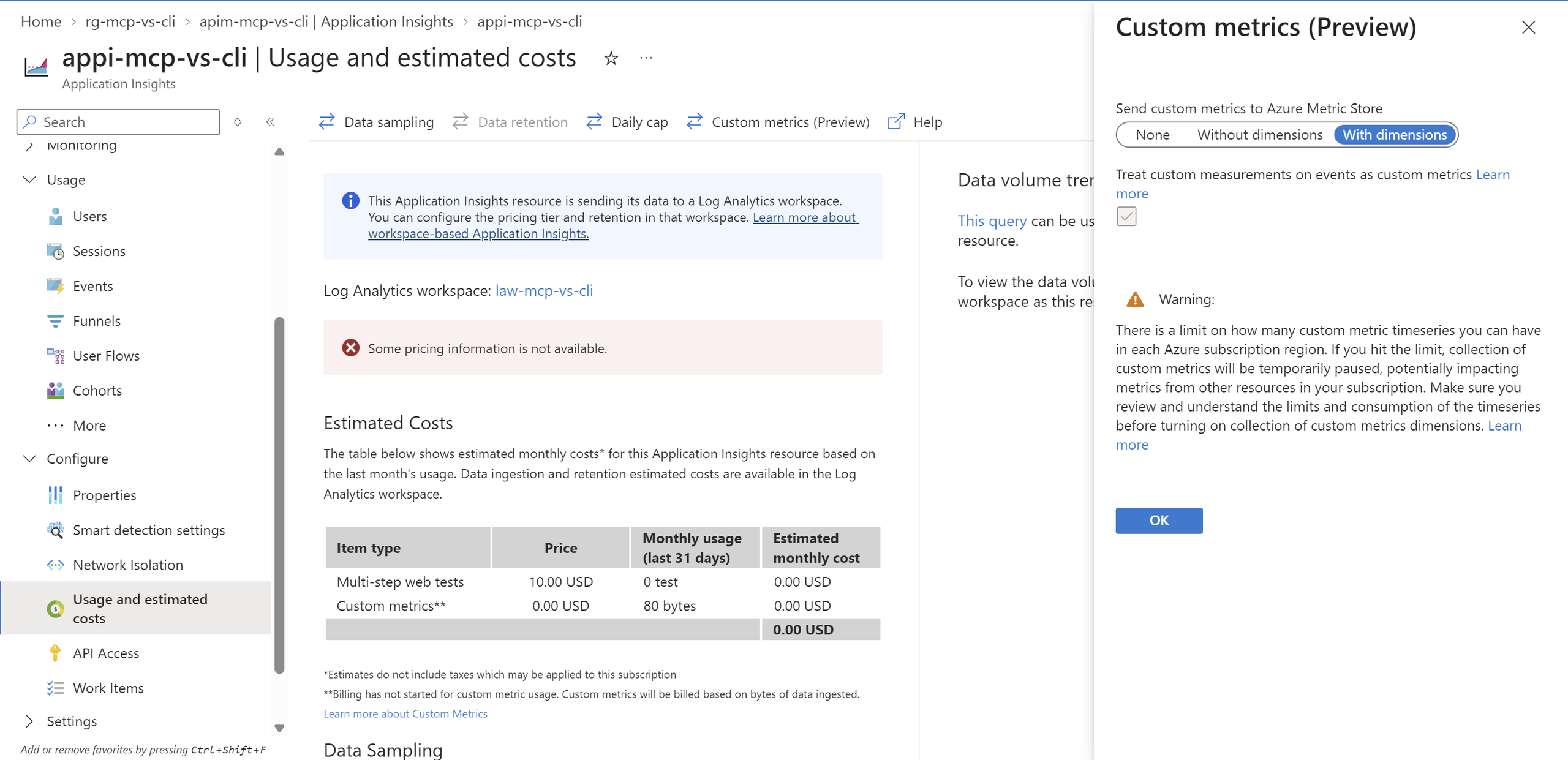
Also enable Custom metrics (Preview) → With dimensions on Application Insights so the custom LoadingMode dimension is surfaced. The property is not in the published `Microsoft.Insights/components@2020-02-02` Bicep schema, so declarative deployment requires a schema escape such as any(); the portal toggle avoids that workaround.
That makes the passthrough useful before any migration: route it through APIM, observe real use, then curate the tools the telemetry justifies.
Taking it to prod?
I used a policy-based MCP handshake here as a quick way to test the idea for myself. It worked for this narrow demo, but I wouldn’t use it as the MCP runtime in prod. I’d move protocol negotiation, streaming and failures into an SDK-backed service, while APIM continues to handle authentication, routing and telemetry. I’d keep the common tools curated and expose less common tools through a separately governed passthrough, using distinct APIM products or authorisation scopes.
I used a granular GitHub PAT for this demo to get moving quickly. In prod, I’d replace it with an organisation-owned GitHub App using least-privilege permissions and short-lived installation tokens
Conclusion
A full GitHub MCP catalogue added about 9,200 input tokens per request in this harness. In separate repeated Copilot CLI runs, the curated path used about 20% fewer AI credits. APIM provides the governed boundary to observe usage, curate the valuable tools, control credentials and responses, and keep re-measuring the trade-off.
reply