
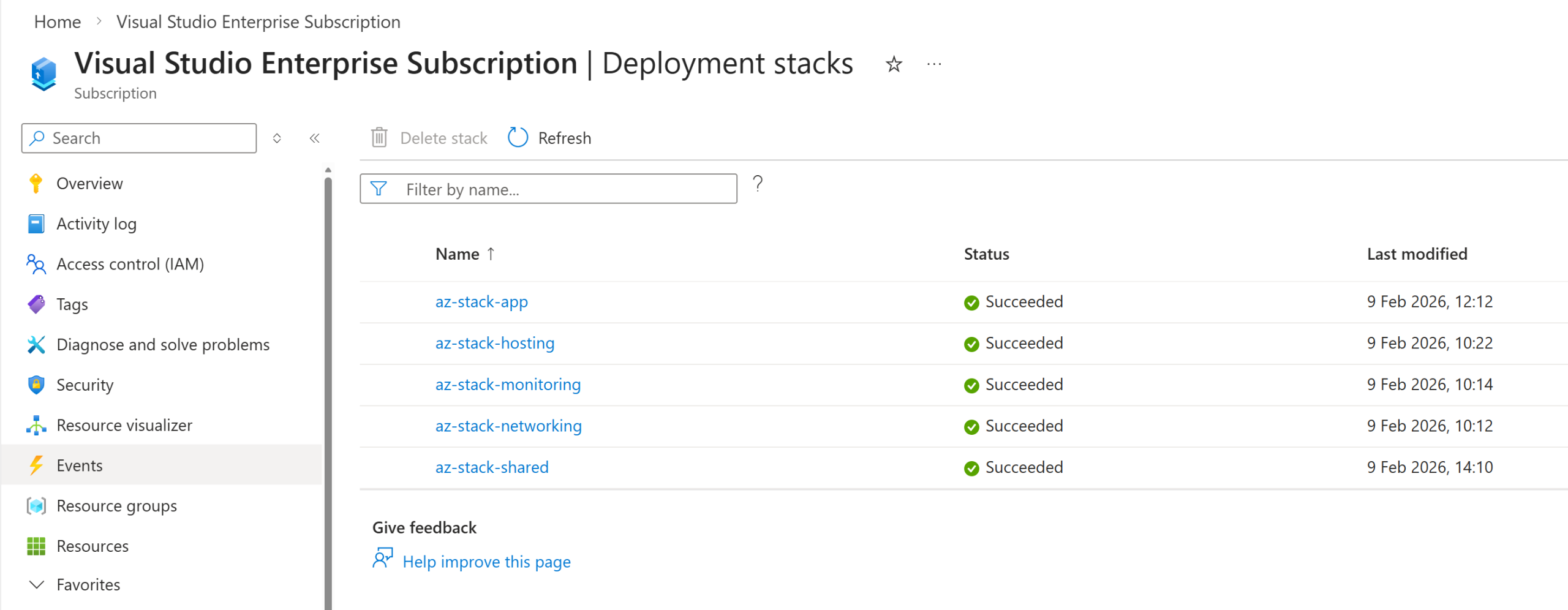
What are micro deployments?
Micro deployments are a simple concept: breaking your application infrastructure into smaller, contained deployment units that share the same lifecycle boundaries. Each Azure stack can be built, tested, released, scaled, and maintained independently, without requiring a full ARM template deployment for components that do not need to change. For example, instead of maintaining a larger main.bicep file, you can split the solution into layered Azure Deployment Stacks (ADS) that evolve together – leveraging the lifecycle benefits ADS offers.
Benefits
This comes with quite a few key benefits such as:
- Avoid ARM template size limits: Templates are naturally smaller, helping you stay well under the 4 MB ARM template limit.
- Clear lifecycle boundaries and better decoupling: Components with shared lifecycles can be grouped together, while unrelated resources remain independent.
- More granular RBAC: For example, the Network team can be granted access only to the stacks they are responsible for.
- Reduced blast radius: A small configuration tweak such as adjusting an Application Insights sampling percentage, should not require redeploying an App Service or other unrelated components. Micro stacks prevent unnecessary redeployments when no changes have been made.
- Downstream dependency chaining: Output metadata from one stack can be consumed by downstream Azure Deployment Stacks. This ensures that dependent stacks always inherit the most current values. No more manually updating parameters or variables downstream stacks automatically receive updated outputs where applicable.
- Isolation with clean downstream value propagation: By breaking upstream resources into micro‑deployments, teams can modify only the components they own (for example, monitoring) without affecting other parts of the system. Downstream deployments then automatically receive updated values through stack outputs, ensuring changes propagate cleanly and safely.
Deployment Flow
In my example / POC I have a sample structure like:
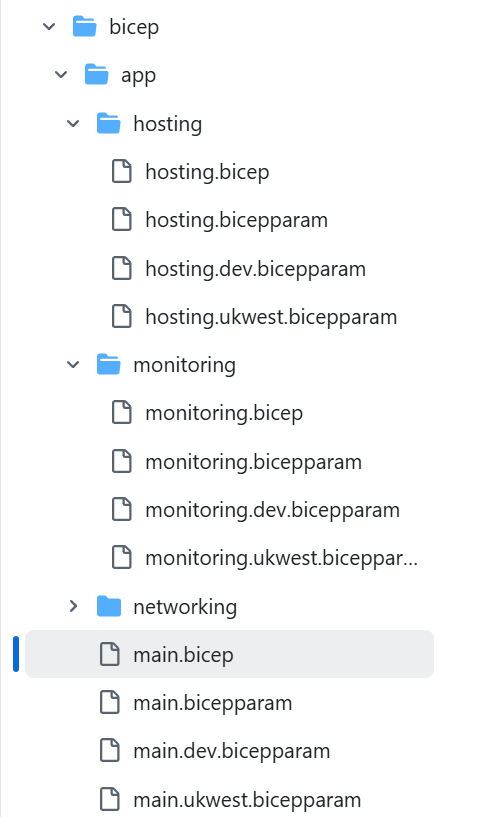
With this sequential deployment model, I know that granting RBAC access to the monitoring stack for the Ops team allows them to add new alerts, update dashboards, and deploy those changes without touching any of the other stacks. The deployment process will only continue downstream where a dependency explicitly requires it, acting as a follow‑on step in a pipeline or script. This links back to my final point below about the gap in native Bicep orchestration today and why I created my orchestrator proof of concept tooling.
┌─────────────────────────────────────────────┐
│  Application Project (Workload Team)       │
│  Deploy Order: 1 → 2 → 3 → 4               │
└─────────────────────────────────────────────┘
         │
         ├─ 1. Networking Stack (VNet/Subnet, Nat Gateway, etc)
         ├─ 2. Monitoring Stack (App Insights, Action Groups, Dashboards, alerts, etc)
         ├─ 3. Hosting Stack (App Service Plan, Key Vault, SQL)
         └─ 4. Application Stack (Web App)
                      │
                      ▼ (outputs hostname)
┌─────────────────────────────────────────────┐
│  Platform Project (Platform Team)          │
│  Deploy Order: 5                            │
└─────────────────────────────────────────────┘
         │
└─ 5. Shared Stack (Front Door with origins)Downstream Stack Outputs
This is an example of my main application bicep template, where it’s pulling in the dependent micro stacks to the template using the resource existing property. By doing so, as long as I make sure my deployment flow deploys in sequential dependent order, a change in say the monitoring or networking stack will now be inherited downstream where required.
The main.bicep file snippet:
// Monitoring Stack
resource resMonitoringStack 'Microsoft.Resources/deploymentStacks@2024-03-01' existing = {
  scope: subscription()
  name: parMonitoringStackName
}

// Monitoring Stack Dependencies
var resMonitoringStackOutputs = resMonitoringStack.properties.outputs
var resMonitoringAppInsightsConnectionString string = contains(
    resMonitoringStackOutputs,
    'applicationInsightsConnectionString'
  )
  ? resMonitoringStackOutputs.applicationInsightsConnectionString.value
  : ''

// Networking stack
resource resNetworkingStack 'Microsoft.Resources/deploymentStacks@2024-03-01' existing = {
  scope: subscription()
  name: parNetworkingStackName
}
// Networking Stack Dependencies
var resNetworkingStackOutputs = resNetworkingStack.properties.outputs
var resNetworkingSubnetId string = resNetworkingStackOutputs.subnetId.valueDeployment Stack Isolation
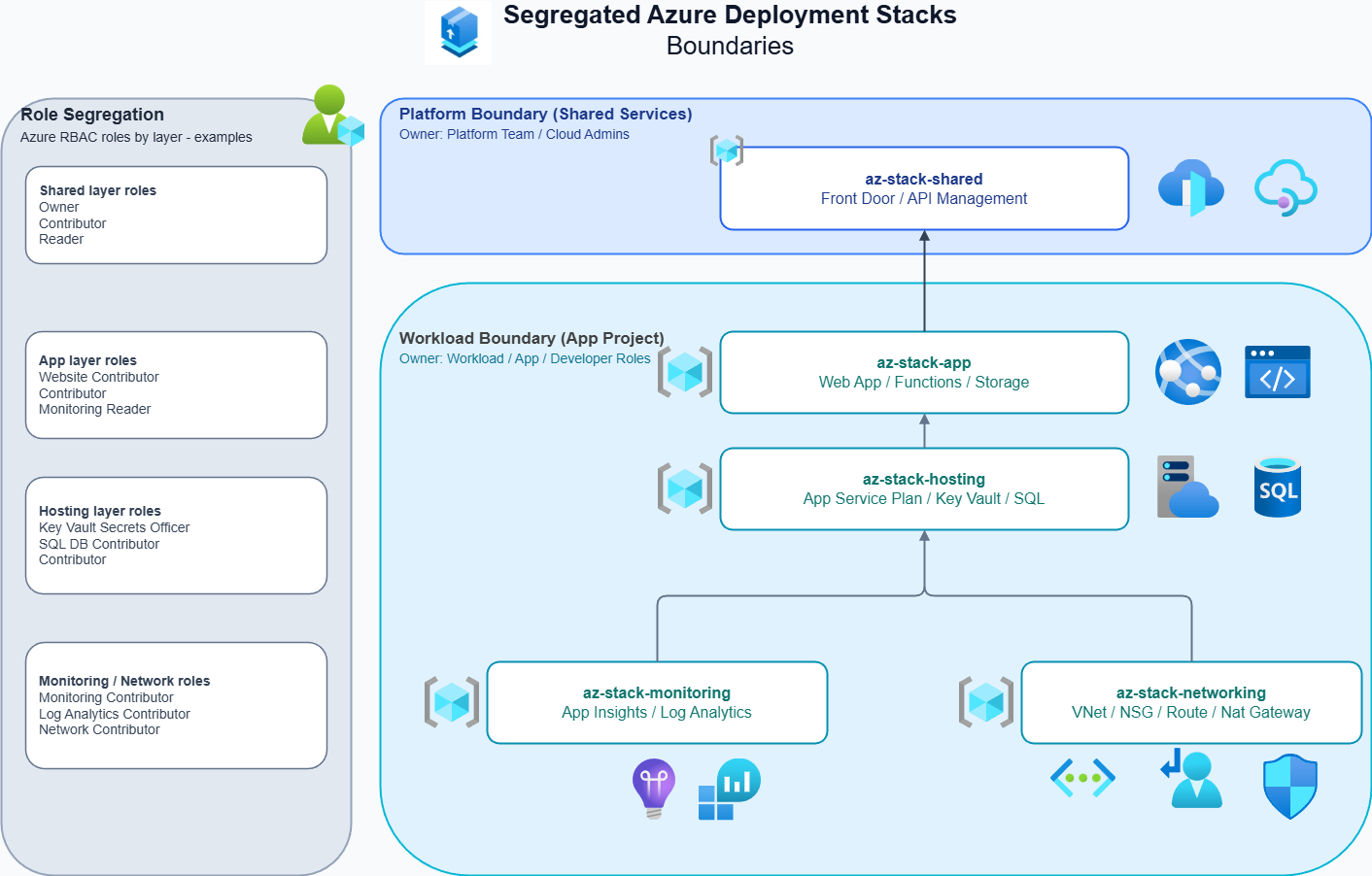
By using a micro deployment pattern with Azure Deployment Stacks, I can isolate lifecycle boundaries within their intended resource groups. Resource groups were always designed as logical containers that help organise and manage resources effectively, and all I am really doing here is applying that same principle at the deployment stack level.
An additional benefit is that lifecycles are now managed by the deployment stack itself – this includes deny/delete protections, resource clean‑up, drift management, and more. This means I can deploy components that have independent lifecycles without needing to interact with other application elements that do not require any changes.
In more mature organisations, the advantages become even more significant: RBAC can be scoped at the resource group level for each area a given team is responsible for. This reduces blast radius impact and supports a more robust IAM posture through least privilege access. The example diagram above illustrates how this separation can be visualised.
Bicep’s current gap: no native orchestration tooling
At present, there is no first party orchestration tool within the Bicep ecosystem that can natively manage dependency handling or the sequential ordering required for this style of deployment. As a result, you must standardise your files (which can feel somewhat rigid, but does work) and rely on your own pipeline logic to ensure resources deploy in the correct order, or that dependent stacks are triggered when needed.
At the end of 2025, I spent some time developing a proof‑of‑concept Bicep Deployment Stack orchestrator. It used YAML to declare dependencies between files and included a deployment mechanism that abstracted that complexity away from the user. The POC highlighted two things: firstly, there is a gap in the current tooling for this approach, at least out of the box and secondly, the importance of supporting parallel deployment where stacks do not depend on one another for deployments at large scale.
If you’re curious about this, you can check out the GitHub repo: riosengineer/stacks-orchestrator: A proof-of-concept Bicep Azure Deployment Stacks Orchestrator tool. I also demonstrated this on the October Bicep Community Call as well as pre-recorded demo walk through on Vimeo:
Orchestration Video Demo
1. Dry-run shows the dependency map for my demo ‘app’ across multiple regions including a shared (global) front door stack
2. When ready, I deploy with parallelism set against the prod environment root to deploy concurrently
3. The orchestrator deploys my application (Web App, Azure SQL DB, Networking, Monitoring, etc.) to multiple UK regions concurrently using the micro deployment pattern and in dependency order, chaining outputs to downstream stacks to consume
4. Finally, it deploys Front Door with origins populated from upstream dependent values.