
Introduction
In Entra External ID you can configure a custom email provider for your one-time code send email events with Azure Communication Service (ACS) or SendGrid. This is practically essential to use as your desired configuration, otherwise you get a Microsoft default email template sent with OTP events.
This (default template) really doesn’t work for anyone wanting to use OTP for External ID B2C solutions, as it looks like spam for one, and two, is not customisable whatsoever (it would be really nice to get basic customisation of this in the future for those who don’t want to rely on other/external services).
Therefore, you’re likely to be using ACS or SendGrid with a custom send event so you can have a fully branded and customisable email template to send out for sign-up/sign-in flows, and you’ll likely want to protect the OTP API endpoint behind an API Management Gateway (APIM). This presents two issues:
- Users could abuse the OTP without a rate limit enforced
- Custom OTP send events come from Microsoft to your API endpoint so limiting by IP could block functionality unintentionally as the originating IP address is likely to be Microsoft ranges
In this short blog, I’ll detail how you can enforce rate limiting for this endpoint using the sign-up/sign-in email address via an APIM policy.
What is in the OTP event payload?
The first thing I wanted to check is what’s within the OTP payload if the IP address isn’t a viable custom key to rate-limit with. From the documentation, the default payload C# code sends an identifier string:
string emailTo = jsonPayload["data"]!["otpContext"]!["identifier"]!.ToString();
string otp = jsonPayload["data"]!["otpContext"]!["onetimecode"]!.ToString();When checking what this value actually, I notice in the docs it says:
“In this example, it reads the email address (identifier) and the OTP”
Great, I can use this to try and formulate a policy in APIM to rate-limit from this identifier string instead. Now, you may want to implement a different solution by adding custom attributes to your request, but for simplicity and out of the box configuration, this will work for all cases.
APIM Policy
Azure API Management has two rate-limiting expressions. The first is rate-limit, which is more rigid for an API operation per subscription, with not many customisations. It’s fine for many use cases, but for this scenario, I needed more customisation for the identifier value. The second is rate-limit-by-key, which allows for a counter key:
The key to use for the rate limit policy. For each key value, a single counter is used for all scopes at which the policy is configured. Policy expressions are allowed.
Using this rate-limit expression, I’m able to specify my own counter key to validate rate-limiting parameters against. In the APIM snippet below, you can see:
- A when condition limits the scope of the match to our custom send OTP event operation name.
- Sets a custom variable (otp-email-identifier) with the string value pulled out from the request body from the inbound payload (thank you StackOverFlow thread).
- Assigns the counter-key value as the identifier string value from the variable above to rate-limit against.
<when condition="@(context.Operation.Id.Equals("sendOtp"))">
                <set-variable name="otp-email-identifier" value="@{
                    var body = context.Request.Body?.As<JObject>(preserveContent: true);
                    var identifier = (string)body?["data"]?["otpContext"]?["identifier"];
                    return identifier?.Trim().ToLowerInvariant() ?? string.Empty;
                }" />
<rate-limit-by-key calls="5" renewal-period="300" counter-key="@((string)context.Variables["otp-email-identifier"])" retry-after-header-name="Retry-After" remaining-calls-header-name="X-RateLimit-Remaining" total-calls-header-name="X-RateLimit-Limit" />The payload body looks like:
{
    "data":{
        "otpContext": {
            "identifier":"[email protected]",
            "oneTimeCode": "19685665"
        }
    }
}Validation
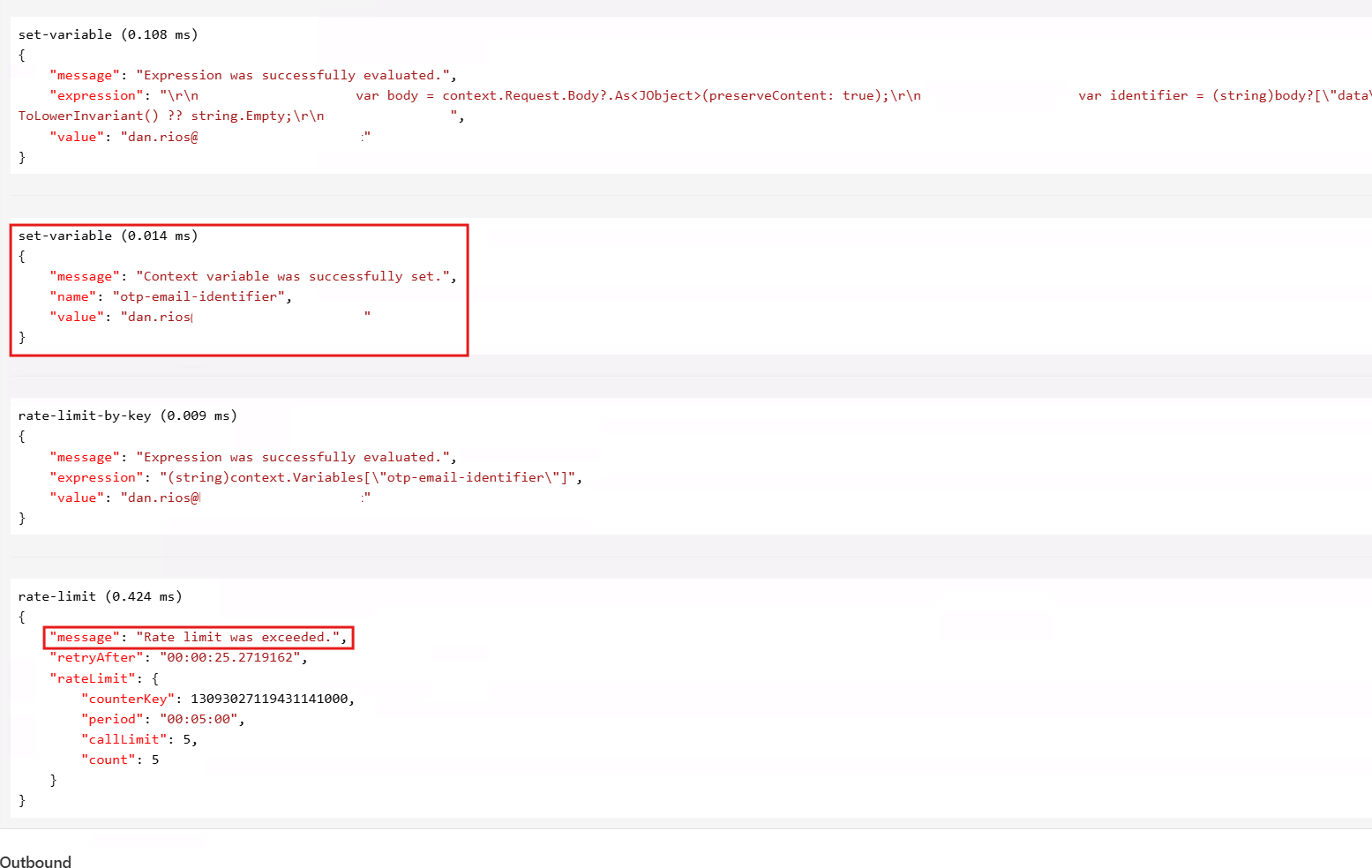
Now this has been implemented, I want to verify it actually works. There are two ways I’m going to validate this: firstly, by confirming the APIM trace shows the policy logic properly resolving as I intended. Secondly, by making a direct API call to my OTP endpoint until I hit my rate-limit kickback.
APIM Trace
Using the APIM Test tab on this operation, I can specify all the necessary authentication headers required for my API and click the trace button. This will show me how my APIM policy logic is evaluated as it executes. In my test, I can verify that the variable being set is actually pulling in the email address string correctly. Then I’m able to send multiple requests until I hit the rate limit imposed and get the 429 Too Many Requests response:
Then, in your favourite (or corporate imposed) cURL GUI tooling of choice, sending a direct API request with the payload body from above eventually nets us our kickback after X requests for the OTP event:

That’s it. Now there is a rate limited OTP custom send event to your Entra External ID flow via Azure API Management!