
Introduction
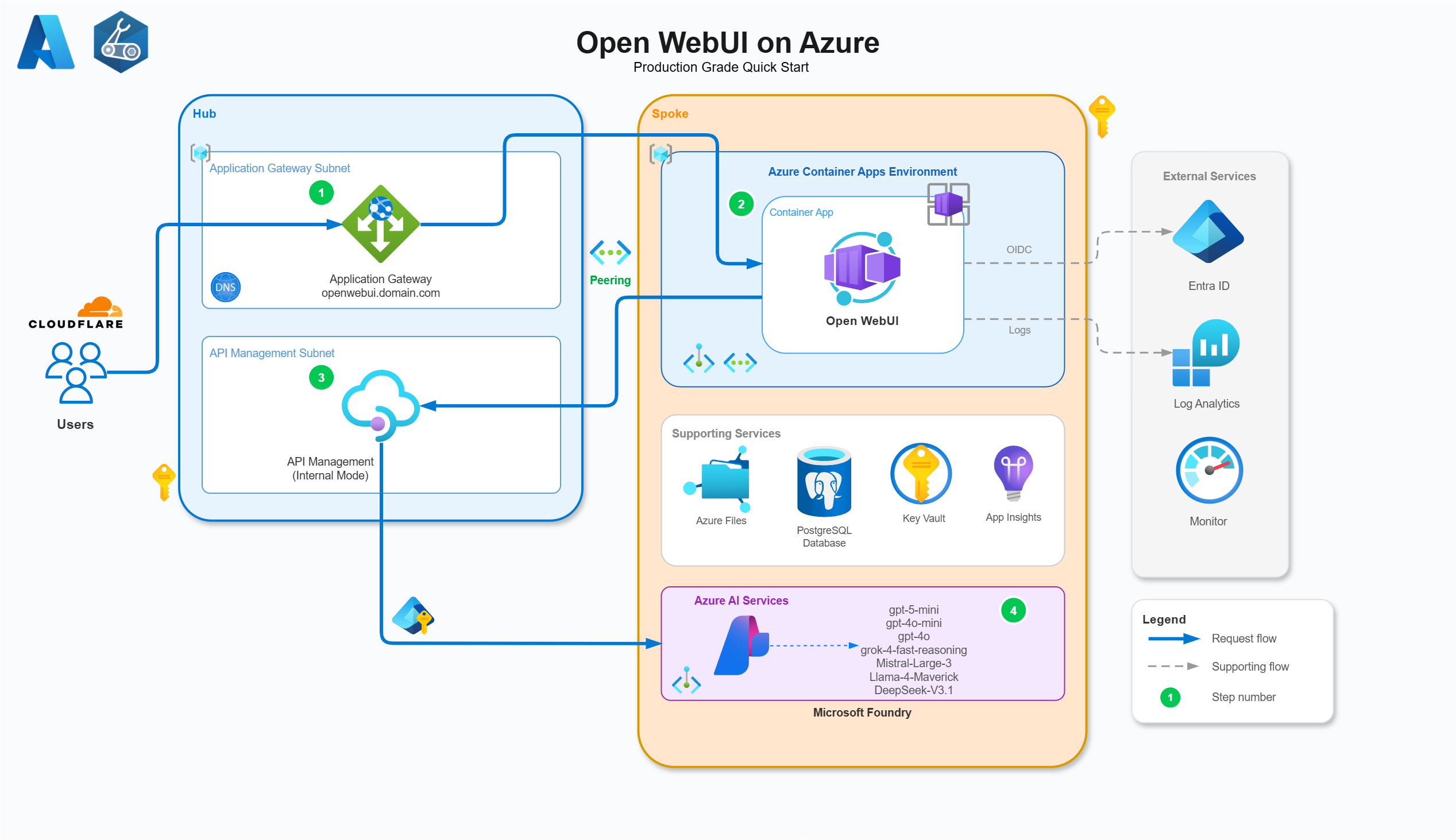
Open WebUI is an open source, self hosted, feature rich AI platform with a built in inference engine (and tons of extensibility) making it really powerful for RAG and local AI or offline usage. It is an aesthetically pleasing and polished UI and UX, with too many feature sets to outline here. A main enterprise benefit I can see is the ability to deploy multiple models and interface them under one UI, controlled and governed with enterprise features like groups, OAuth, Entra integrations and more, without having to build the UI yourself from scratch.
Think M365 Copilot, but not limited to OpenAI and Claude, instead Grok 4 fast reasoning, Llama, DeepSeek, Mistral Large 3, Dall E, and anything else, all wrapped in a much better UI and feature set in my opinion.
I wanted to explore how this could be deployed in Azure, how I could make it productionised by configuring the Azure infrastructure, the Foundry API controls and authentication methods, Entra ID integrations and more. In this part 1 of a wider series on Open WebUI on Azure we will cover:
- Breaking down each Azure component in the architecture
- The features and benefits of each of them
- Deploy instructions for Open WebUI from my GitHub QuickStart repo
Some of the key features of the solution include:
- Open WebUI on Azure Container Apps with Entra ID integration and OAuth2 authentication
- Microsoft Foundry with multiple models (OpenAI, Grok, Mistral, Llama, DeepSeek) using Managed Identity
- Application Gateway with custom domain and SSL termination
- API Management with AI in Azure, detailed user token tracking, limits, usage metrics, model breakdowns with Entra OAuth policy validation for session auth
- Azure PostgreSQL Database for persistent storage (users, chats, settings) with private endpoint access
- No secrets, Managed Identity and OIDC throughout**
- Infrastructure as Code using Bicep with Azure Verified Modules
- Secure by default using internal ingresses and private endpoints throughout
I hope this helps others looking at Open WebUI on Azure, specifically proxying via Azure API Management for tracking, usage metrics, centralised authorisation and detailed custom LLM metric breakdowns.
*Open WebUI currently doesn’t support an Entra PostgresSQL connection string so this requires a password.
**Azure Files with ACA still requires a Storage Account Key.
Azure Architecture & Configuration
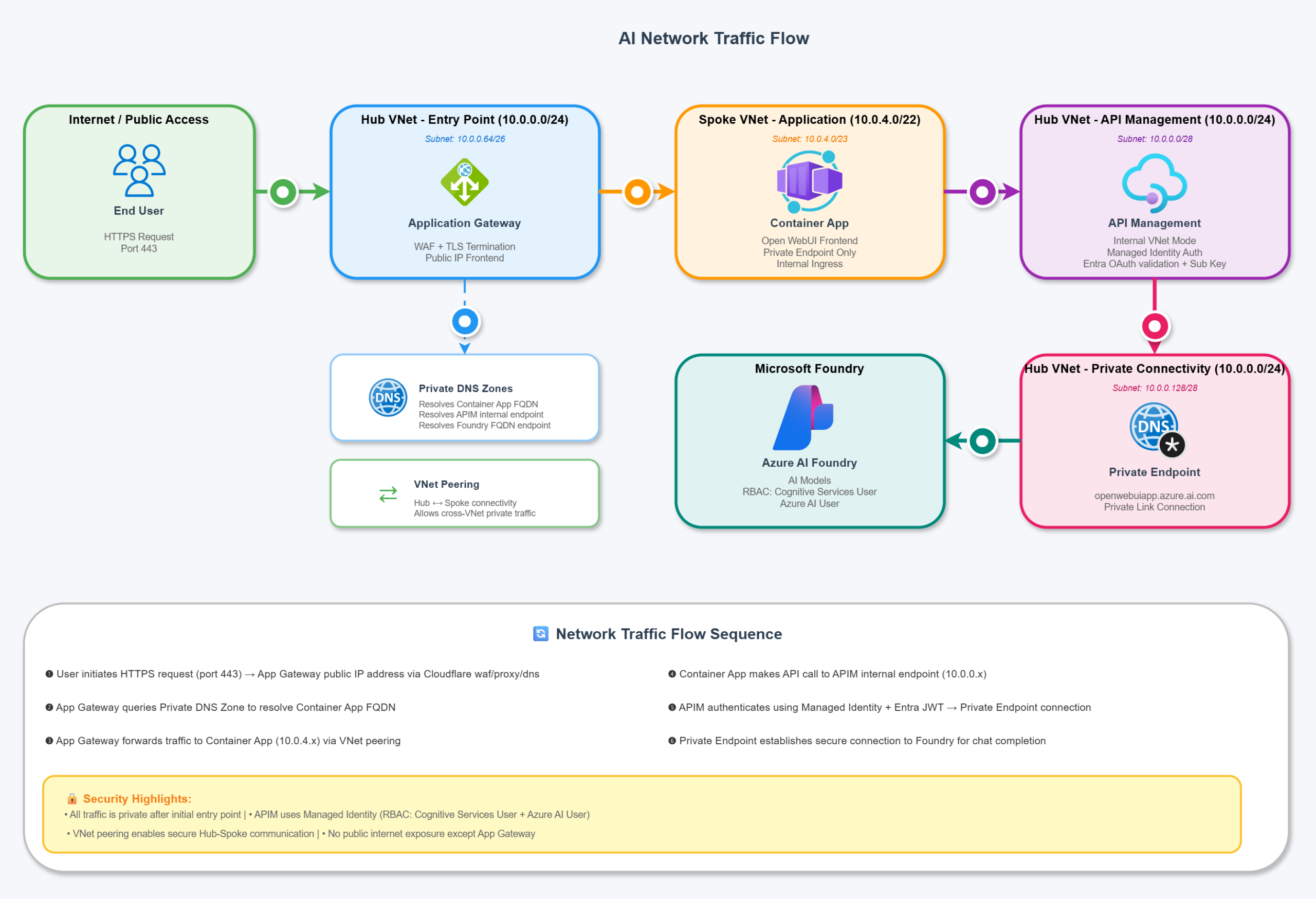
AI Network Traffic flow
RBAC / Managed Identity
All access besides the Azure Files SMB mount is using System Assigned / User Assigned Managed Identity for resource to resource access through Azure Role Based Access Control (with least privileged in mind). These are defined in the Bicep code but here’s a high level breakdown:
| From (Identity) | To (Resource) | Role | Purpose |
|---|---|---|---|
| App Gateway (User Assigned MI) | Hub Key Vault | Key Vault Secrets User | Read SSL certificate for HTTPS listener |
| ACA Environment (User Assigned MI) | Spoke Key Vault | Key Vault Secrets User | Read SSL certificate for custom domain binding |
| Container App (System Assigned MI) | Spoke Key Vault | Key Vault Secrets User | Read PostgreSQL connection string secret |
| APIM (System Assigned MI) | Application Insights | Monitoring Metrics Publisher | Publish custom metrics from llm-emit-token-metric policy + APIM to App Insights metric streaming via Entra only |
| APIM (System Assigned MI) | Microsoft Foundry | Cognitive Services User | Call Foundry AI models via Managed Identity |
| APIM (System Assigned MI) | Microsoft Foundry | Azure AI User | Additional Foundry permissions for AI services |
App Gateway / Edge
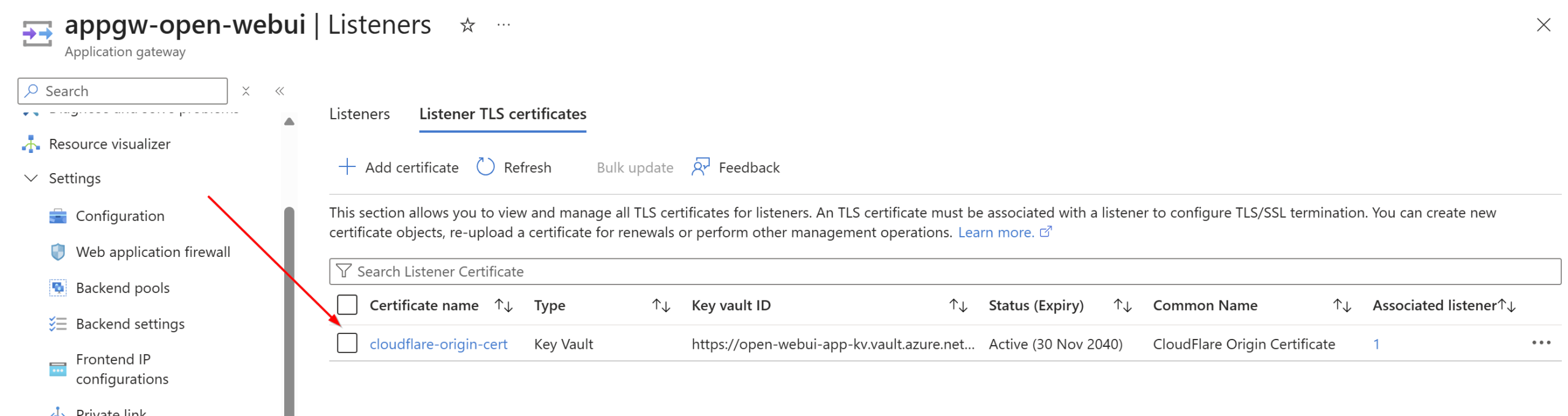
Azure Application Gateway to serve web (layer 7) requests over a custom vanity domain to front externally to users and route requests internally to the backend Azure Container Apps environment. I use Cloudflare personally and love it, so instead of paying for the App Gateway WAF I am using Cloudflare WAF, DDOS protection, and all the other goodies (like free certificates and CDN). Using Key Vault, I uploaded the Cloudflare origin certificate and linked it to the Open WebUI listener to terminate TLS for the custom domain with Cloudflare:
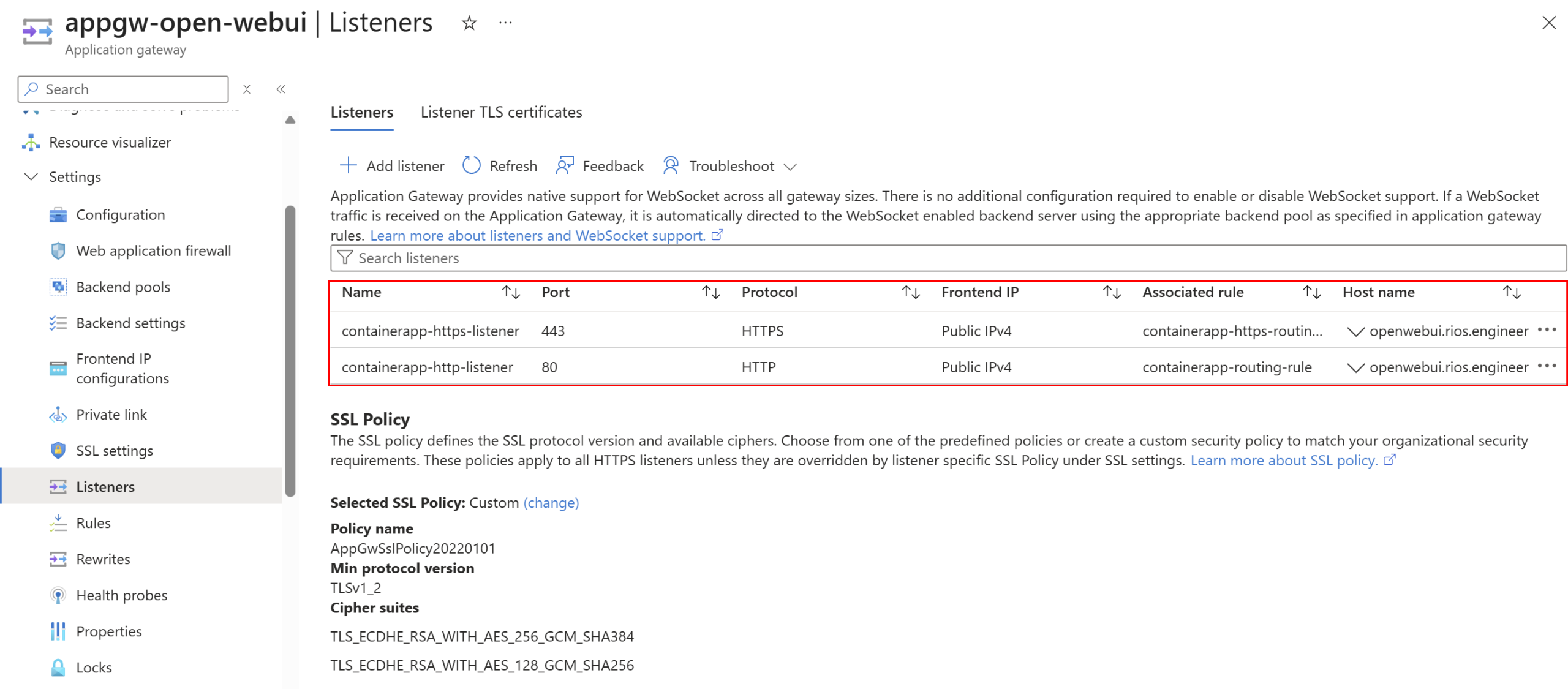
I’ve configured listeners on ports 80 and 443 for my custom domain, forwarding incoming traffic to the backend Container Apps environment:
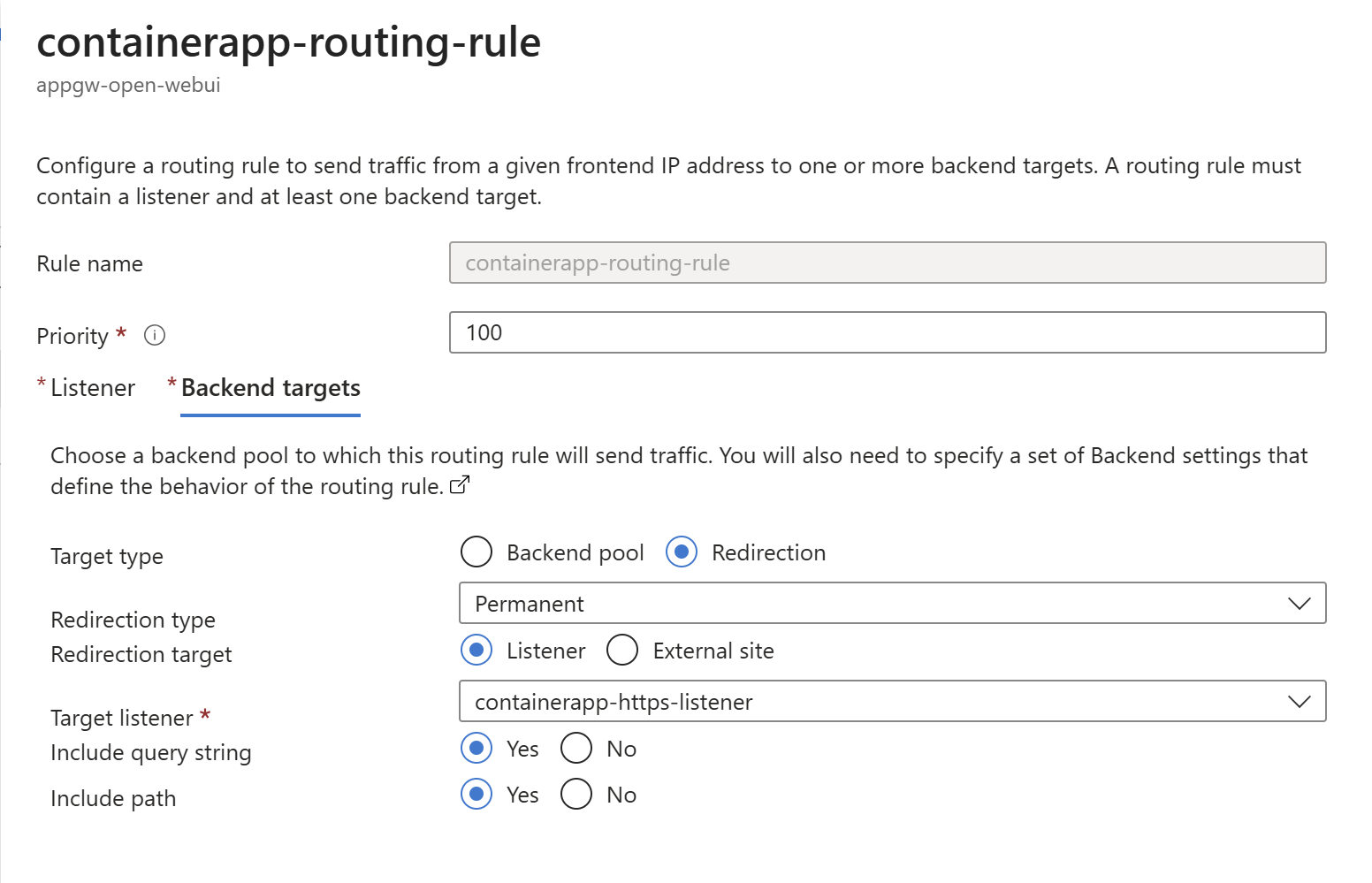
Lastly, I have a rule to permanently redirect HTTP traffic to HTTPS to the backend to ensure all traffic flows over HTTPS only:
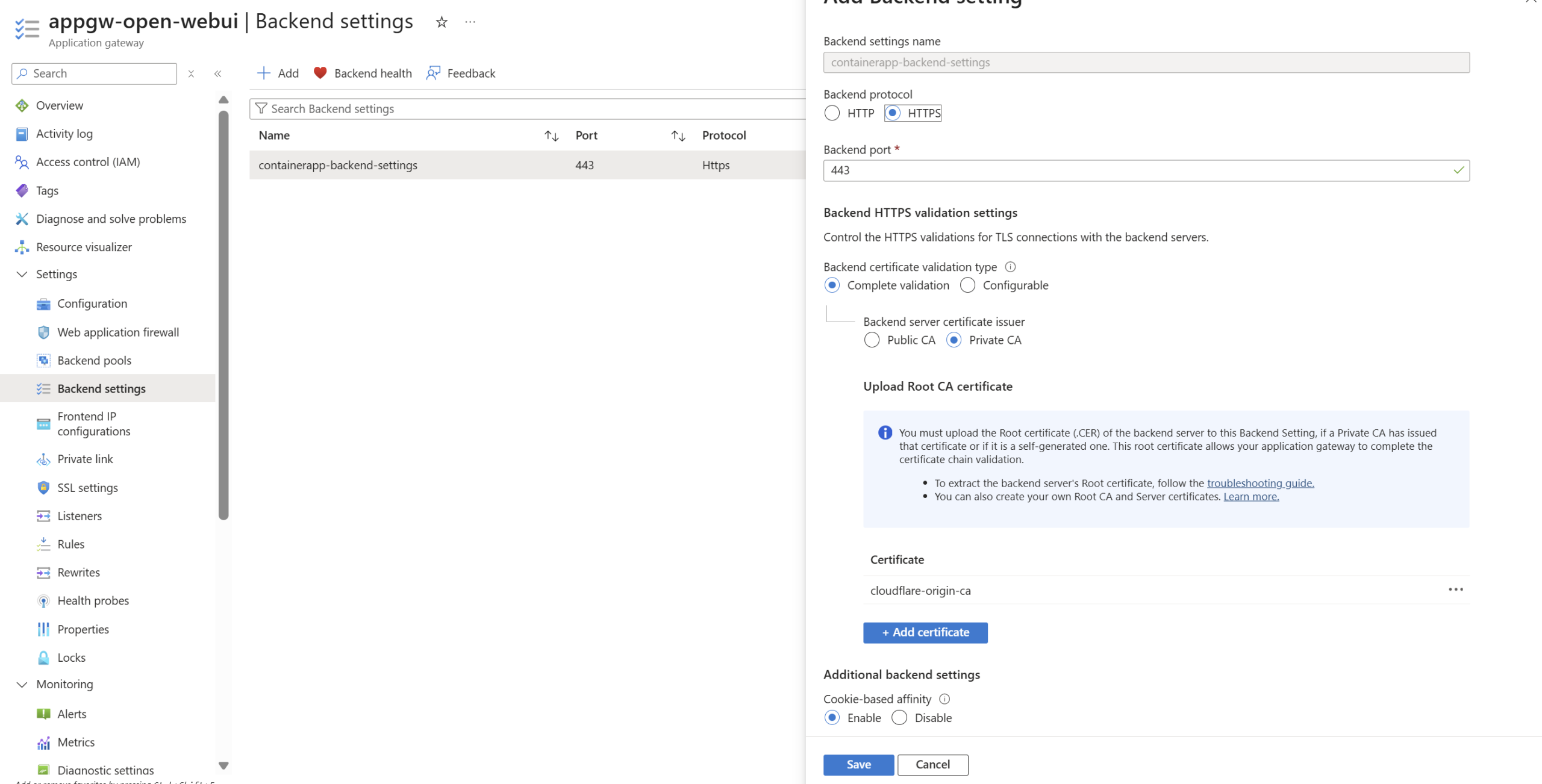
Backend setup with HTTPS, TLS validation, and session affinity to the Container Apps Environment. Session affinity ensures chat streams stay connected to the same backend node during conversations:
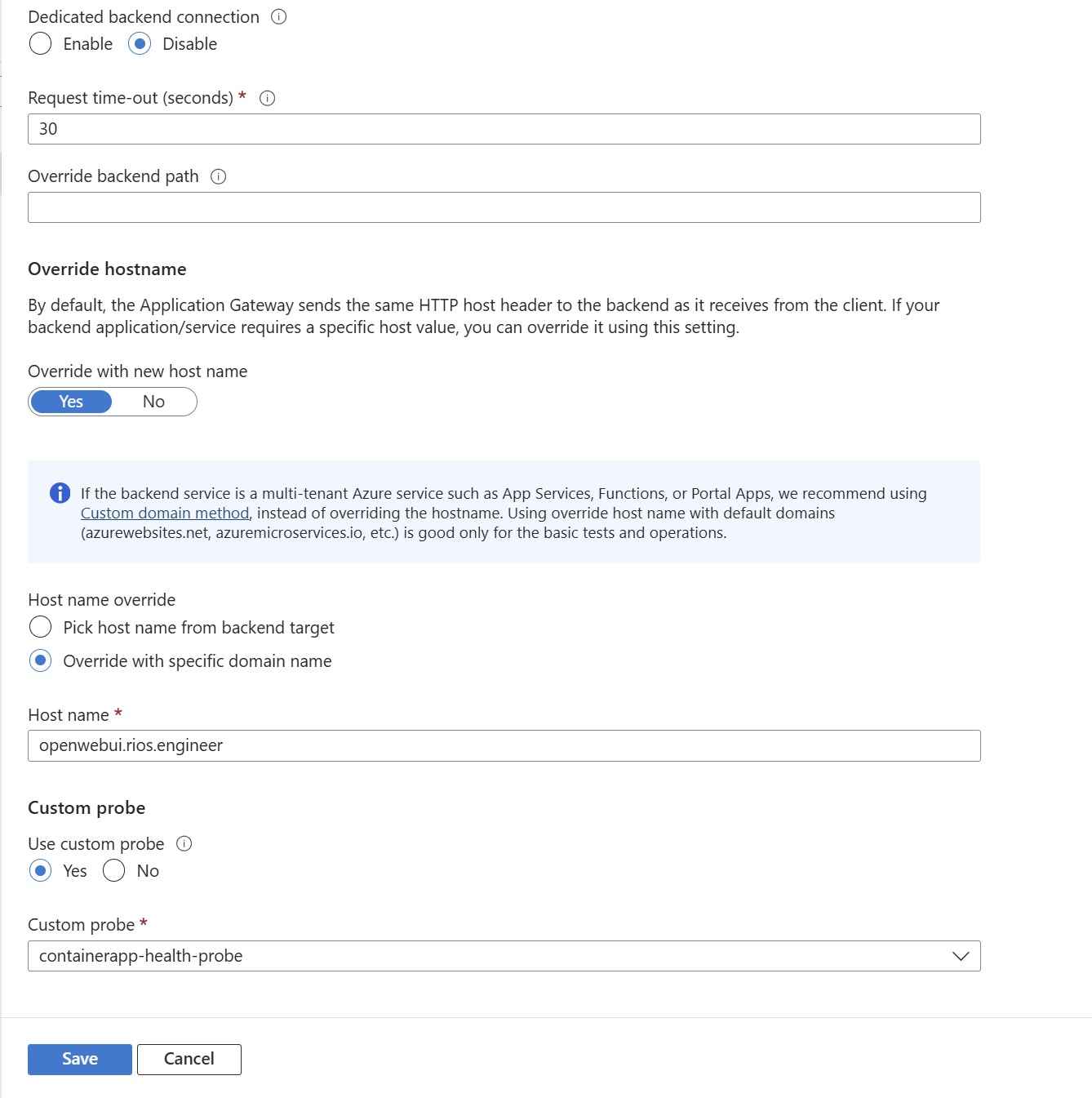
Using host override as I am using a custom domain on Open WebUI and the ACA and want the same host header to go to the backend:
Azure API Management (APIM)
I am a huge fan of Azure API Management for various reasons (authorisation, policy logic, native integrations, etc). The primary driver for including APIM here is to control inbound AI calls (via the OpenAI V1 API) as a proxy to Foundry. The APIM is in internal mode so it is private and traffic is routed to the Foundry backend entirely privately. The primary win for APIM here is the power behind APIM policies for authorisation via OAuth with fantastic custom metric logging, token usages, limits, other analytics and LLM breakdowns (even per user, per model). I’ll cover those in full in Part 2 of the series, along with a complete walkthrough of the APIM technical configuration. Because APIM is so central to the solution, it deserves its own dedicated post.
Azure Container Apps (ACA)
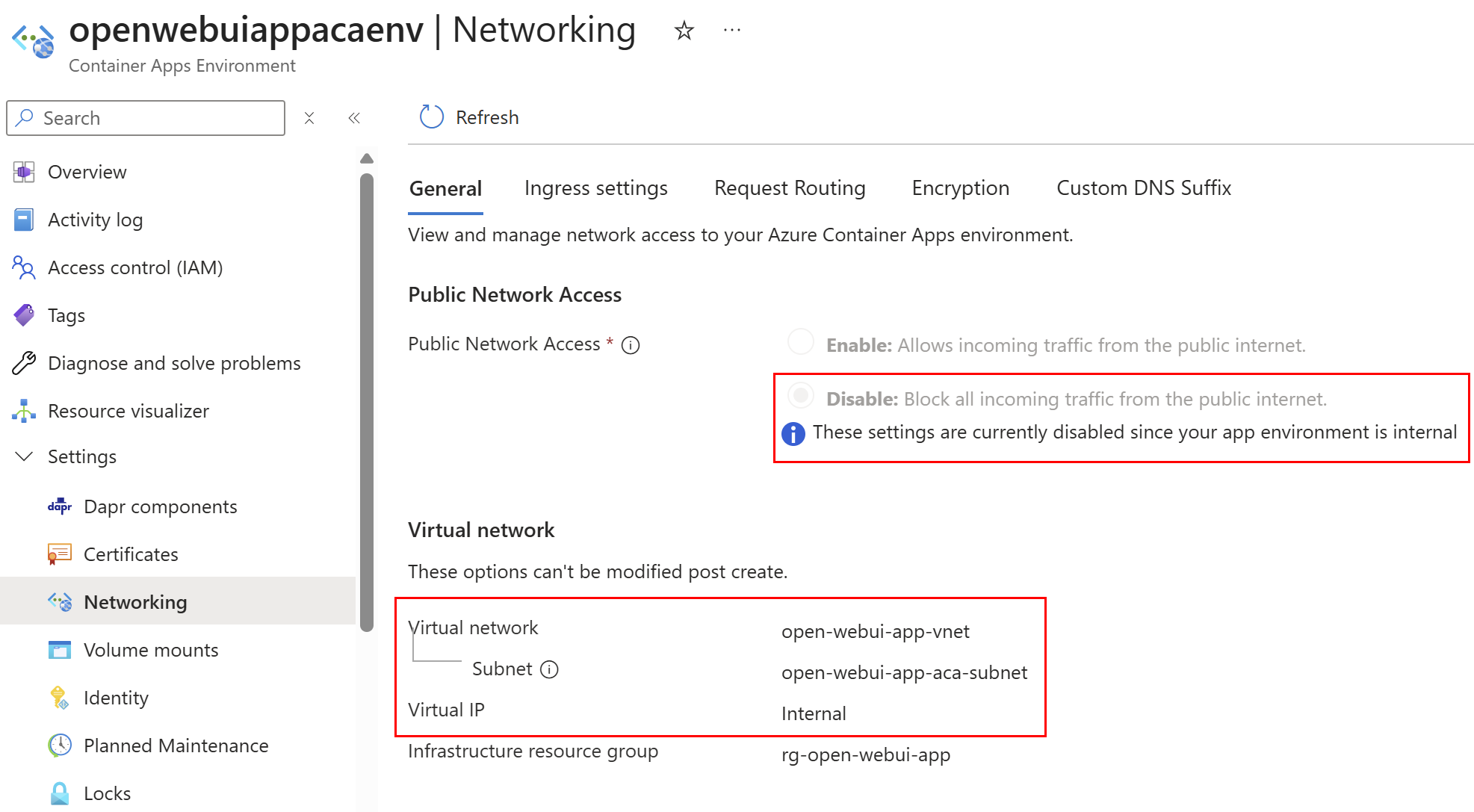
Azure Container Apps TLDR: fully managed Kubernetes by Microsoft. You don’t need to be an AKS or K8s pro to manage ACA as Microsoft handle a lot of the infrastructure. It is simple, pretty cheap, and has many of the benefits Kubernetes offers without the faff (DAPR, KEDA scaling, revisions and roll back mechanisms) as well as a ton of out of the box native integrations (EasyAuth, Key Vault, etc). I was toying between this and App Service, but ultimately I preferred the scalability and roll back options ACA has (plus some personal development for myself). This is deploying as an internal container app environment, so ingress is within the virtual network and not exposed to the internet. This also means when Open WebUI reaches out to APIM it just traverses through the peer to the hub to resolve the private DNS for the APIM FQDN to reach the Foundry backend.
Open WebUI being pulled from GitHub image mirror with latest tag with my base compute (hey, I needed to keep costs low – it’s only me using this thing 😂):
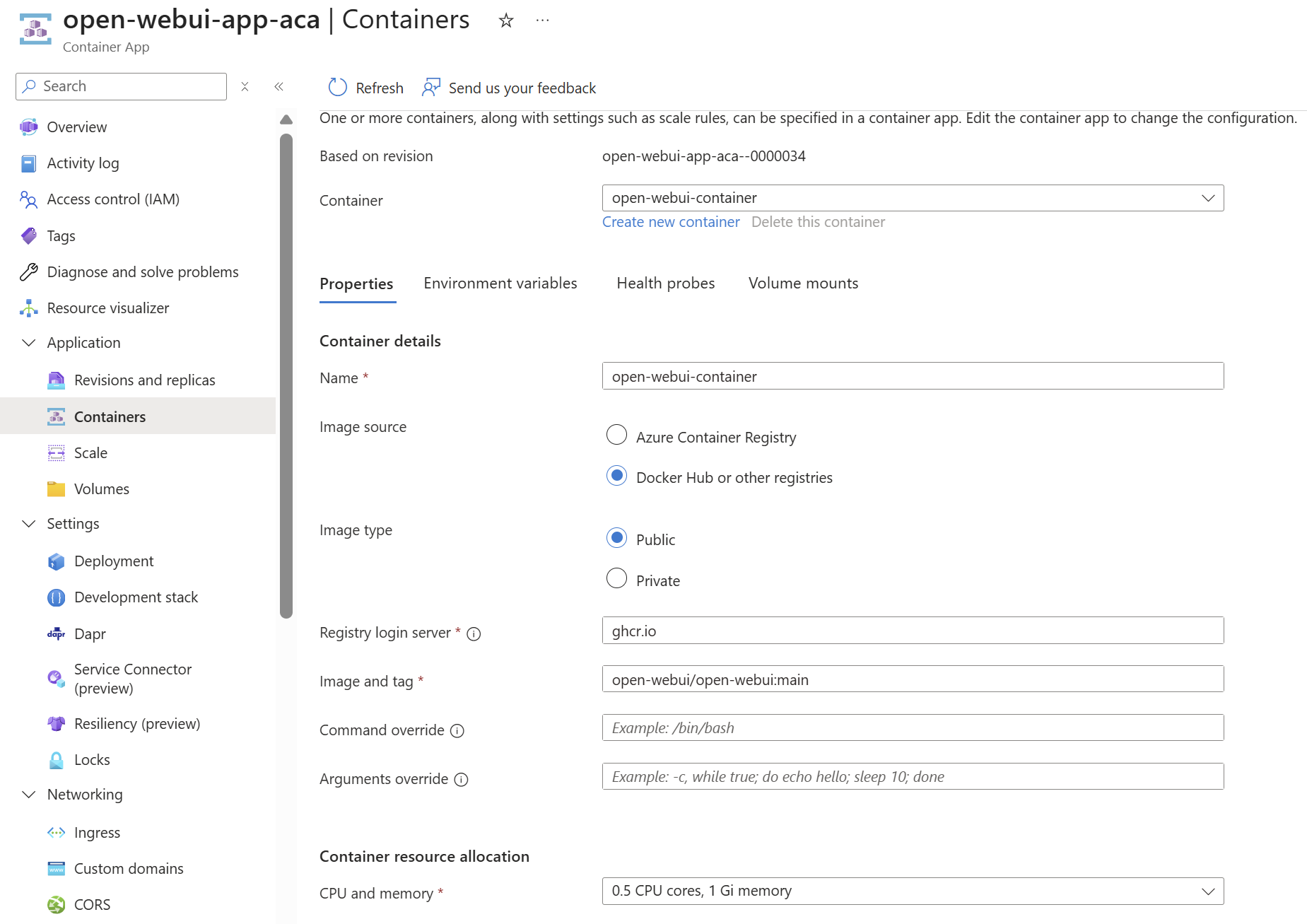
This is perhaps the only part of the solution you may want to revise for production IMO. Using your own Azure Container Registry would provide: 1) Faster pulls via cached images in your region 2) Protection against upstream outages or supply chain attacks 3) Controlled release management with pinned versions.
Open WebUI supports dozens of environment variables. I’ve done the legwork and configured the ones that matter for production: Entra ID OAuth, group syncing, role mapping, and secure defaults. It’s all in the Bicep – tweak as you see fit though. Full reference: Open WebUI docs.
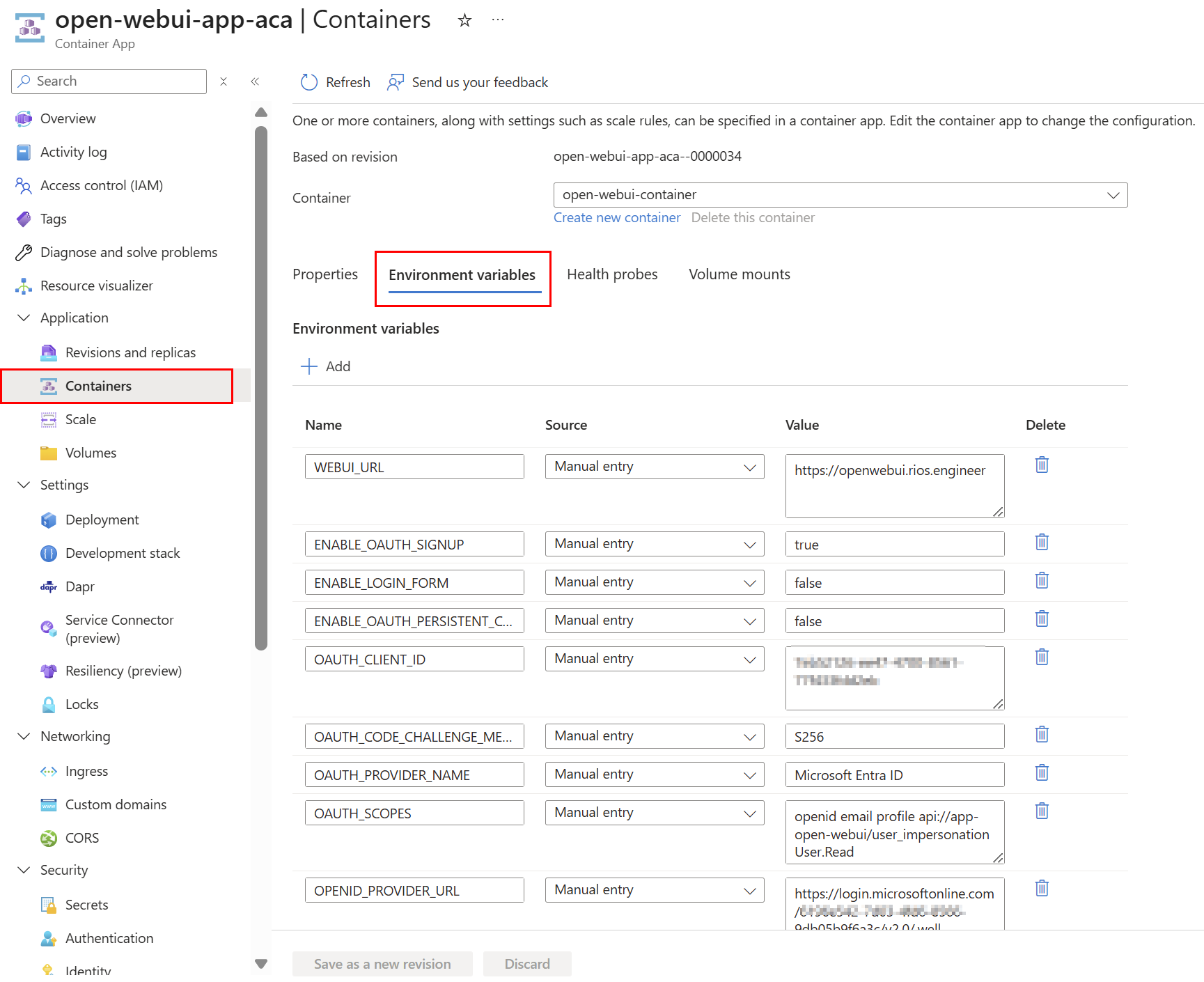
Internal networking on the environment keeps traffic secure and internal:
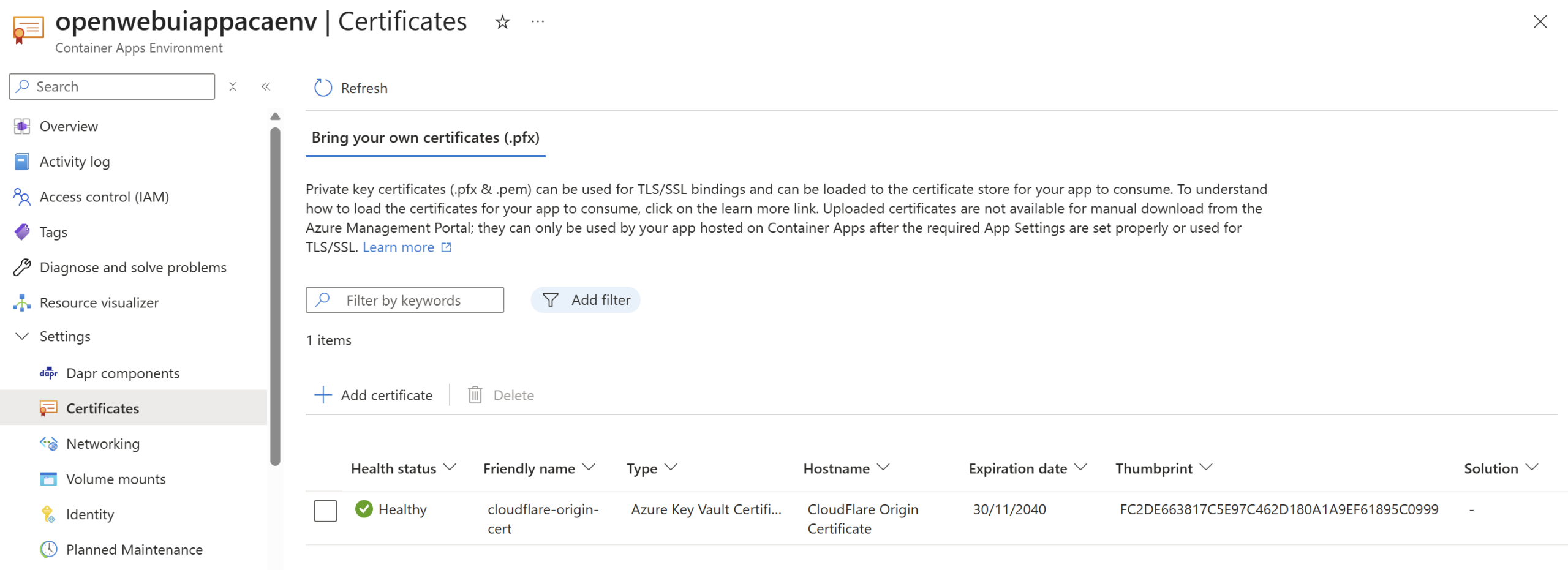
Cloudflare Origin certificate added to the ACA environment via Key Vault, to ensure end to end TLS, custom domain functionality and full strict mode in Cloudflare:
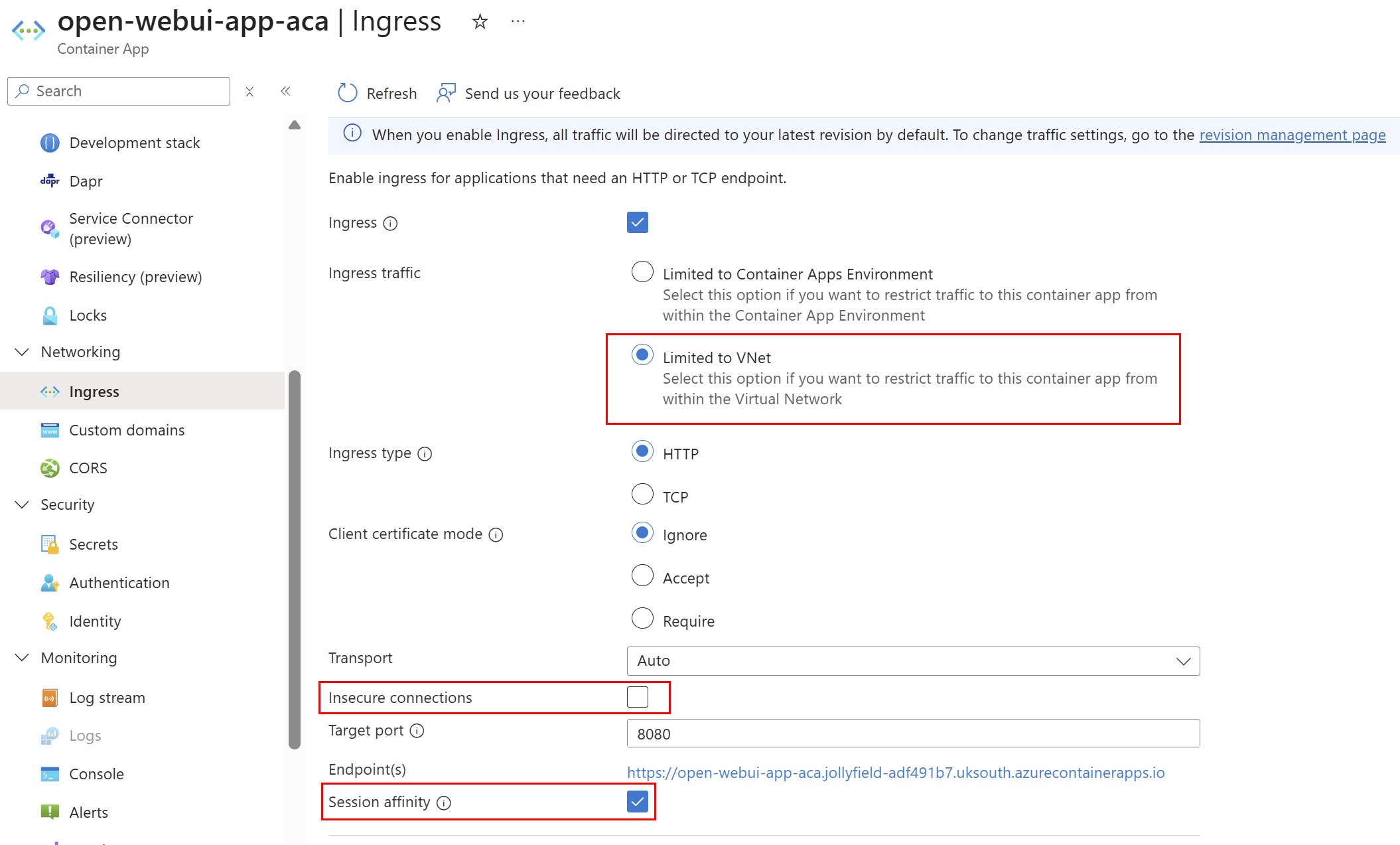
Ingress traffic limited explicitly to the internal virtual network, with insecure connections set to false to ensure secure traffic only. Session affinity is enabled to help with serving traffic to the same backend node if scaling up for better UX:
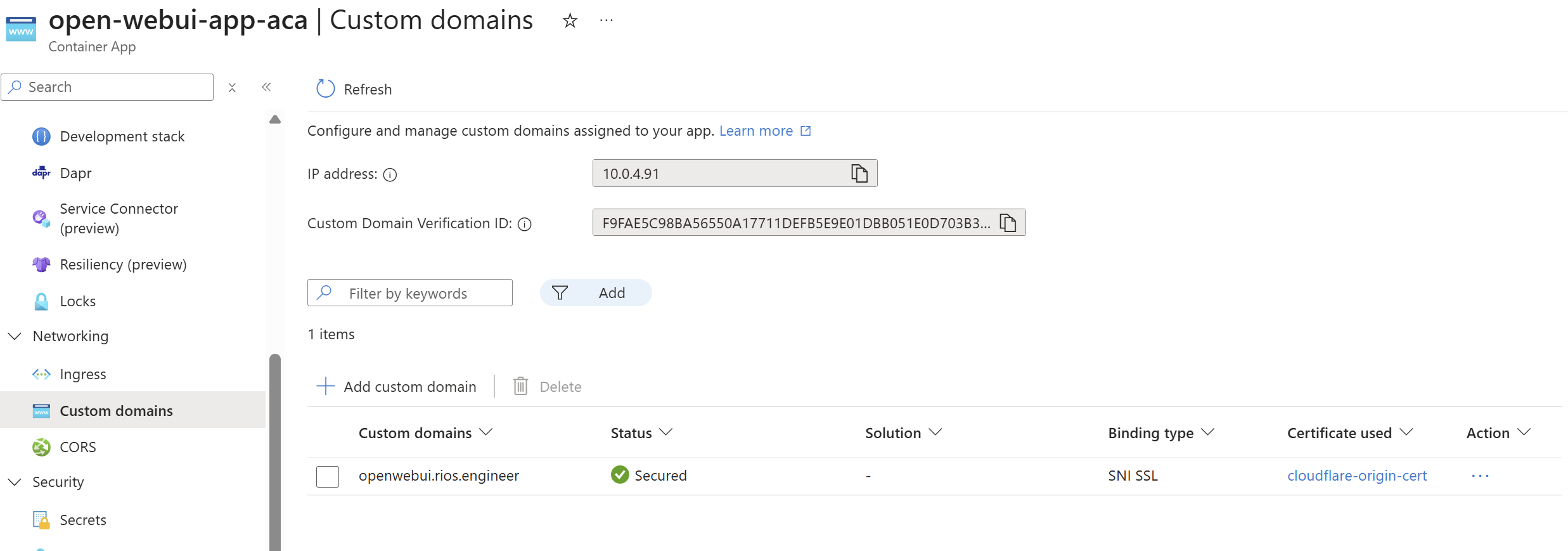
Custom domain configured using the Key Vault Cloudflare certificate:
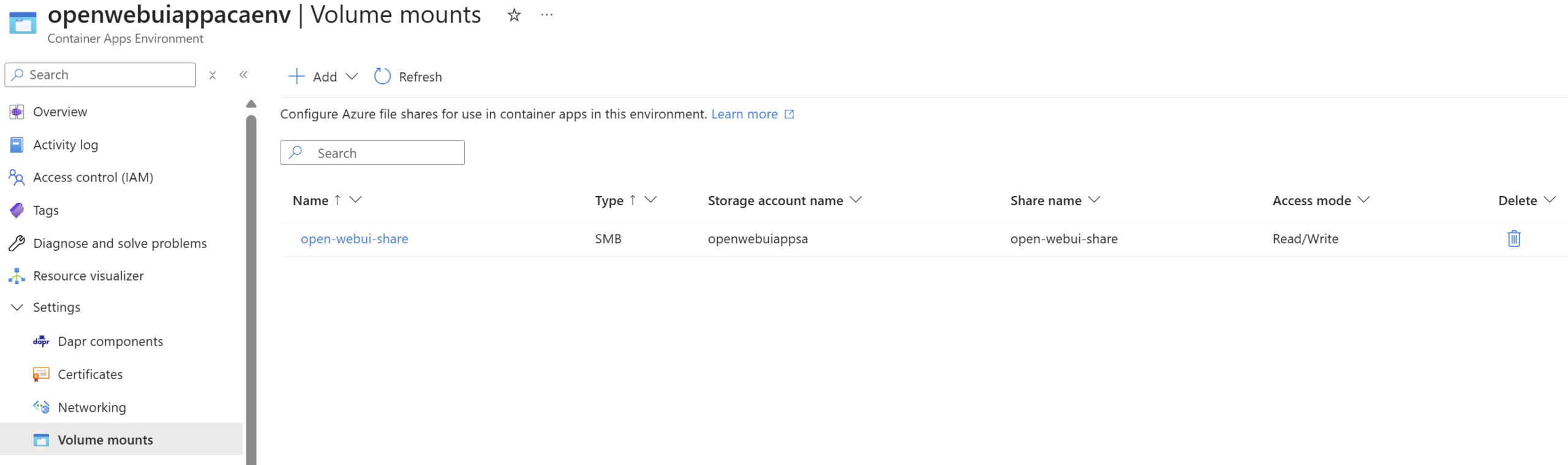
Mounted SMB Azure Files share for the Open WebUI to have persistent media and other static files it requires:
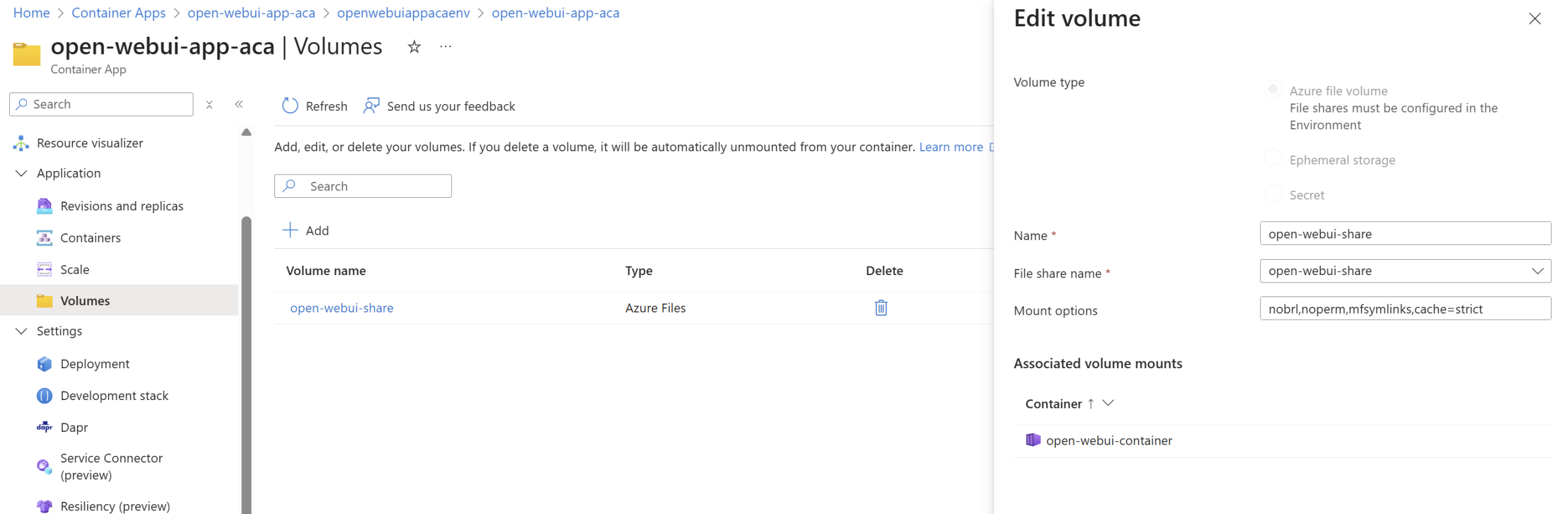
This is connecting via the Storage Account key which is added as a Key Vault secret which the Container App environment uses to in order to mount it with.
I am using these mount options: nobrl,noperm,mfsymlinks,cache=strict which are necessary as these play an important part for a good UX for Open WebUI:
| Option | Purpose |
|---|---|
nobrl | Disables SMB byte-range locking. |
noperm | Skips Unix permission checks. Azure Files doesn’t fully support Unix permissions, so this prevents access denied errors. |
mfsymlinks | Enables symbolic link support on the SMB share. (Not necessarily relevant for Open WebUI but I added for good measure). |
cache=strict | Ensures data is written to Azure Files before confirming success. Prevents data loss or corruption. |
Microsoft Foundry
A no brainer, deploying a cognitive account for AI Services in Azure is the way to go for the needs of the solution here. The Azure OpenAI resource is limited to OpenAI and is now ‘classic’ in the sense that it will not get newer models, so our flexibility would be limited to OpenAI. Foundry allows you to deploy multiple models from various providers like xAI, Meta, Mistral, and many more. Because it is an AI Services cognitive account it also has all the necessary endpoints for future growth around speech to text, text, OCR, etc for integrations with Open WebUI.
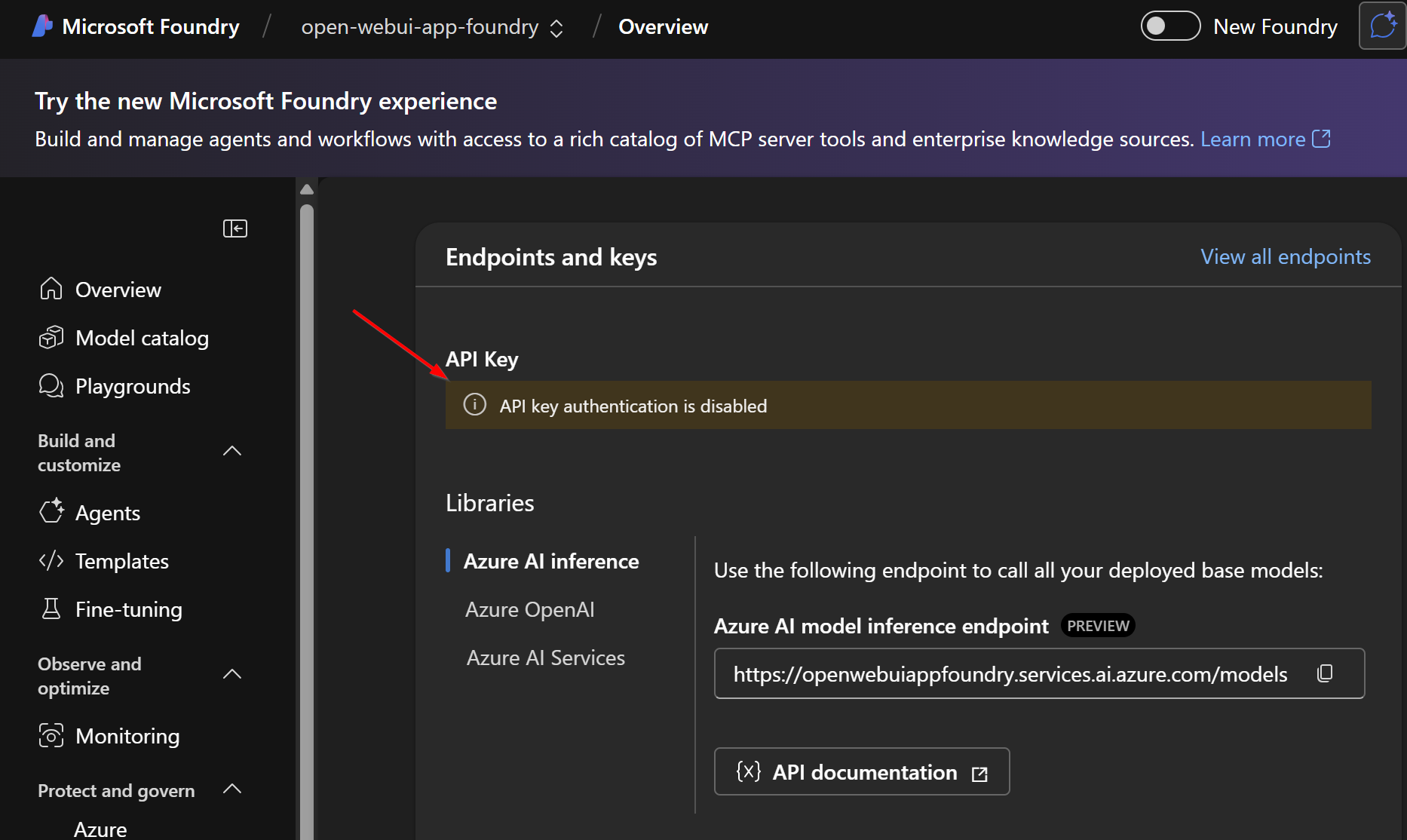
Microsoft Foundry with API key access disabled, ensuring Entra only authentication – configured in the Infrastructure as Code:
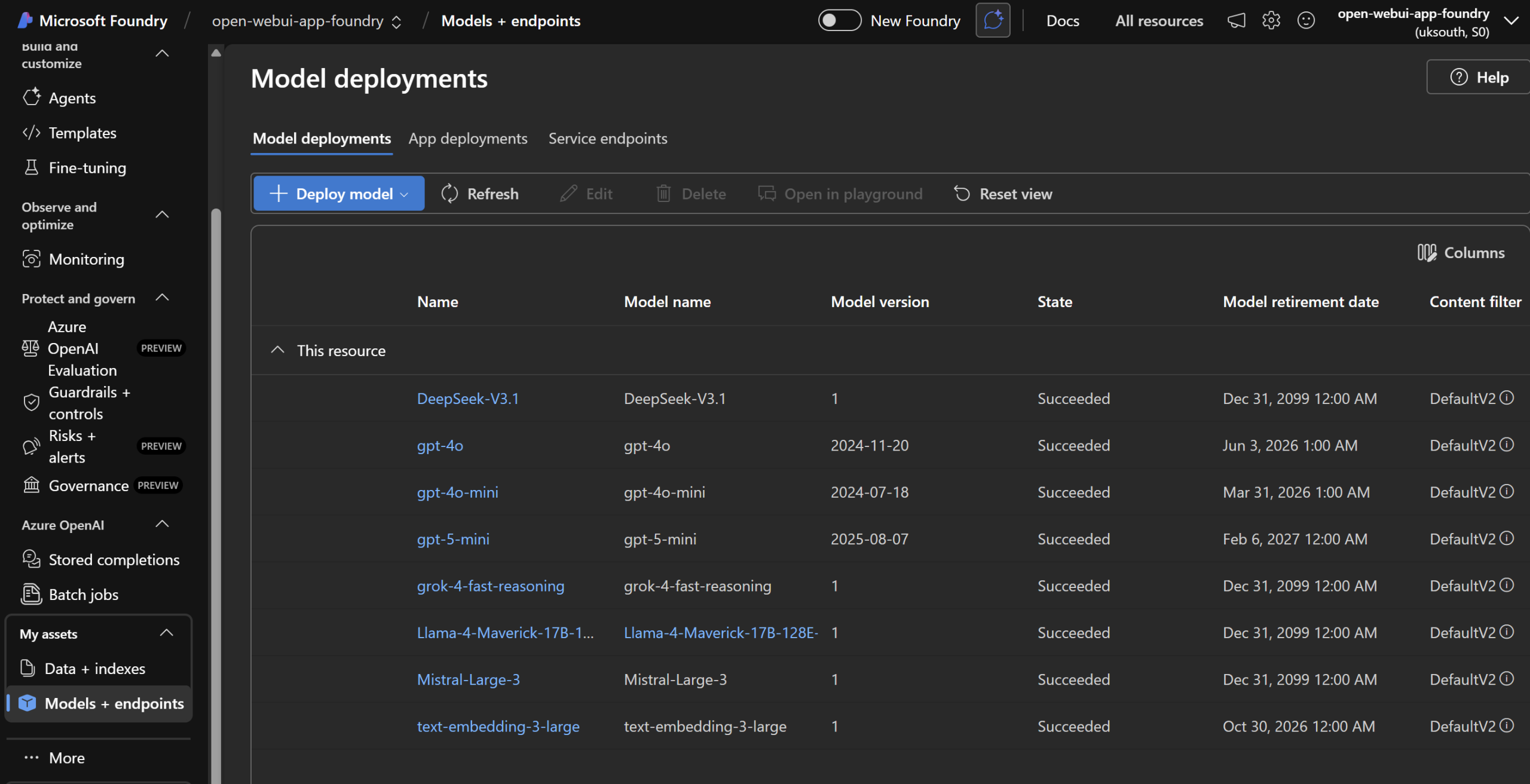
Models deployed to Foundry through Bicep ready to be used in Open WebUI via the Azure API Management proxy gateway for metrics, control and authorisation:
Azure Files (SMB)
For persistent data in the container app environment I have gone for Azure Files (SMB), with easy to configure soft deletion, backups, and ease of setup. Whilst SMB with ACA for Azure Files still requires access key access to the Storage Account it is a simple and easy option to set up. Azure Blob or Azure NetApp is not supported for container apps storage mounts, so there are not many other choices here. It appears even for NFS you require the access key, so no managed identity support yet. The access key for the Storage Account is stored within Key Vault which has been added to the Container App environment – added through the Bicep module outputs through Key Vault, keeping things secure. It’s important to note the SMB share only acts as a share for vectors, uploads and cache files – not Open WebUIs database.
SMB volume mounted with Read/Write to the Azure Files share name in the Storage Account:
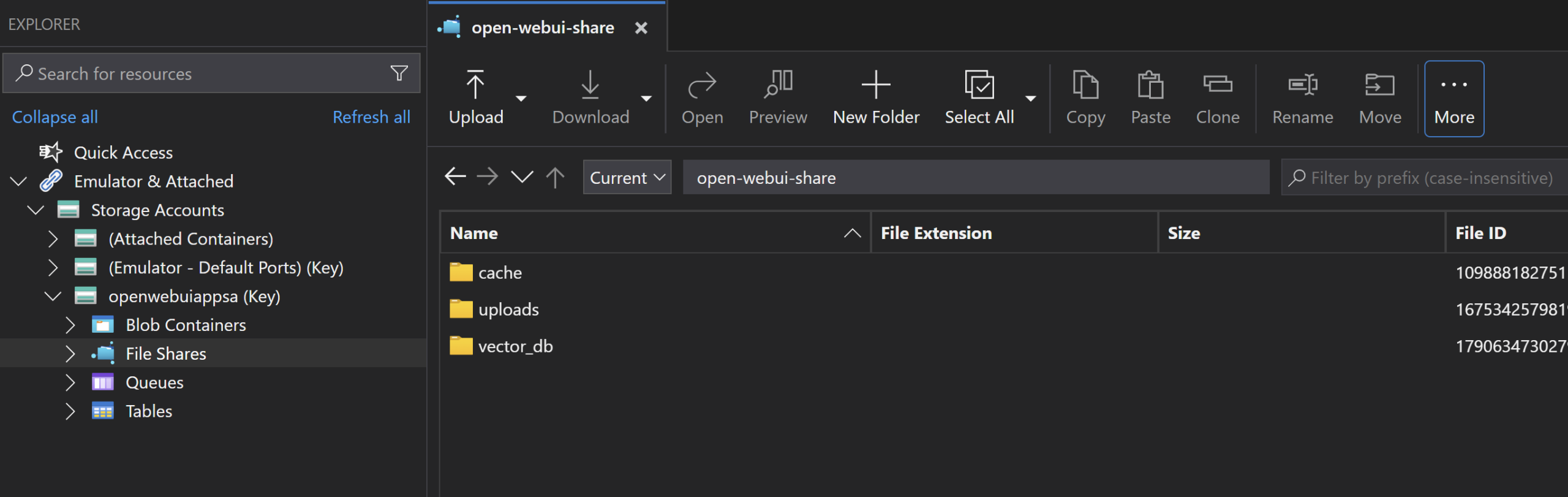
Open WebUI uses the persistent Azure Files SMB mount path for media, cache, other static files required to keep Open WebUI data safe if the Container Apps restarts, scales up or down ensuring data remains persistent for users:
Azure PostgreSQL Flexible Server – Database
Open WebUI uses SQLite out of the box, which is fine for local PC use. However, in Azure, SQLite has very limited native support. Using it over SMB with Azure Files will be slow and will likely have connection, concurrency, and reliability problems as well. Fortunately, Open WebUI does support PostgreSQL, which we can use in Azure for a better database solution for user data and chats.
There’s one caveat that sort of breaks my plan to keep everything using Entra ID and Managed Identities: Open WebUI’s source code doesn’t yet support Entra ID authentication for PostgreSQL connection strings, so I was forced to use a password stored in Key Vault which is added as a secret to the Container App for the Database variable to use.
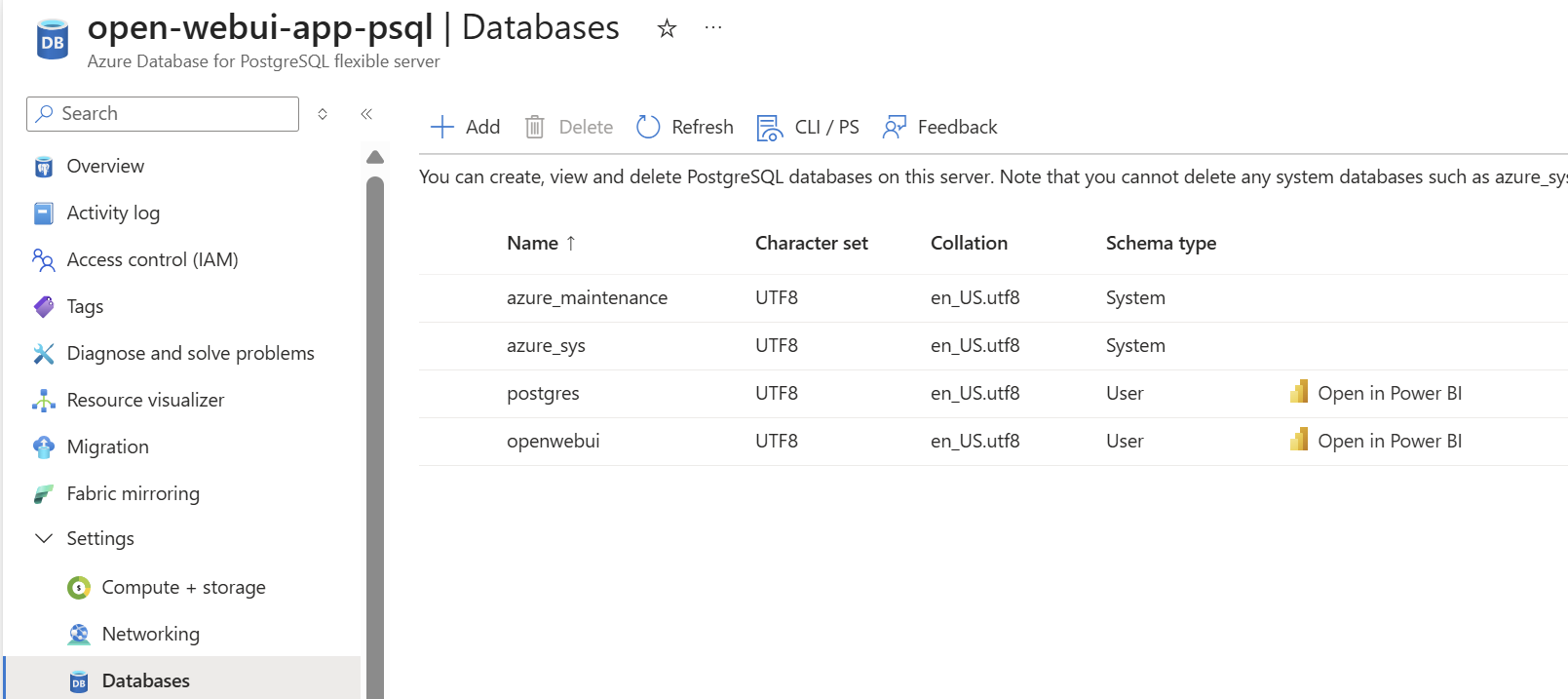
PostgreSQL with a dedicated openwebui database on Azure, with a private endpoint on the resource:
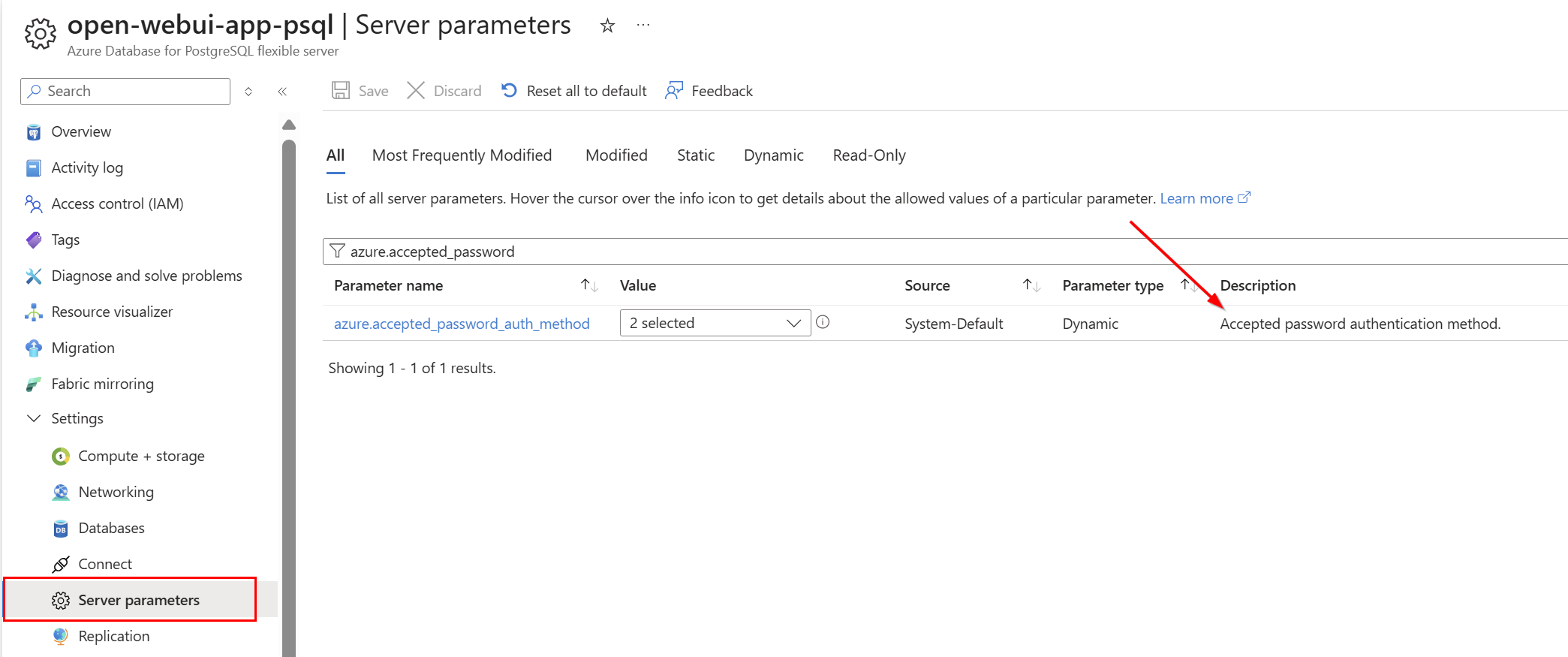
As mentioned above, I’ve had to enable Password authentication – which is in the Bicep code for when the database resource gets deployed (passing inline to keep it out of git/code):
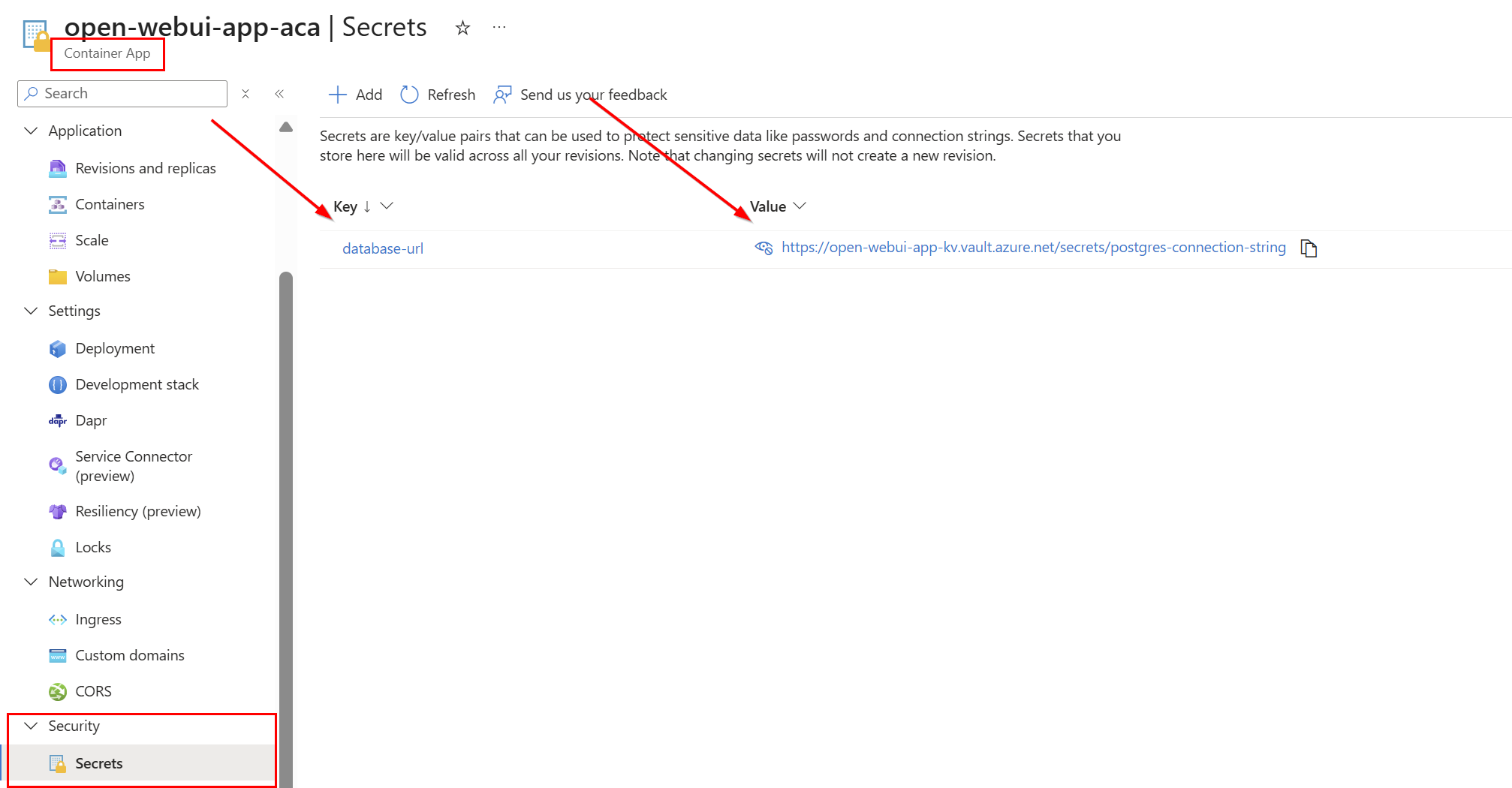
On the Container App itself, there is a secret created called database-url, which is a Key Vault secret containing the PostgreSQL connection string (which looks like: postgresql://<admin-username>:<password>@<your-azure-postgres-name>.postgres.database.azure.com:5432/openwebui?sslmode=require):
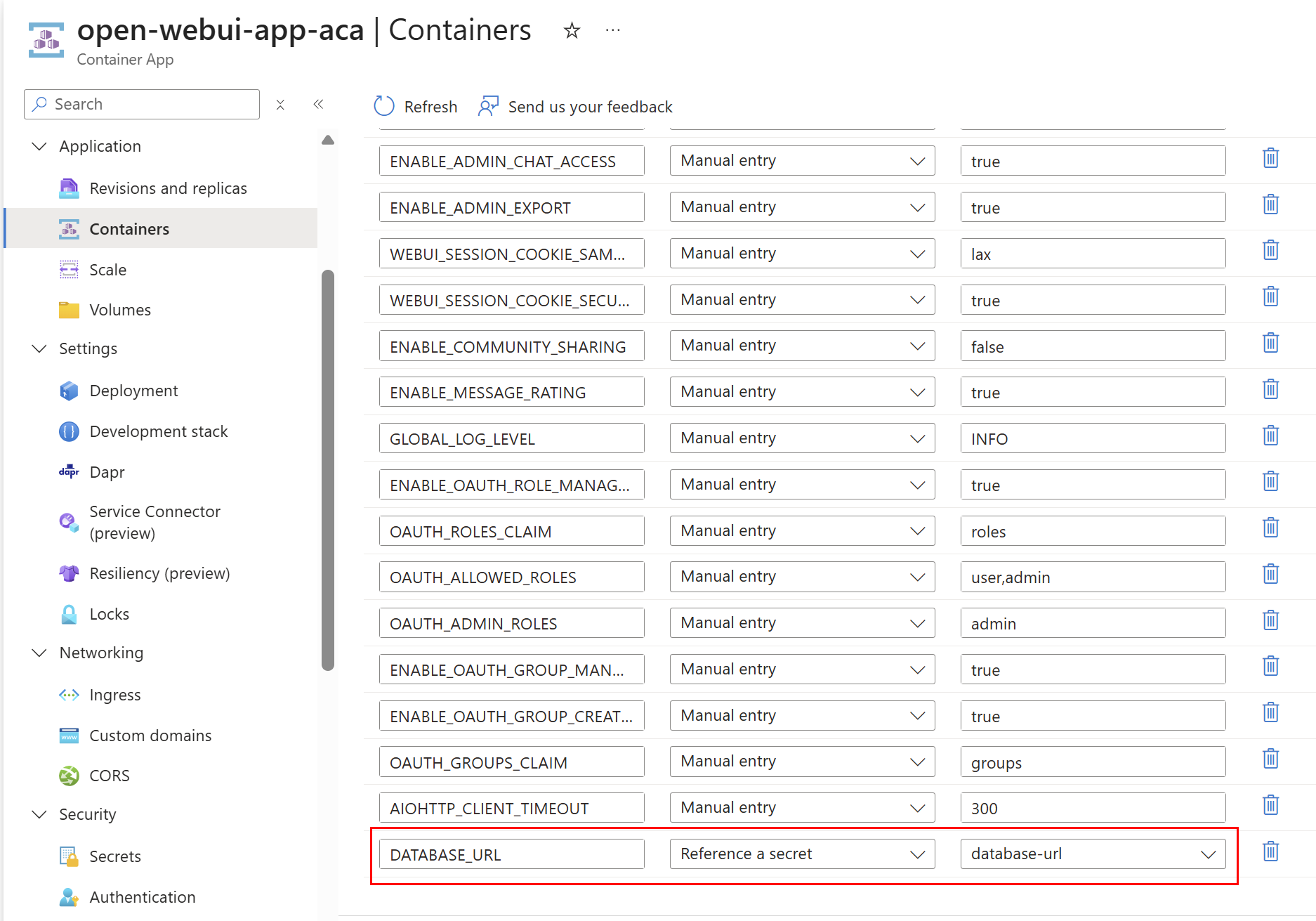
Lastly to ensure Open WebUI uses this database and does not use the SMB share (which it will if you don’t specify the database config variable) there is a DATABASE_URL variable I have configured, which reference the Key Vault secret connection string:
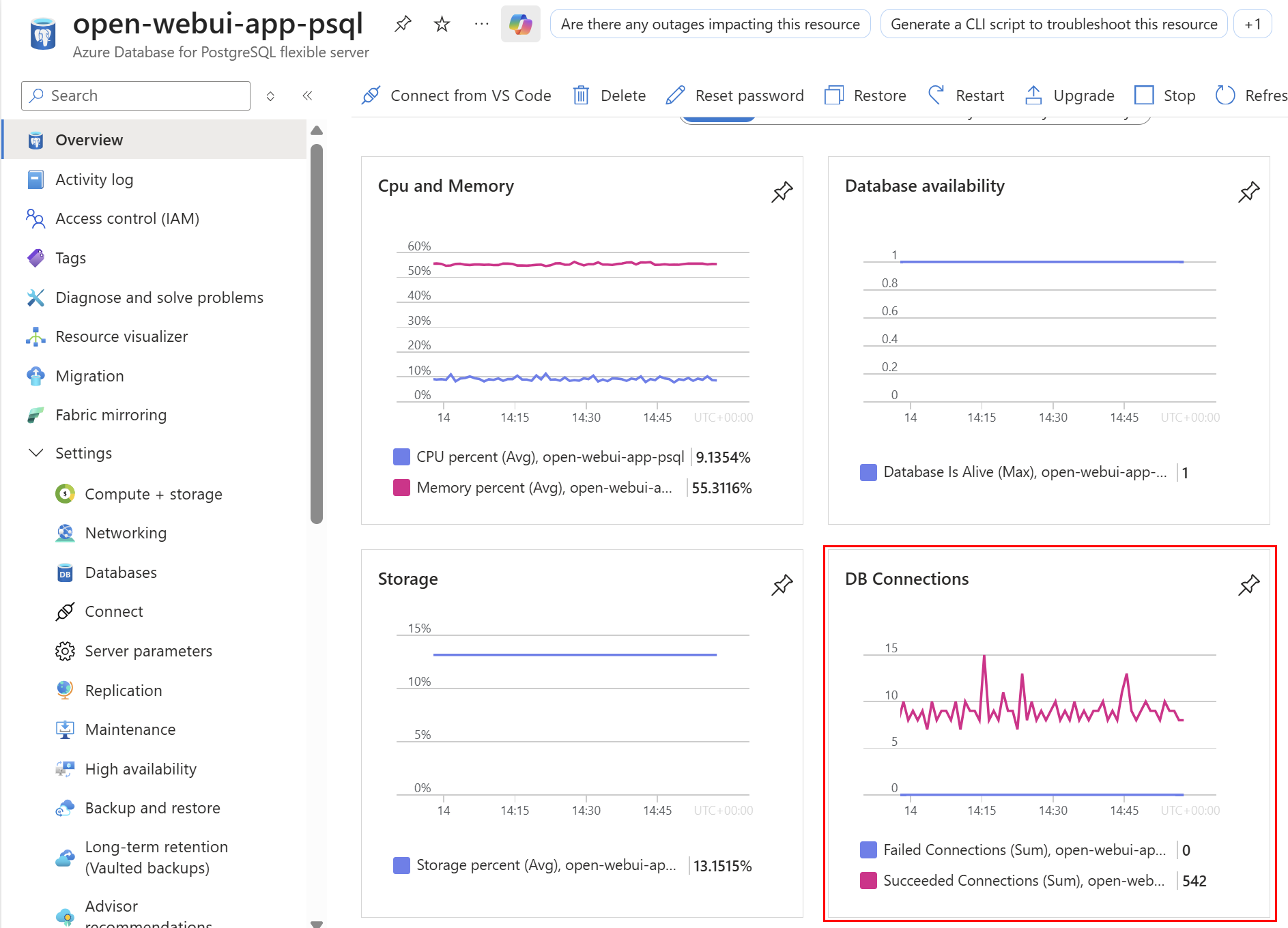
On the Overview page of the resource, I can click the Monitoring tab and verify connections are flowing and the Open WebUI is loading correctly (look for chat histories loading correctly, folders and the main chat window for example):
Entra App
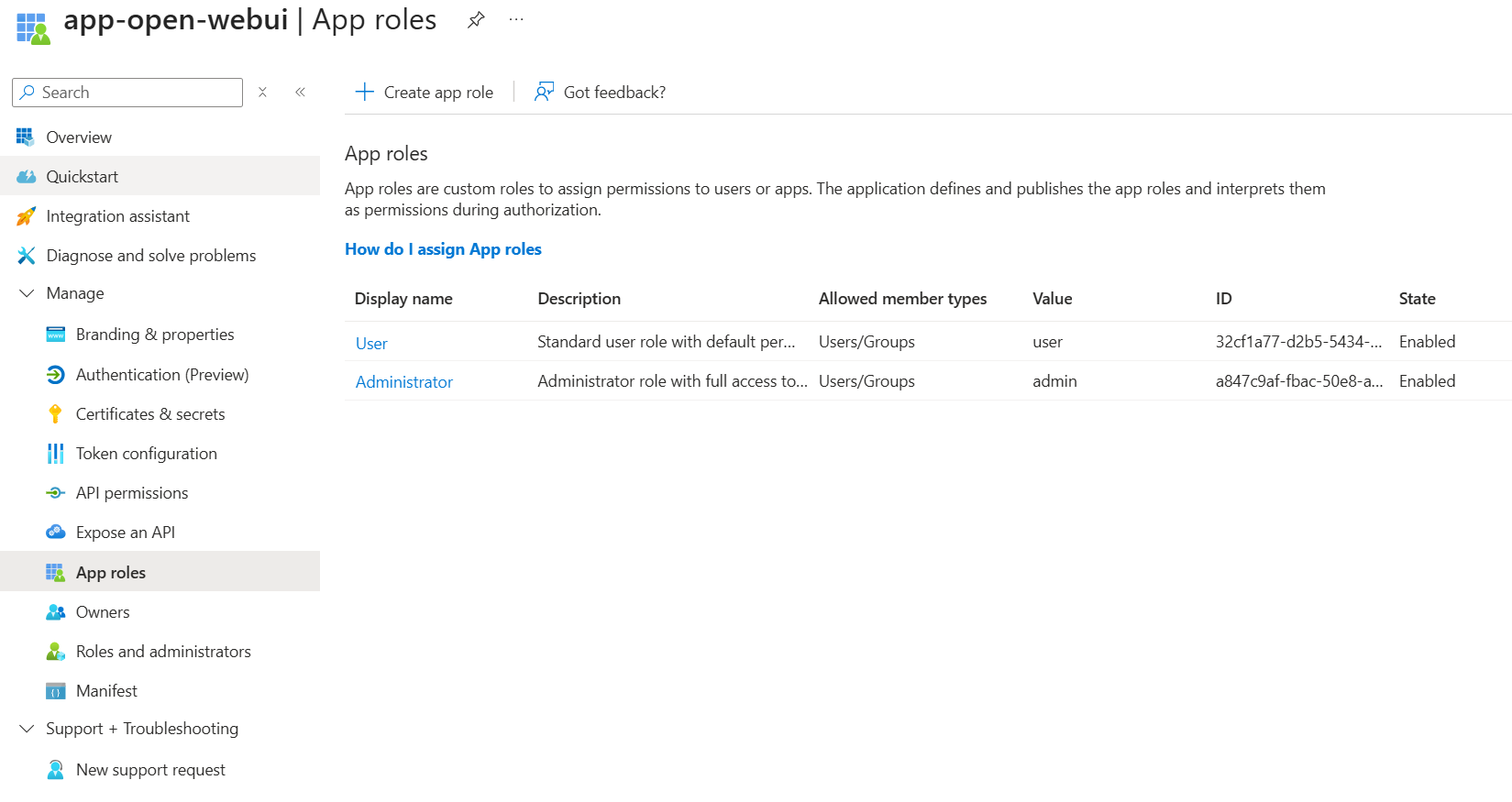
The Entra ID App Registration enables Open WebUI’s OAuth authentication flow (OAuth callback redirect URI) and defines the roles and scopes that APIM validates. Using OIDC I could setup Open WebUI with Entra ID for the IdP without needing a client secret, which is still all too common a flow which I wanted to avoid. The app requests two Microsoft Graph delegated permissions: User.Read (profile info) and GroupMember.Read.All (for syncing Entra groups to Open WebUI groups).
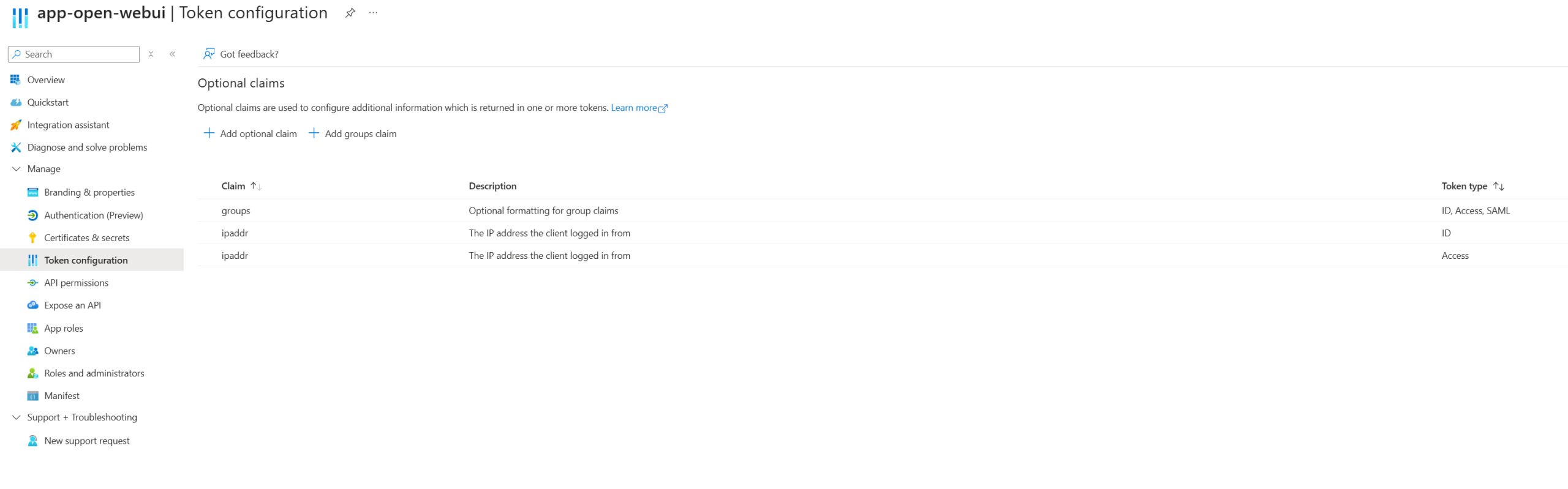
Admin consent is required specifically for GroupMember.Read.All since it can expose organizational structure. Without granting it, users won’t be able to sign in and Open WebUI can’t sync group memberships. The app defines two roles (admin and user) that get assigned in the Enterprise App, and these roles flow through the JWT token to both Open WebUI (for UI permissions) and APIM (for API authorization via the validate-azure-ad-token policy). Optional claims are configured to grab the client IP (ipaddr) and Entra group object IDs (groups), which APIM extracts from the JWT for custom metrics and per-user rate limiting. More on that in Part 2 when I cover APIM policies in detail.
Optional claims configured for client IP and group memberships:
App roles defined for Open WebUI permissions:
Costs
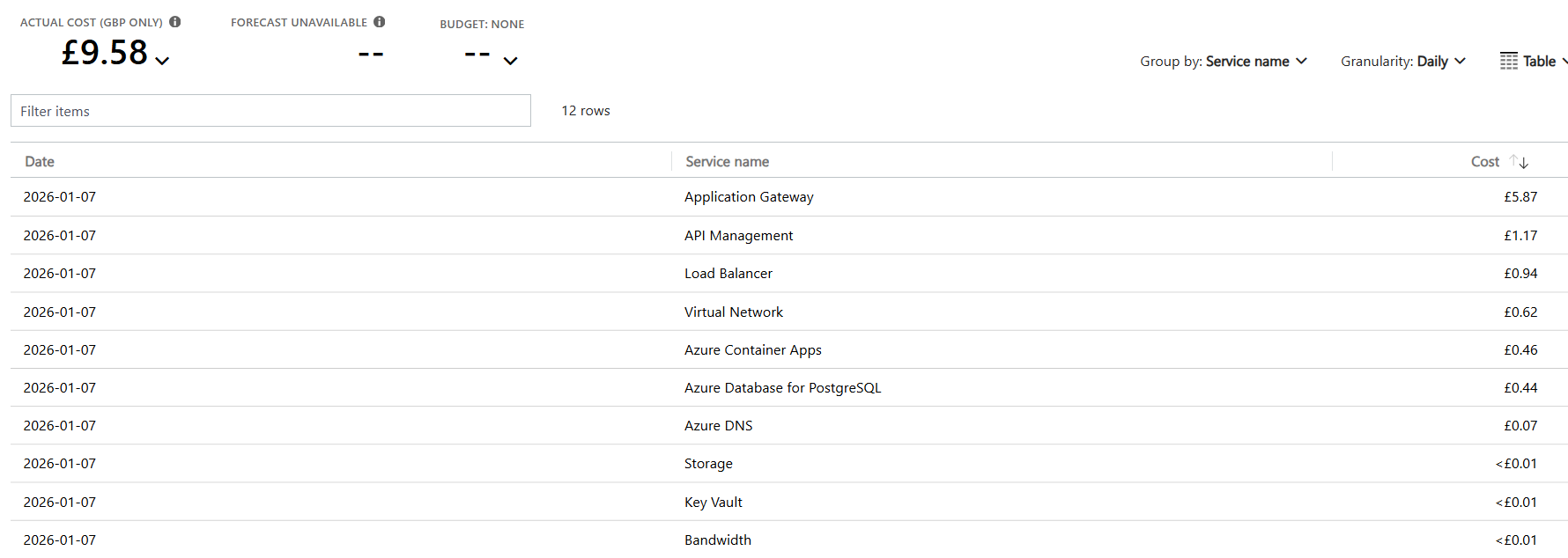
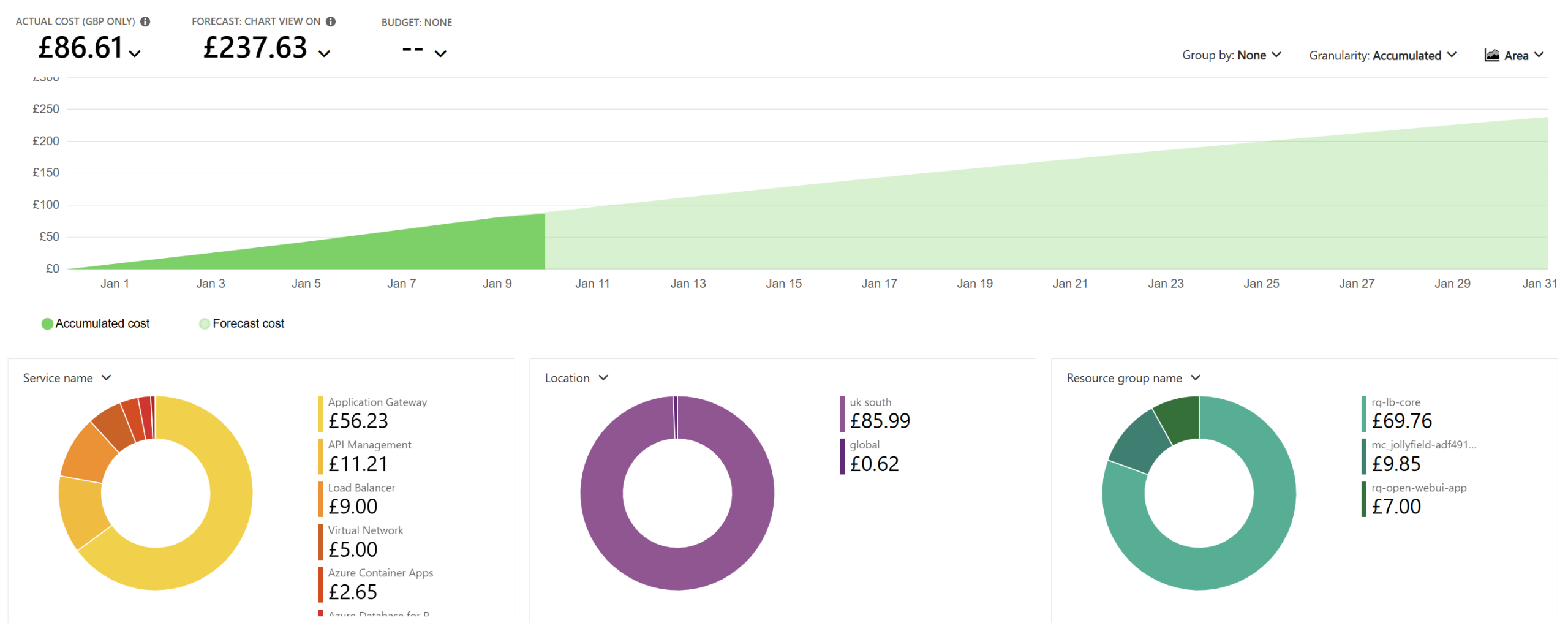
The vast majority of the cost will come from the Application Gateway, as it’s one of the most expensive Azure resources. If you don’t need it because you already have a VPN or other hybrid connectivity, you can route directly to the Container Apps ingress instead. This alone can significantly reduce your monthly spend.
The second‑largest cost tends to be the Container Apps (consumption) resource itself. This is mainly because it cannot reliably or officially scale to zero when sitting behind an Application Gateway (see: https://github.com/microsoft/azure-container-apps/issues/1090). The health probes keep at least one instance running at all times, which inevitably racks up costs. As above, if you don’t need the app to be publicly accessible via an App Gateway, you can reduce costs further by allowing ACA to scale to zero and simply accept the cold‑start delays.
Azure Database for PostgreSQL I have deployed as a burstable SKU, to keep my own personal costs low (on B1MS). However, this is likely another area to review for your user count – General Purpose can quickly become hundreds a month. As it stands though, the burstable SKUs are cheap for the first few SKUs, but can quickly get expensive. A silent cost may be the storage, which increase lineraly but Open WebUI does have some built-in features around this for retentions and history which is worth checking
All other costs are fairly minor in the grand scheme of the solution. Token costs for many models (anything other than the very latest) are genuinely inexpensive per million tokens so this depends on your user base size in terms of how much it could cost. APIM can usually run on the Basic SKU for production unless you have particularly heavy requirements although here I am using the Developer SKU so factor that price change in.
Lastly, to note, this isn’t including considerations you should factor in for your use case, if you have 100 users then your costs will be far greater, you’ll have much larger token usages, traffic ingress/egress costs and more to consider as well as increased production SKUs. This however, gives you an idea for a baseline for the core infrastructure services.
Daily Cost breakdown by Service (with demo/low SKUs):
Monthly Forecast (with demo/dev SKUs):
Deploying in Azure
Prerequisites:
- Azure subscription(s) Owner access with Azure CLI and Bicep installed
- Custom domain with DNS provider (Cloudflare used in GitHub Repo)
- SSL certificate (Cloudflare Origin Certificate for Full strict SSL mode and custom domain on ACA env)
- Application Developer Role (Entra)
1. Deploy Hub Infrastructure (VNet, DNS Zones, APIM)
Deploy the hub first to create networking, private DNS zones, and the Private Endpoint subnet:
# APIM will be created but Foundry backend won't be configured yet
az deployment sub create \
  --location uksouth \
  --template-file infra/bicep/main.bicep \
--parameters infra/bicep/main.bicepparamNote the output:
outAppGatewayPublicIp– Application Gateway public IP (for DNS)
2. Deploy App Infrastructure (Foundry, Container Apps, PostgreSQL)
Create the PFX certificate and deploy the app:
MacOS / Linux
# Create passwordless PFX and base64 encode it (macOS / Linux)
openssl pkcs12 -export \
  -out cloudflare-origin.pfx \
  -inkey origin.key \
  -in origin.pem \
  -password pass:

base64 -w0 cloudflare-origin.pfx > pfx.b64

# Deploy spoke infrastructure (use the base64 file)
az deployment sub create \
  --location uksouth \
  --template-file infra/bicep/app.bicep \
  --parameters infra/bicep/app.bicepparam \
--parameters parCertificatePfxBase64="$(cat pfx.b64)" parPostgresAdminPassword='<Postgresql-Password>'Windows:
# Create passwordless PFX and base64 encode it (Windows PowerShell)
openssl pkcs12 -export -out cloudflare-origin.pfx -inkey origin.key -in origin.pem -password pass:
$pfxBase64 = [Convert]::ToBase64String([IO.File]::ReadAllBytes("cloudflare-origin.pfx"))

# Deploy spoke infrastructure (use the base64 variable)
az deployment sub create `
  --location uksouth `
  --template-file infra/bicep/app.bicep `
  --parameters infra/bicep/app.bicepparam `
--parameters parCertificatePfxBase64=$pfxBase64 parPostgresAdminPassword='<Postgresql-Password>'PostgreSQL Password Requirements: Must be at least 8 characters with a mix of uppercase, lowercase, numbers, and special characters. The password is stored securely in Key Vault and used by Open WebUI to connect to the database.
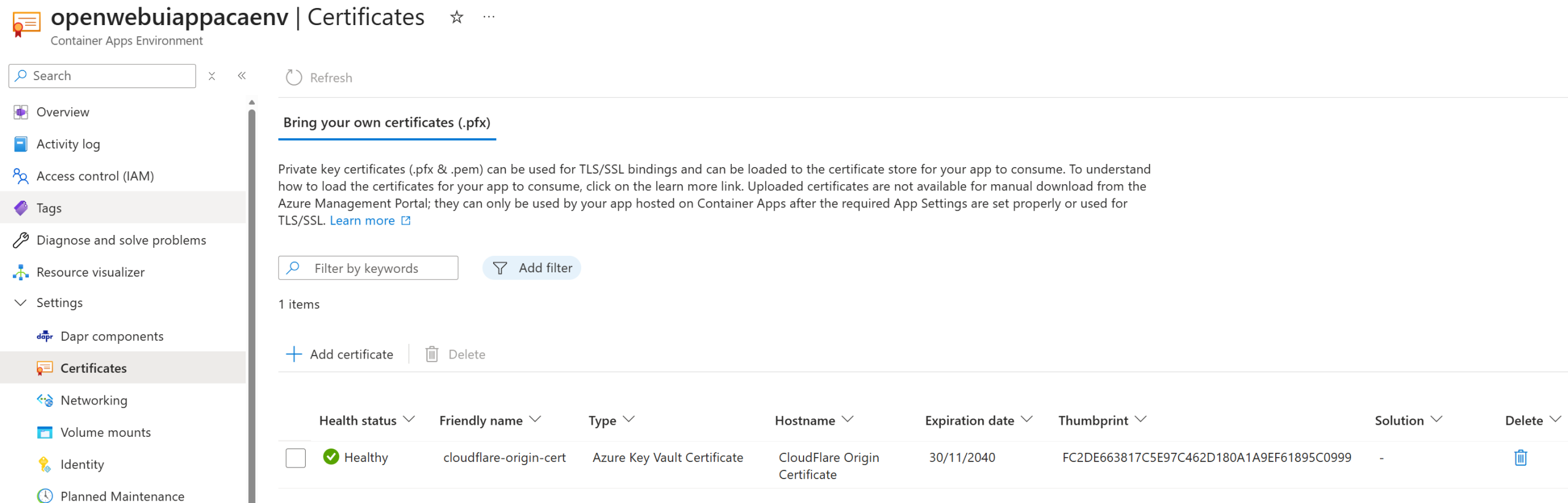
Note these outputs:
outContainerAppFqdn– Container App FQDNoutVirtualNetworkName– Spoke VNet nameoutContainerAppEnvStaticIp– Container App Environment static IPoutOpenWebUIAppId– Entra ID App Registration ID
Update main.bicepparam with spoke values:
parContainerAppFqdn– UseoutContainerAppFqdnparContainerAppStaticIp– – Use outContainerAppEnvStaticIpparSpokeVirtualNetworkName– UseoutVirtualNetworkNameparOpenWebUIAppId– UseoutOpenWebUIAppId
Grant Admin Consent:
- Azure Portal → Entra ID → App registrations → app-open-webui
- API permissions → Grant admin consent
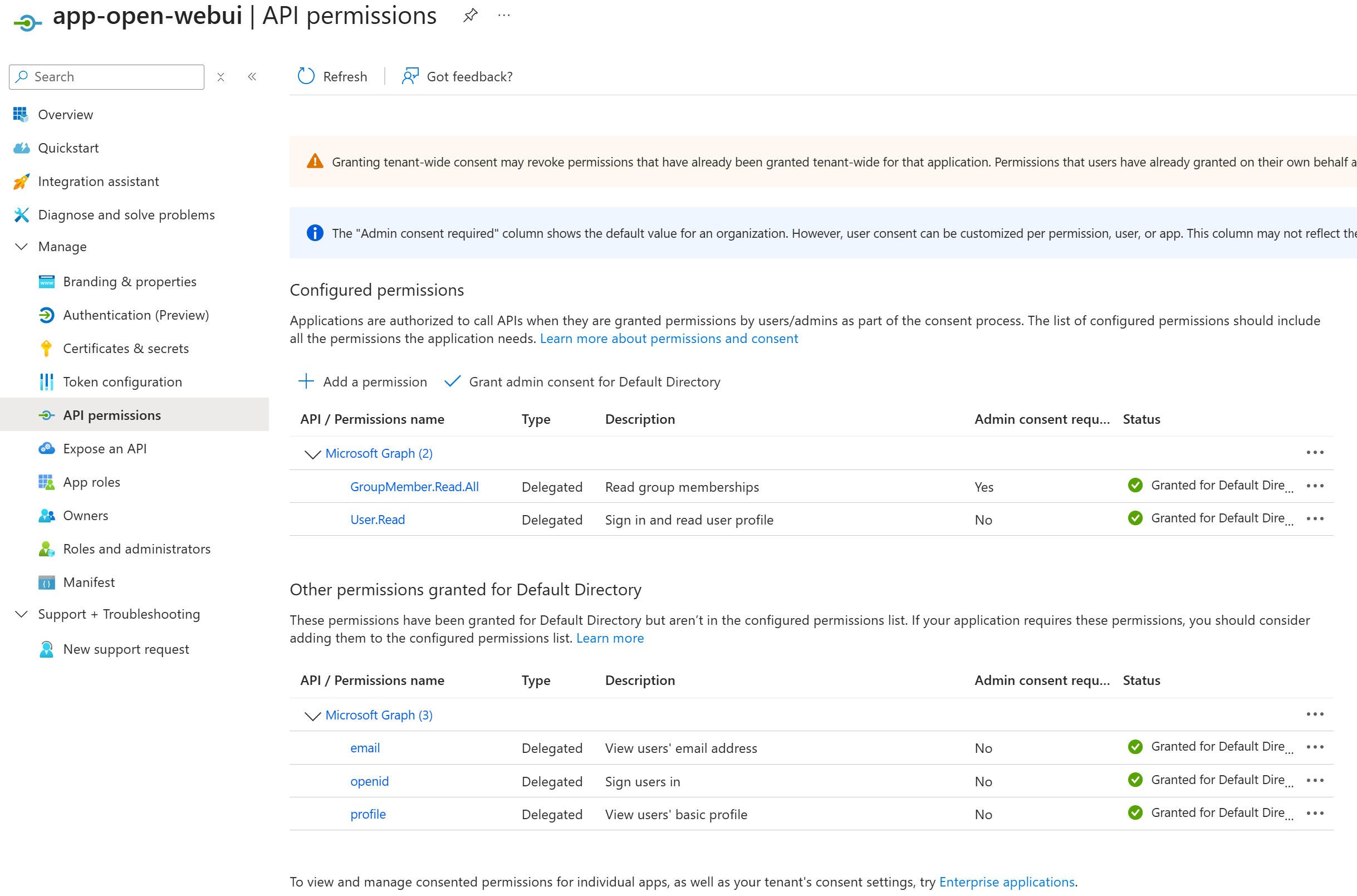
This will be used for Open WebUI Entra login, group/email syncing and APIM Entra validation for backend Foundry API calls.
3. Redeploy Hub / Shared (for APIM Foundry Backend, RBAC + Entra ID Validation)
Redeploy hub with parConfigureFoundry=true to configure APIM with the Foundry backend, grant RBAC, and enable Entra ID token validation:
az deployment sub create \
  --location uksouth \
  --template-file infra/bicep/main.bicep \
  --parameters infra/bicep/main.bicepparam \
--parameters parConfigureFoundry=trueConfigure DNS:
- Add an A record pointing to the Application Gateway public IP (
outAppGatewayPublicIp)
If using Cloudflare:
- Set SSL/TLS mode to Full (strict)
- Enable Cloudflare proxy (orange cloud icon)
4. Import OpenAPI Spec to APIM
az apim api import --resource-group rg-lb-core --service-name <apim-name> --api-id openai --path "openai/v1" --specification-format OpenApiJson --specification-path infra/bicep/openapi/openai.openapi.json --display-name "Azure OpenAI v1 API" --protocols https --subscription-required true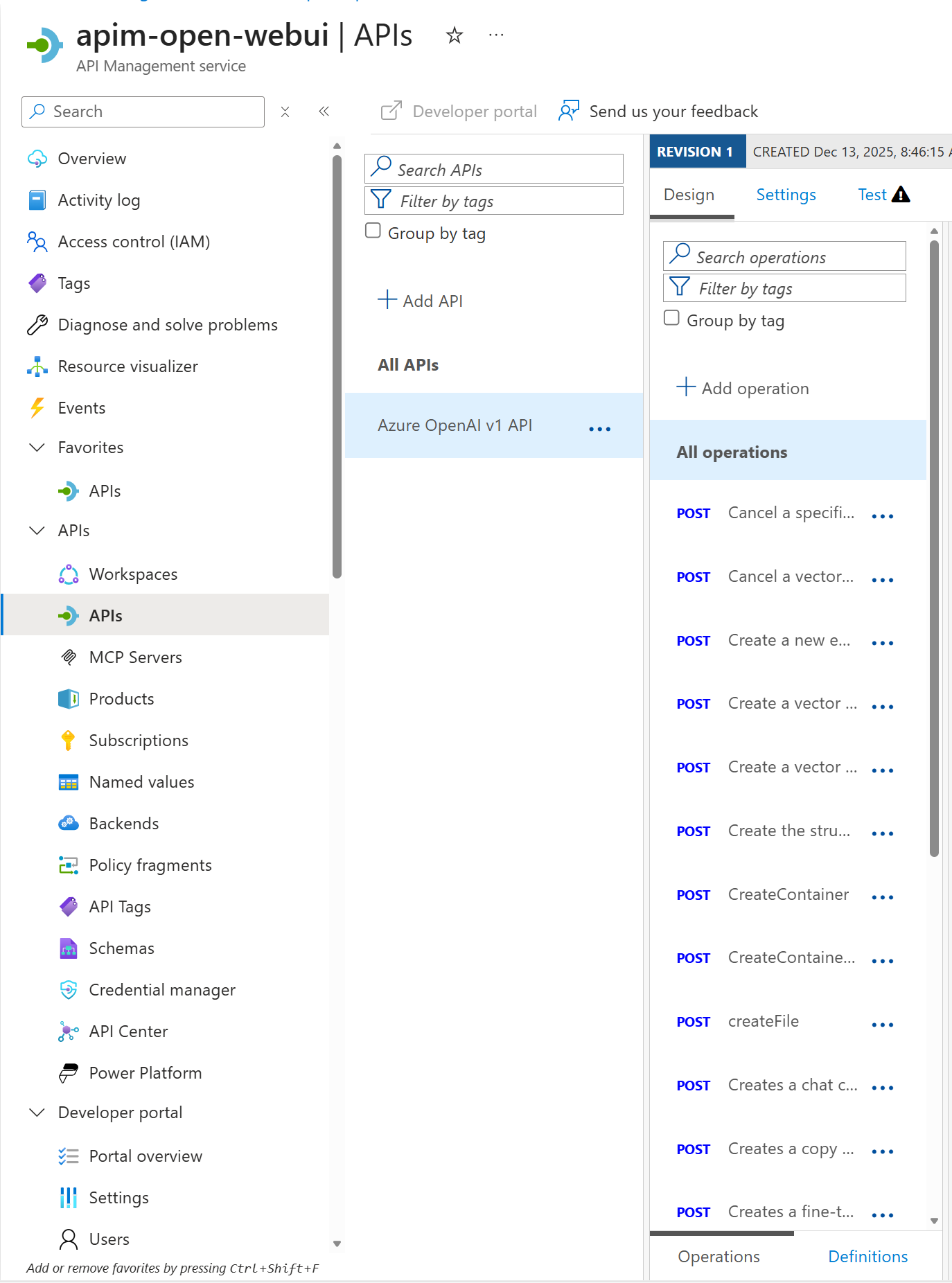
Open WebUI Configuration
In Open WebUI, you can allow users to create their own OpenAI‑compatible connection. This can be a good way to track metrics, token limits, usages by LLM and user as the solution captures custom metrics via APIM.
Connect Open WebUI to Microsoft Foundry (via APIM)
- Navigate to Open WebUI and log in with Entra ID
- Go to Admin Settings → Connections
- Add OpenAI-compatible connection:
- API Base URL:
https://<apim-name>.azure-api.net/openai/v1
- API Base URL:
- Headers: Get from APIM subscription
” } - API Type:
OpenAI - Auth:
OAuth - Model Ids: Input all models deployed to Foundry,e.g.
gpt-5-mini
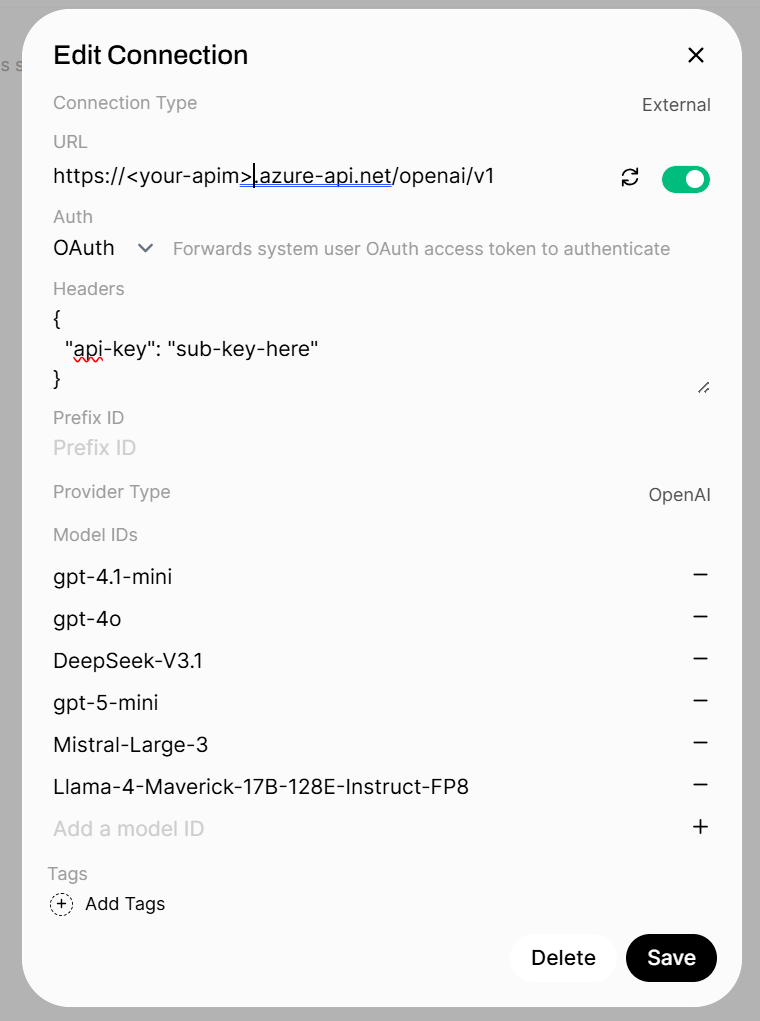
Once verified, all models should be available that you have deployed to Foundry via the Model IDs attached to the connection.

In part 2 I will detail Azure API Management, the metrics, logging, subscription use cases and policy or authorisation logic, and how APIM with AI is crucial as a gateway not only for this solution, but for any Foundry based solution in Azure as a central ingress and control point.
This is an amazingly thorough walk-through and worth its weight in gold, thank you!
Thank you James. Great to hear this 🙏