
Contents
Intro
Foundry has had a messy start. The pivot from the classic hub/projects architecture to the “New” account model happened quickly and feature parity still isn’t there (for example, managed VNet is still in preview). That made it hard to know what to use today, let alone where to invest from a governance and enterprise standpoint. Not too long ago BYON landed for the new Foundry, and I wanted to dig into how it ties together and what it means beyond the quickstart templates and docs.
For the unacquainted, BYON Foundry is a potential necessity for any organisation whose security and regulatory posture demands private, internal networking. You can let Microsoft manage the Foundry networking, but you won’t have the same control over routing or egress. That comes at a cost, both operationally and financially. It’s important to understand what you gain (and what you give up) by going the BYON route.
There are three layers to get right: the network (spoke topology and egress), the account (Bicep and BYO dependencies), and the governance (RBAC and BU topology). I’ll walk through each one, then cover the gotchas I found building it.
Traffic flow
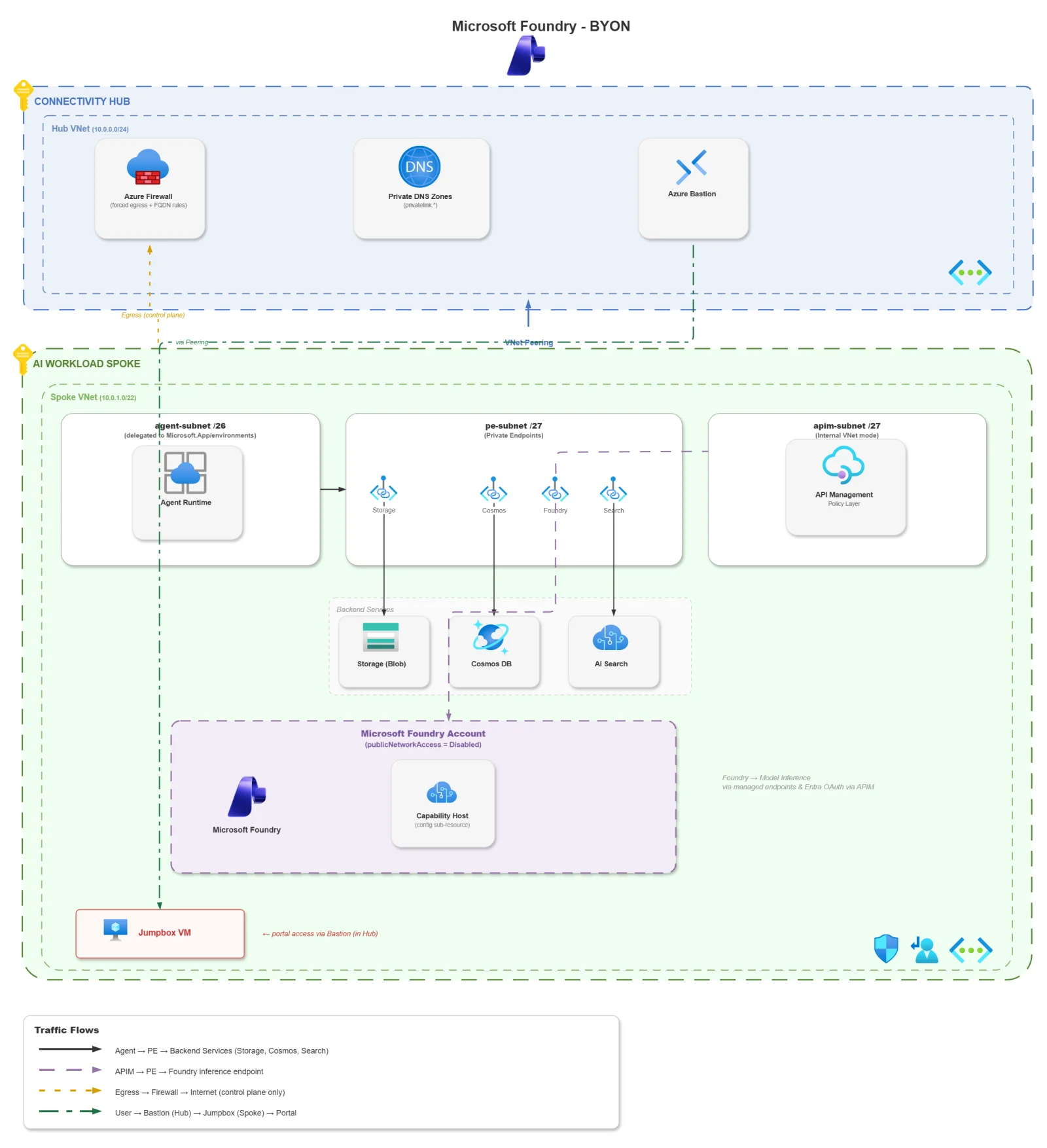
Before we dive into resources, it helps to see where the traffic goes in a locked-down Foundry deployment:
Three traffic flows matter here:
- The agent talks to Storage (blob), Cosmos DB, and AI Search. All through private endpoints in the
pe-subnet(via the Foundry Data Proxy Host). No public/external involved besides explicit egress traffic. - If you’re using APIM as your AI Gateway (I plan to cover this in detail for Part 2), the gateway routes through an internal VNet-mode APIM that hits the Foundry account’s private endpoint.
- Agent tool calls to external APIs and Foundry control-plane traffic leave through the firewall. Everything else stays inside.
Architecture
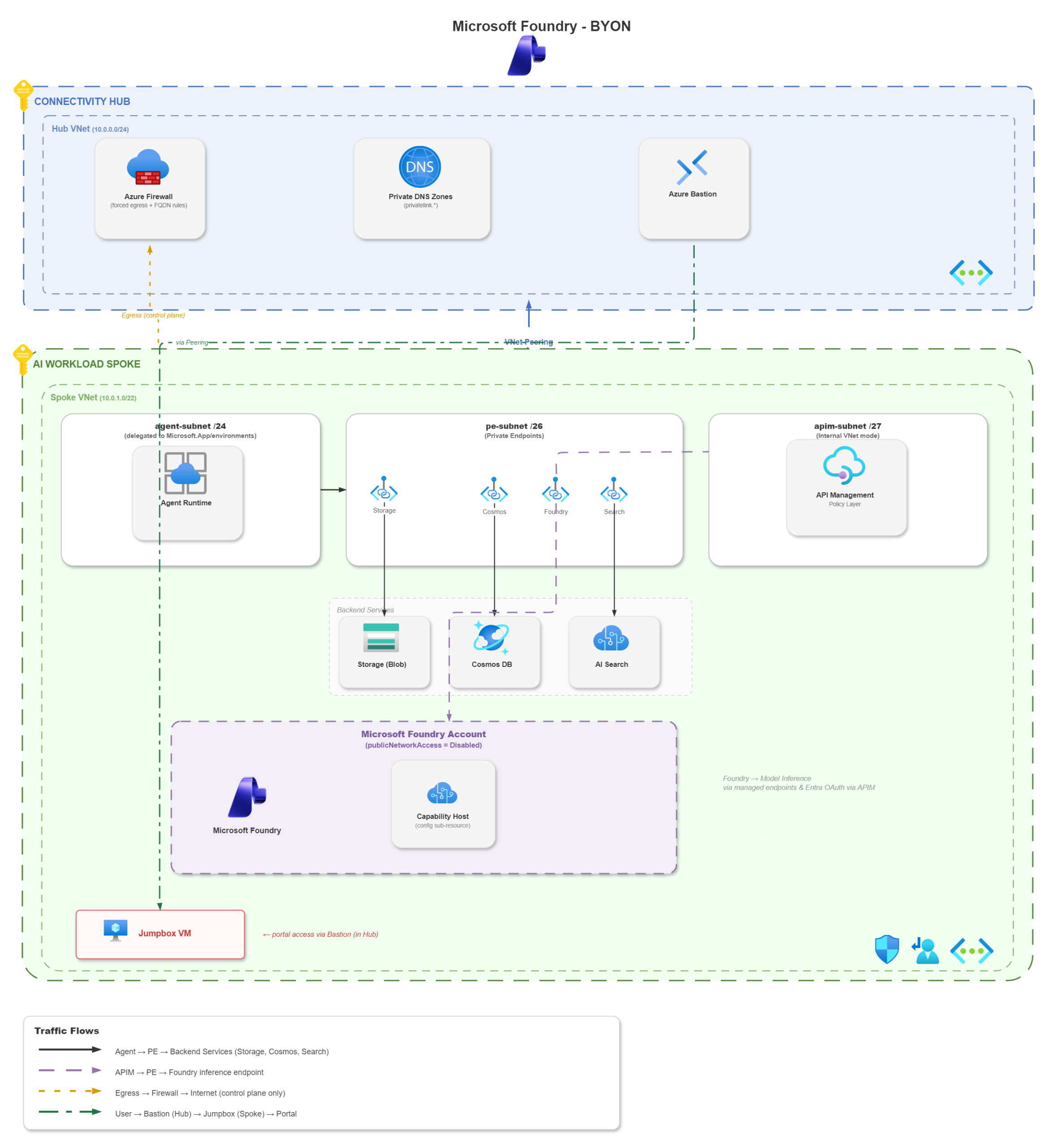
This is a hub-and-spoke topology. The hub holds the Azure Firewall (forced egress), route tables, and the central private DNS zones. The spoke holds everything else: the Foundry account, its capability host, the BYO dependencies (Storage, Cosmos, AI Search), APIM (or can be shared service rather than per workload because £££), and a Bastion ([in the hub] – keep compute out the hub) + jumpbox for Foundry management portal access and network line-of-sight.
The example spoke VNet is 10.1.0.0/22, broken into these subnets:
| Subnet | CIDR | Purpose |
|---|---|---|
| agent-subnet | 10.1.0.0/24 | Delegated to Microsoft.App/environments for the agent runtime |
| pe-subnet | 10.1.1.0/26 | Private endpoints for Storage, Cosmos, AI Search, Foundry |
| apim-subnet | 10.1.2.0/27 | APIM internal VNet mode |
| jumpbox-subnet | 10.1.3.0/28 | Bastion-mediated admin access for Foundry Portal |
The /26 on the PE subnet is deliberate – about 12 private endpoints, enough for one Foundry account plus its BYO dependencies. A /24 would waste IPs, which matters in enterprise hub-spoke where address space can be contentious.
The agent subnet is a /24 as Foundry caps concurrent agent sessions at 50 per subscription per region, and the docs recommend /24 for production. A /26 can technically reach the 50-session ceiling but leaves very little headroom for platform upgrades, which run old and new infrastructure in parallel. The /24 is the safer enterprise pick.
The Foundry capability host is the key bit for BYON. It’s what connects the agent runtime to your Azure Virtual Network. It needs these two key things:
- The
agent-subnetdelegated toMicrosoft.App/environments - Private endpoints for every dependency required
APIM can be a shared service rather than per spoke; this example is just to illustrate the foundational components. This way all your AI inbound traffic can ingress via APIM for Entra OAuth (AuthN), token limits, rate limiting/circuit breaking, load balancing and custom metrics.
If you’re deciding between BYO VNet and Managed VNet, the tradeoffs are clear:
| BYO VNet | Managed VNet | |
|---|---|---|
| Egress control | Full (Azure Firewall or NVA) | Microsoft-managed |
| DNS | You own it | Auto-provisioned |
| Agent tool support | Gaps (see gotchas) | Full |
| Complexity | High | Low |
| Status | GA | Preview |
Managed VNet is easier but you lose egress control and it’s still in preview. BYO is GA, gives you full control, and comes with the DNS and firewall complexity covered in this post.
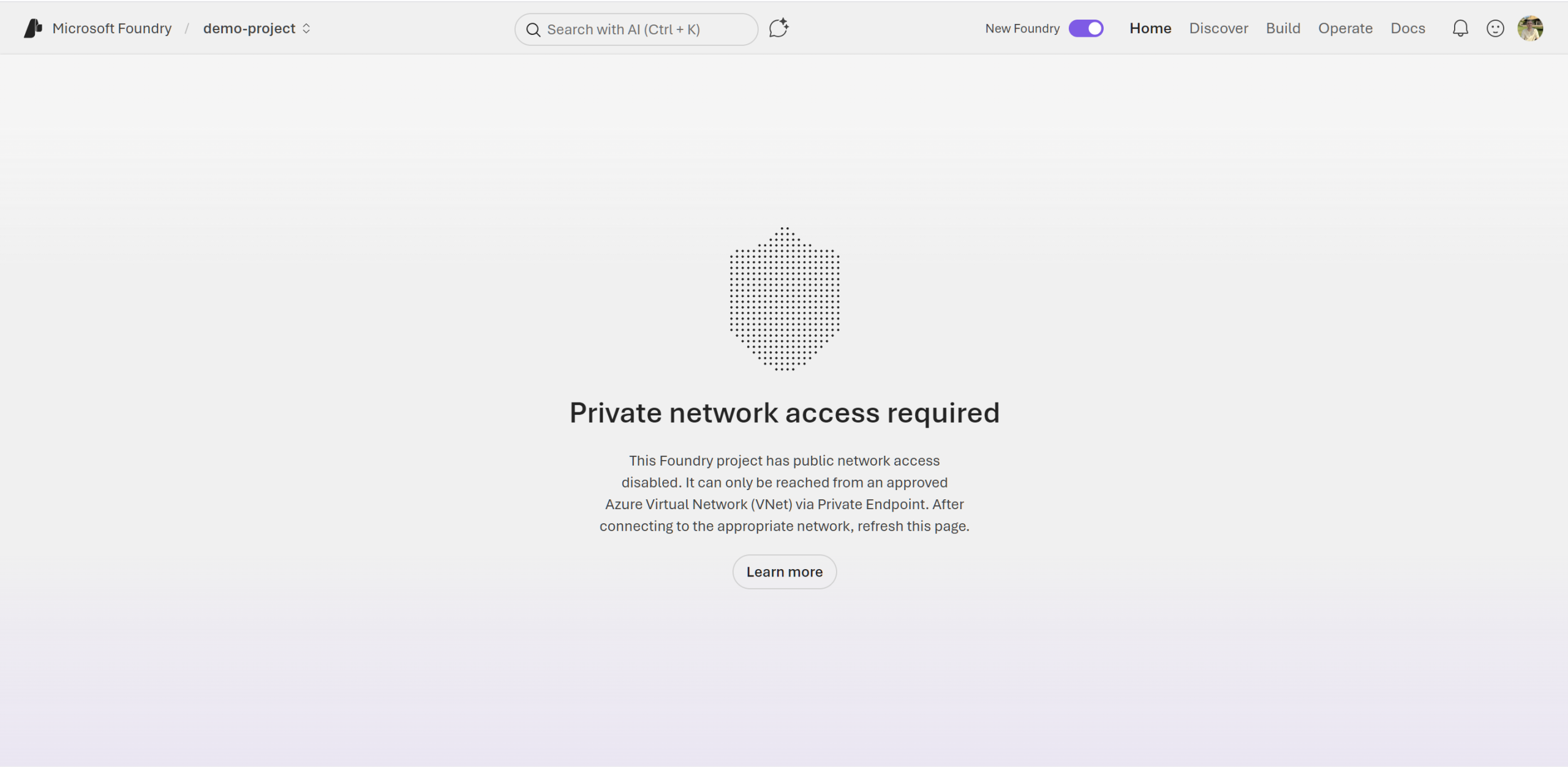
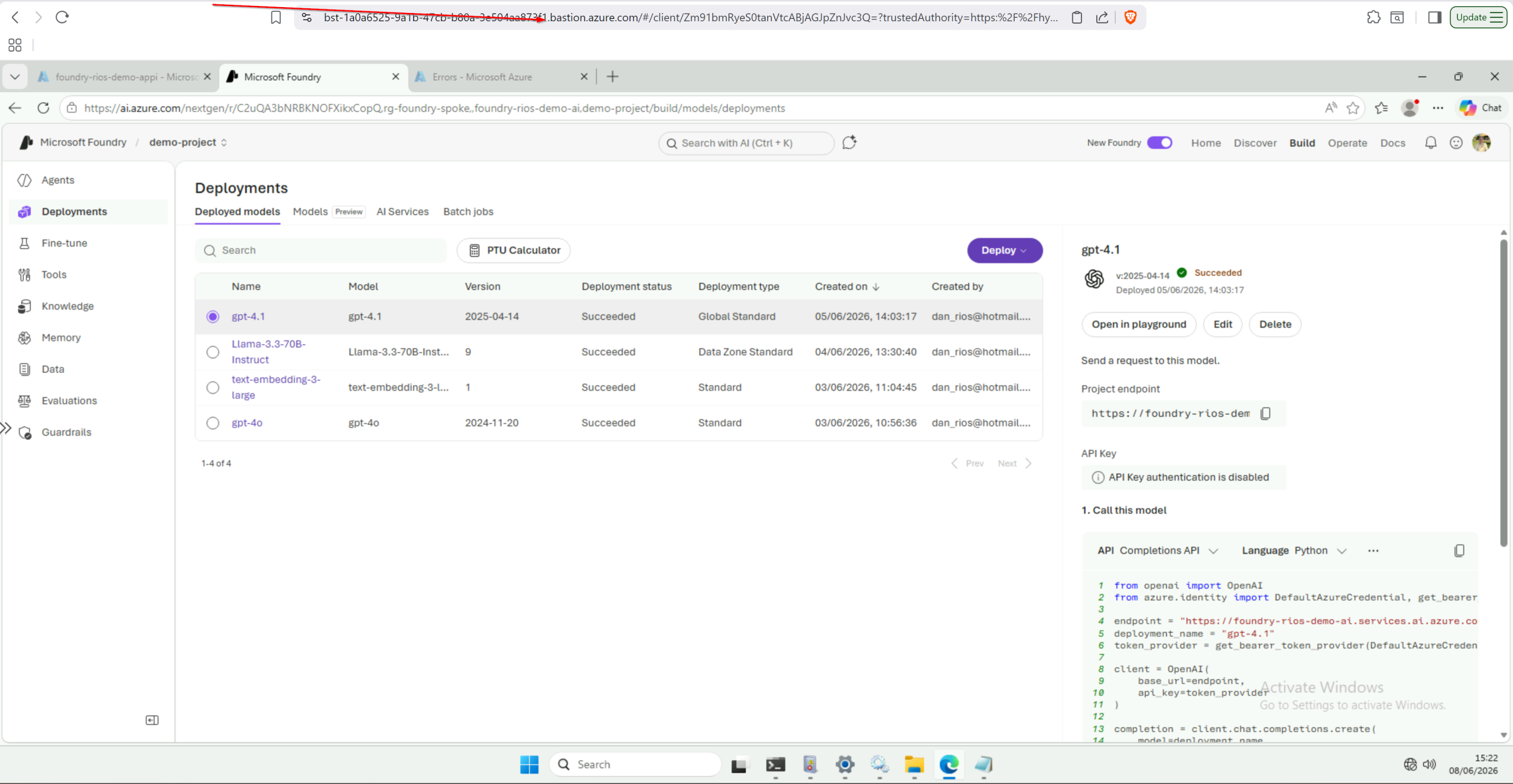
Another point around Foundry access: the playground, agent chat, and dataset upload all call *.services.ai.azure.com and *.openai.azure.com from your browser. With publicNetworkAccess = Disabled on the Foundry account, those calls only resolve from a network that can reach the private endpoints. That was the case in the classic model and this doesn’t change here. So you need Bastion (in the hub) + a VM on the spoke. Budget for the Bastion and the necessary compute required.
The Foundry account in Bicep
Here’s what some of my Bicep looked like to get the BYON Foundry deployed:
resource foundryAccount 'Microsoft.CognitiveServices/accounts@2025-12-01' = {
  name: aiServicesName
  location: location
  tags: tags
  kind: 'AIServices'
  sku: {
    name: 'S0'
  }
  identity: {
    type: 'SystemAssigned'
  }
  properties: {
    allowProjectManagement: true
    publicNetworkAccess: 'Disabled'
    networkAcls: {
      defaultAction: 'Deny'
      bypass: 'AzureServices'
      ipRules: []
      virtualNetworkRules: []
    }
    customSubDomainName: aiServicesName
    disableLocalAuth: disableLocalAuth
    networkInjections: [
      {
        scenario: 'agent'
        subnetArmId: agentSubnetId
        useMicrosoftManagedNetwork: false
      }
    ]
  }
}
The model deployments, serialised to avoid rate limits:
@batchSize(1)
resource modelDeployments 'Microsoft.CognitiveServices/accounts/deployments@2025-04-01-preview' = [for model in models: {
  parent: foundryAccount
  name: model.name
  sku: {
    name: model.skuName
    capacity: model.capacity
  }
  properties: {
    model: {
      format: model.format
      name: model.name
      version: model.version
    }
  }
}]
And the private endpoint showing all three DNS zones:
module foundryPe 'br/public:avm/res/network/private-endpoint:0.12.1' = {
  name: '${aiServicesName}-pe-deploy'
  params: {
    name: '${aiServicesName}-pe'
    location: location
    tags: tags
    subnetResourceId: peSubnetId
    privateLinkServiceConnections: [
      {
        name: '${aiServicesName}-plsc'
        properties: {
          privateLinkServiceId: foundryAccount.id
          groupIds: ['account']
        }
      }
    ]
    privateDnsZoneGroup: {
      name: 'foundry-dns-group'
      privateDnsZoneGroupConfigs: [
        {
          name: 'privatelink-cognitiveservices'
          privateDnsZoneResourceId: cognitiveservicesPrivateDnsZoneId
        }
        {
          name: 'privatelink-openai'
          privateDnsZoneResourceId: openaiPrivateDnsZoneId
        }
        {
          name: 'privatelink-ai-services'
          privateDnsZoneResourceId: aiServicesPrivateDnsZoneId
        }
      ]
    }
  }
  dependsOn: [modelDeployments]
}
A few things worth calling out:
customSubDomainName is required for Entra/MI auth. The value must be globally unique. It’s a common convention to reuse the account name. Without it, the private endpoint DNS resolution fails and managed identity token acquisition can’t resolve the correct audience.
networkInjections is inline on the account, not a separate resource. It takes the scenario, the agent subnet ID, and a boolean for managed vs BYON.
I’m using @batchSize(1) on the model deployment loop in Bicep. I was deploying some models in parallel and hit some regional deployment rate limits. This fixed that.
The project Bicep
Each project wires the BYO dependencies (Storage, Cosmos, AI Search) via connections and a project-level capability host:
resource foundryProject 'Microsoft.CognitiveServices/accounts/projects@2025-04-01-preview' = {
  parent: foundryAccount
  name: projectName
  location: location
  tags: tags
  identity: { type: 'SystemAssigned' }
  properties: {}
}

resource projectCapabilityHost 'Microsoft.CognitiveServices/accounts/projects/capabilityHosts@2025-04-01-preview' = {
  parent: foundryProject
  name: '${projectName}-caphost'
  properties: {
    capabilityHostKind: 'Agents'
    vectorStoreConnections: [searchConnectionName]
    threadStorageConnections: [cosmosConnectionName]
    storageConnections: [storageConnectionName]
  }
	dependsOn: [
	    storageConnection
	    cosmosConnection
	    searchConnection
	    rbacStorageBlob
	    rbacStorageAccountContributor
	    rbacCosmosOperator
	    rbacCosmosDataContributor
	    rbacSearchIndexData
	    rbacSearchServiceContrib
  ]
}

// Example BYO connection
resource storageConnection 'Microsoft.CognitiveServices/accounts/projects/connections@2025-04-01-preview' = {
  parent: foundryProject
  name: storageConnectionName
  properties: {
    category: 'AzureStorageAccount'
    target: storageAccount.properties.primaryEndpoints.blob
    authType: 'AAD'
    isSharedToAll: false
    metadata: {
      ApiType: 'Azure'
      ResourceId: storageAccount.id
      location: storageAccount.location
    }
  }
}
...etc
The caphost is where the agent runtime wires to your BYO dependencies. Connection names are prefixed with the project name to avoid collisions when multiple projects share an account. The dependsOn ensures RBAC is in place before the caphost tries to provision backing containers – if you get the ordering wrong, the platform creates the caphost but never finishes the provisioning step.
With the account and projects deployed, the next question is what traffic leaves the spoke and how you control it.
Egress via Azure Firewall
The spoke UDR forces 0.0.0.0/0 through the hub firewall, so every outbound call from the agent runtime hits it including tool calls to external endpoints. That means you need explicit FQDN allow rules for everything the agents touch.
Core platform rules are the same for any Foundry deployment: Entra ID, Azure portal, Foundry control plane (*.services.ai.azure.com), Storage, Search, Cosmos, APIM, and Log Analytics.
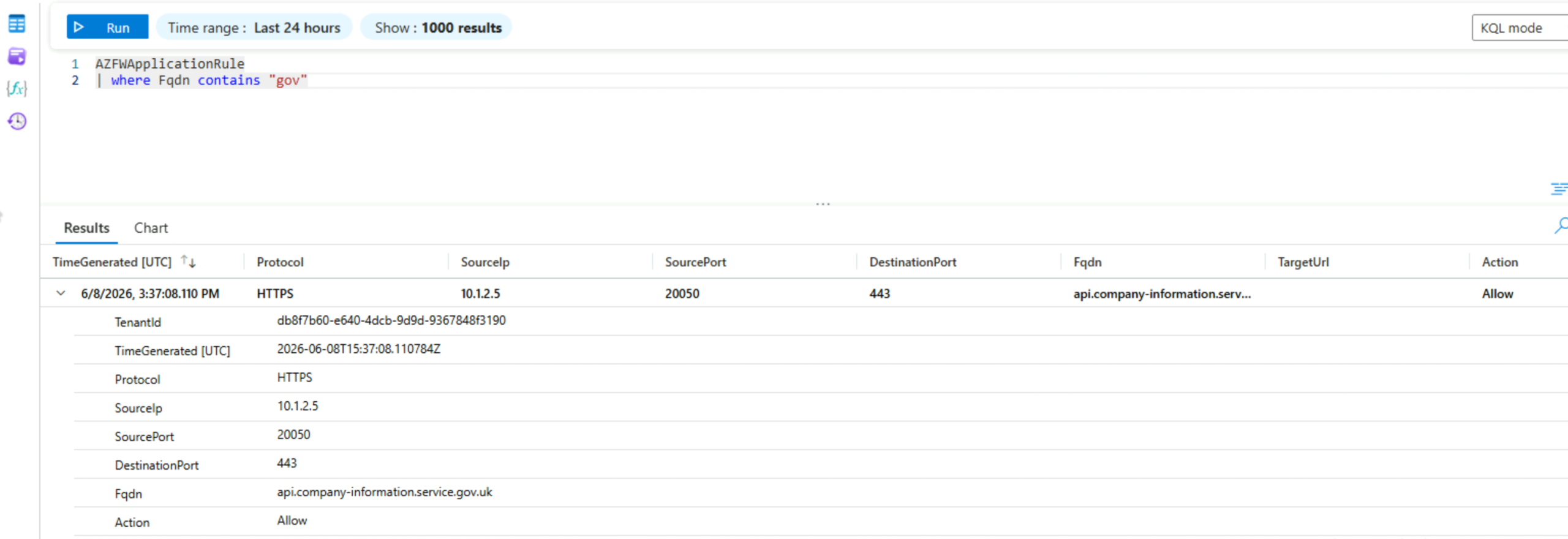
Agent tool rules are where it gets interesting. Every external API your agents call needs its own allow rule – Bing grounding, web search, a Companies House API for an agent. If it’s not on the list, the firewall drops it silently. There’s no “agent called an unapproved endpoint” error in the portal. The agent just times out.
// Bing Grounding — property flood/subsidence enrichment
{
  name: 'allow-bing-grounding'
  targetFqdns: ['api.bing.microsoft.com']
}
// Companies House API — landlord entity registration status
{
  name: 'allow-companies-house'
  targetFqdns: ['api.company-information.service.gov.uk']
}
Observability
Three telemetry layers feed into the same Log Analytics workspace. Foundry account diagnostics go to LAW (Audit + RequestResponse logs). APIM sends GatewayLlmLogs and GatewayMCPLogs to LAW, plus token/custom metrics to App Insights. BYO dependencies such as Storage, Cosmos, Search – each have their own diagnostic settings pointing at the same LAW.
The gotcha is the custom metrics opt-in for App Insights. APIM’s llm-emit-token-metric policy emits token usage with dimensions (subscription, model, etc.) to App Insights. For those dimensions to appear in the Foundry portal workbooks and logs, you need CustomMetricsOptedInType: 'WithDimensions' on the App Insights resource. Without it, custom metrics won’t pull through to the tables and won’t populate App Insights or any workbooks.
resource appInsightsCustomMetrics 'Microsoft.Insights/components@2020-02-02' = {
  name: '${prefix}-appi'
  location: location
  kind: 'web'
  properties: any({
    Application_Type: 'web'
    WorkspaceResourceId: logAnalytics.outputs.resourceId
    DisableIpMasking: false
    DisableLocalAuth: true
    RetentionInDays: retentionInDays
    CustomMetricsOptedInType: 'WithDimensions'
  })
  dependsOn: [
    appInsights
  ]
}
Public ingestion and query access stay Enabled (with disableLocalAuth: true so it forces Entra auth at the very least for ingestion) unless you deploy Azure Monitor Private Link Scope (AMPLS). Without AMPLS, disabling ingestion blocks diagnostic data from the Agent runtime, APIM, and all BYO dependencies.
The Foundry Grafana workbook (screenshot below) surfaces token consumption by model, error rate breakdowns by HTTP status, and deployment latency p50/p95/p99. For agent debugging, Foundry supports distributed tracing via OpenTelemetry integrated with App Insights, but private Application Insights isn’t supported for traces yet. You’d need AMPLS or public access for traces to work.
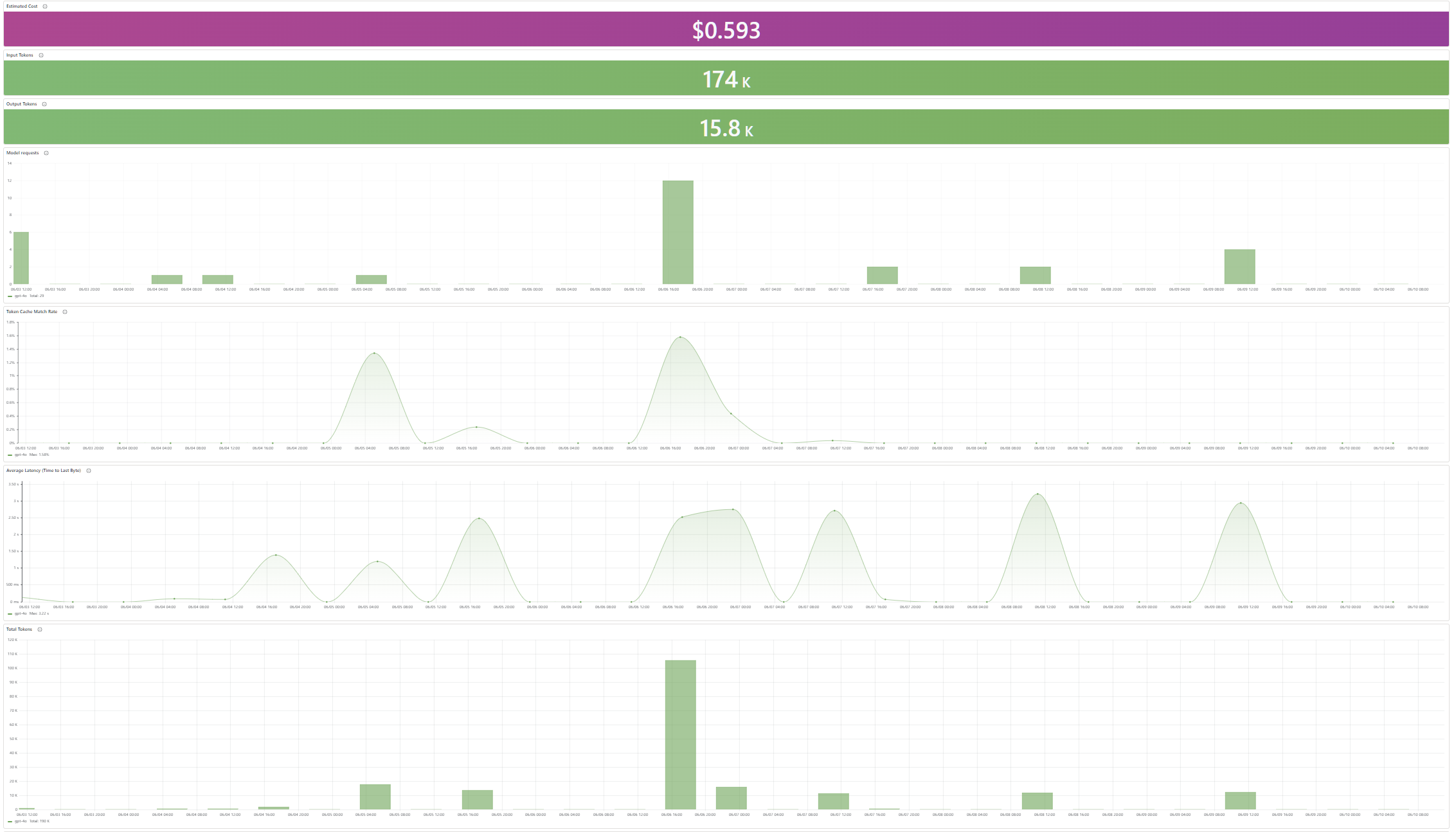
Check out the prebuilt Foundry agent dashboards in App Insights (Agents pane) and Azure Monitor ‘Dashboards with Grafana’ (Agent Framework, Agent Framework workflow, AI Foundry). If you want evaluator scores and tool-level breakdowns on top of that, Microsoft’s AI Observability Starter Kit spins up a Grafana dashboard, eight batch evaluators, and scheduled alerts. It looks fantastic and well worth checking out.
VNet Flow Logs
Standard NSG Flow Logs are blind to traffic traversing private endpoints and are being retired September 2027. VNet Flow Logs are the GA successor and capture the full picture.
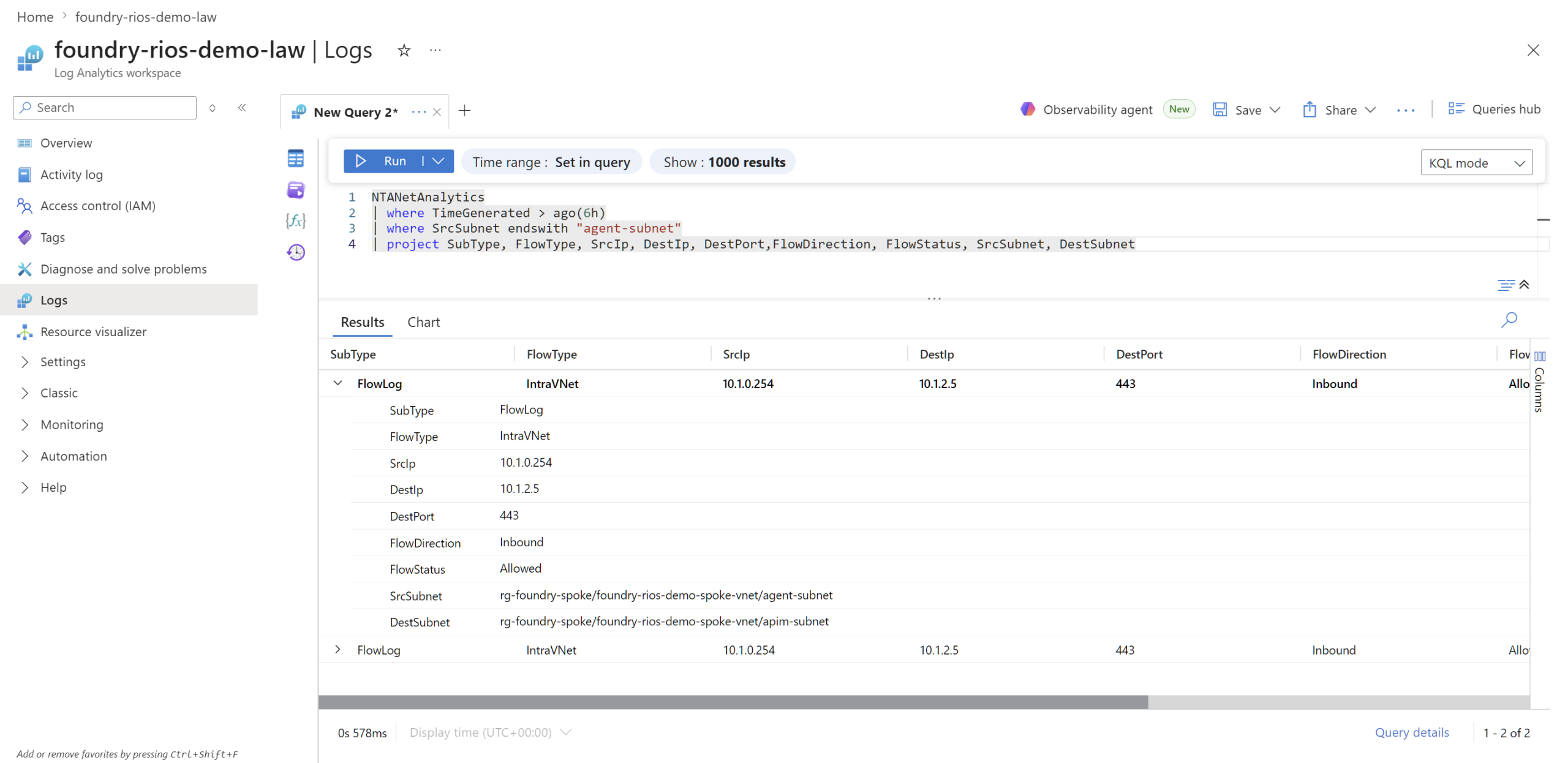
This record from NTANetAnalytics shows the agent runtime (10.1.0.254) calling APIM (10.1.2.5) on port 443. The IntraVNet flow type confirms traffic stayed private.
NTANetAnalytics
| where TimeGenerated > ago(6h)
| where SrcSubnet endswith "agent-subnet"
| project SubType, FlowType, SrcIp, DestIp, DestPort, FlowDirection, FlowStatus, SrcSubnet, DestSubnet, PrivateLinkResourceId
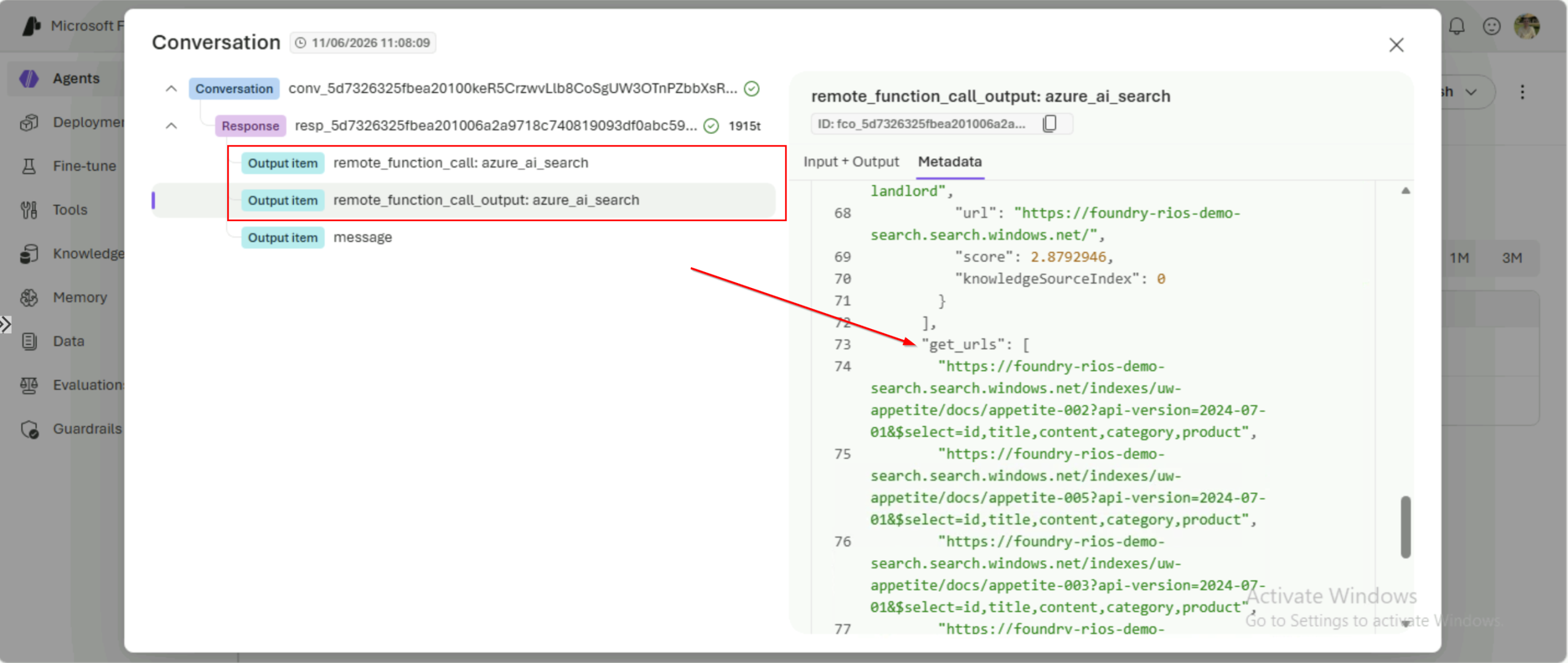
The Foundry Data Proxy handles dependency calls to Storage, Cosmos, and AI Search through private endpoints. The docs mention the underlying infrastructure runs on Azure Container Apps, which is listed as incompatible with VNet Flow Logs.
This is a bit of an annoyance. When I was trying to validate fully private traffic flow I couldn’t see any agent tool calls to Azure AI Search, even though my agent did call those tools and returned real data. It led me down a bit of a rabbit hole trying to figure out why. This is my best guess at why I can’t see that traffic in the logs.
VNet Flow Logs also expose a PrivateEndpointResourceId field that identifies which private endpoint the traffic hit. Useful when DestIp alone doesn’t tell you which service received the call.
The gotchas
1. Foundry needs multiple DNS zones, not one
Most Cognitive Services resources need one private DNS zone (privatelink.cognitiveservices.azure.com). Foundry account needs three foundational zones, and many more supporting resource zones for BYON model:
@export()
var privateDnsZoneNames = [
  'privatelink.cognitiveservices.azure.com'
  'privatelink.openai.azure.com'
  'privatelink.services.ai.azure.com'
  'privatelink.search.windows.net'
  'privatelink.documents.azure.com'
  'privatelink.blob.core.windows.net'
  'privatelink.queue.core.windows.net'
  'privatelink.azure-api.net' // if using API Management
]
Miss any of these and the Foundry account deploys successfully but parts of the portal and agent runtime fail with DNS resolution errors. The error messages don’t tell you which zone is missing so it’ll be a pain to troubleshoot.
2. Private networking has gaps in the agent tool catalogue
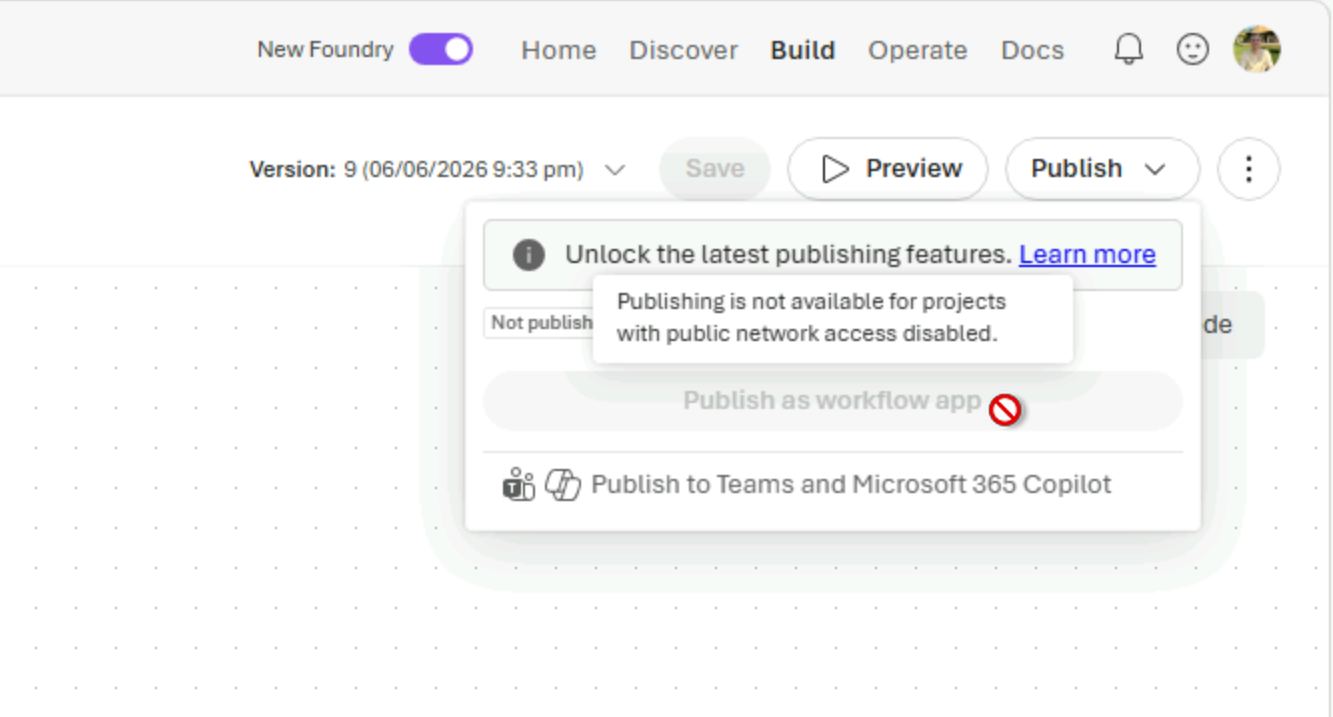
The Foundry docs are transparent about this: go fully private and you lose access to some agent tools that are not supported (yet).
Here’s the current state per the network isolation docs with the most notable unsupported tool being Logic Apps (in development though).
Publishing agents to Teams and M365 is supported with private networking (docs), but Private Link isn’t supported for the Bot Service integration so the publish path itself can’t be fully private.
So if this is a hard requirement for you with private networking, then it’s a show stopper currently. The alternative is managed networking, but then you lose egress control so it’s a risk balance for what your org feels comfortable proceeding with.
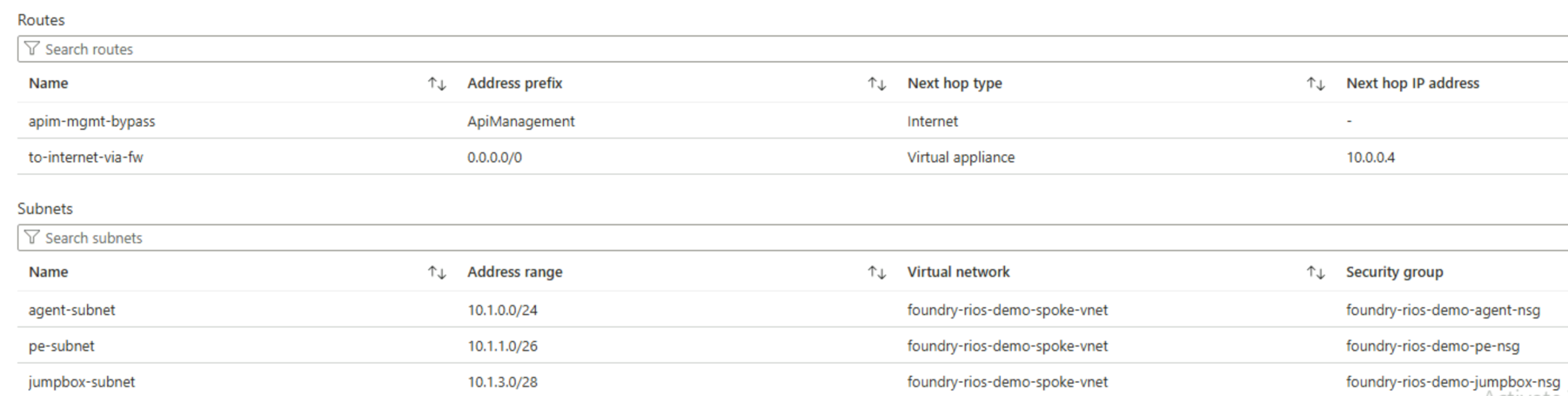
3. ‘AI Gateway’ – APIM’s control plane needs to bypass the firewall
APIM in internal VNet mode needs direct inbound control-plane connectivity from the ApiManagement service tag on port 3443 for housekeeping: config sync, certificate refresh, status probes, scaling. With a spoke UDR force-tunnelling everything through Azure Firewall, the gateway goes Unhealthy because the control-plane path breaks. This wasn’t something I was aware of until I forced the traffic and it broke APIM.
module apimRouteTable 'br/public:avm/res/network/route-table:0.5.0' = {
  name: 'apim-route-table'
  params: {
    name: '${prefix}-apim-udr'
    location: location
    tags: tags
    disableBgpRoutePropagation: true
    routes: [
    {
        name: 'apim-mgmt-bypass'
        properties: {
          addressPrefix: 'ApiManagement'
          nextHopType: 'Internet'
        }
      }
	]
}
The bypass is narrow as it only accepts Microsoft-owned IPs in the ApiManagement tag. Every byte of tenant data-plane traffic still hits the firewall’s FQDN allowlist. I assumed a service-tag route exception was a wider opening that could compromise my network traffic flow, but in reality it doesn’t.
4. Foundry uses a different API inference endpoint now
The Foundry inference endpoint is at *.services.ai.azure.com, not the classic *.cognitiveservices.azure.com you might expect from the Cognitive Services lineage. The old endpoint may still work today but the services.ai domain is the forward trajectory.
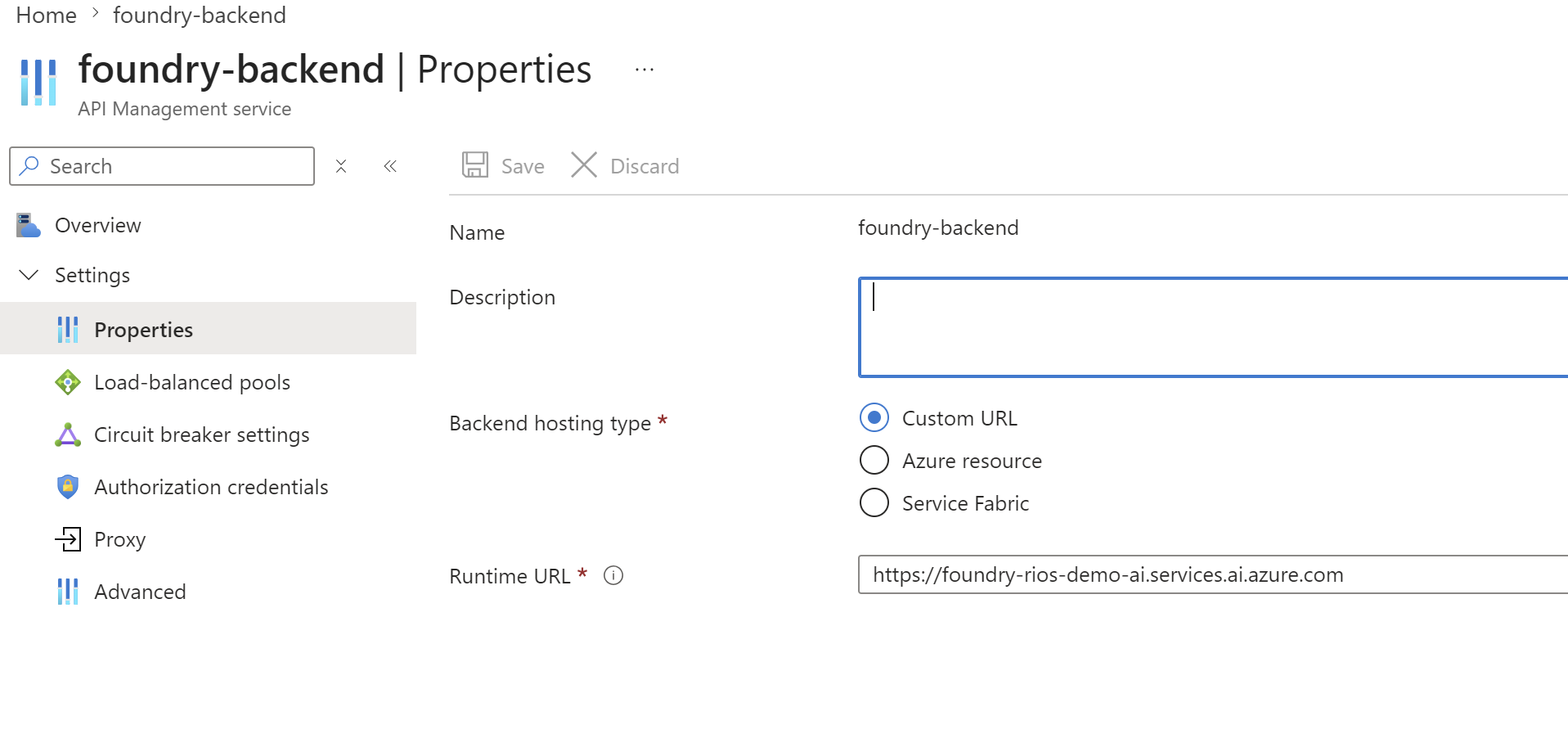
If you’re wiring up APIM backends or firewall rules, use the new endpoint. And if you’re importing the API into APIM, pick the Azure AI compatibility shape (not Azure OpenAI) – the Azure AI shape lets one API cover every model (Phi, Mistral, Cohere, Meta) instead of needing per-deployment routes.
One Foundry account per business unit (BU)
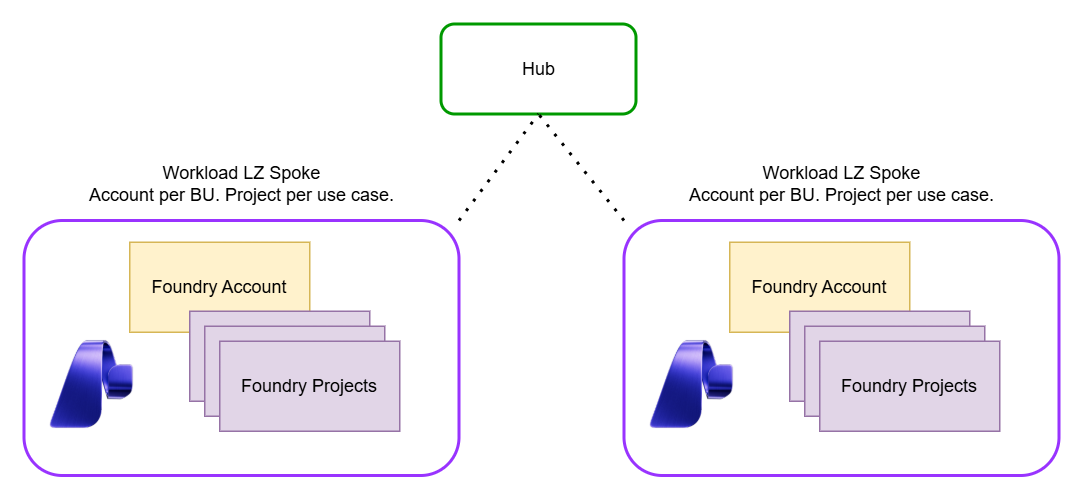
This is the question I wanted to ask and learn more about the Foundry governance model. How do you set this up for consumption? What’s the best approach? What’s the best operational model to follow? The docs are pretty strong here thankfully.
From the Foundry rollout planning guidance: “Create a separate Foundry resource for each business group.” This made it easy to proceed with a vision that each Foundry account is per BU (business unit) and each use case is a project. Great for RBAC and least privilege.
If you put multiple business units (BUs) into one Foundry account you’d hit real problems fast:
| What breaks | Why |
|---|---|
| Can’t set different network postures per BU | publicNetworkAccess is account-wide, not per-BU or per-project |
| One BU’s firewall rules have to allow every BU’s tools | Egress rules are account-scoped via the capability host |
| One team’s RBAC can accidentally grant cross-BU access | Account-level roles cascade to all projects |
| One BU’s capacity spike throttles the others | Quotas are per account, per region |
| Cost attribution is painful | The billing rollup is the account, not the project |
If you do need public access within a BU that’s otherwise private, the planning guidance recommends a separate Foundry resource per workload boundary. That means two accounts for one BU, one private, one public, rather than mixing access levels in a single account where publicNetworkAccess is shared by all projects.
The same goes for multiple isolated production workloads within the same BU. If two teams in the same group are building unrelated prod apps, they probably need separate accounts rather than sibling projects in one account. Shared quota, shared network posture, and shared blast radius make a single account risky when workloads don’t need to share anything.
Foundry cost attribution is account-level too, so tracking spend per project requires manual tagging or custom reporting. Something to budget for if you need per-client cost breakdowns.
A project is a use case, not a business unit. Sibling projects in the same BU share the account, the network posture, the APIM gateway, and the BYO data tier. Different BUs get different accounts with hard network and identity boundaries.
RBAC – blast radius by design
Foundry RBAC splits into two tiers: account-level roles for portal visibility and API access, and project-level roles for data-plane access to BYO dependencies.
Account-level has two roles, both scoped to the Foundry account:
Reader– needed for portal visibility. Developers building agents need this on the account scope even if they haveFoundry Useron the project. Missing this is a common “I can’t see anything in the portal” issue.Foundry Useron the account scope – API-level access for calling models directly (not through APIM). The RBAC docs caution against usingCognitive Servicesroles for Foundry because they don’t apply to Foundry scenarios.
resource rbacFoundryAccountReader 'Microsoft.Authorization/roleAssignments@2022-04-01' = [
  for principalId in accountReaderPrincipalIds: {
    name: guid(foundryAccount.id, principalId, roleDefinitions('Reader').id)
    scope: foundryAccount
    properties: {
      roleDefinitionId: roleDefinitions('Reader').id
      principalId: principalId
      principalType: accountReaderPrincipalType
    }
  }
]
Project-level – the project’s system-assigned managed identity gets scoped roles on each BYO dependency. The dependsOn block in the capability host shows the assignment:
resource projectCapabilityHost 'Microsoft.CognitiveServices/accounts/projects/capabilityHosts@2025-04-01-preview' = {
  parent: foundryProject
  name: '${projectName}-caphost'
  properties: {
    capabilityHostKind: 'Agents'
    vectorStoreConnections: [searchConnectionName]
    threadStorageConnections: [cosmosConnectionName]
    storageConnections: [storageConnectionName]
  }
  dependsOn: [
    storageConnection
    cosmosConnection
    searchConnection
    rbacStorageBlob          // Storage Blob Data Owner
    rbacStorageAccountContributor  // Storage Account Contributor
    rbacCosmosOperator       // Cosmos DB Operator
    rbacCosmosDataContributor // Cosmos DB Built-in Data Contributor
    rbacSearchIndexData      // Search Index Data Contributor
    rbacSearchServiceContrib // Search Service Contributor
  ]
}
Each role is scoped to the individual resource: Storage, Cosmos, or Search. Nothing cascades to sibling projects or other BUs.
User access needs two roles. Foundry User assigned by role GUID (53ca6127-db72-4b80-b1b0-d745d6d5456d) on the project scope for building agents, and Reader on the account scope for portal visibility. Assign by GUID, not display name, because Microsoft renamed these roles recently and broke a lot of people’s assignments where they relied on role name over GUID. Also, the docs recommend using GUIDs for this reason.
resource rbacHumanFoundryUser 'Microsoft.Authorization/roleAssignments@2022-04-01' = [
  for principalId in foundryUserPrincipalIds: {
    name: guid(foundryProject.id, principalId, foundryUserRoleId)
    scope: foundryProject
    properties: {
      roleDefinitionId: subscriptionResourceId('Microsoft.Authorization/roleDefinitions', foundryUserRoleId)
      principalId: principalId
      principalType: foundryUserPrincipalType
    }
  }
]
The blast radius is controlled: a compromised project MI can only reach its own Storage containers, Cosmos database, and Search index. It can’t read the account, can’t reach sibling projects, and can’t escalate roles. That’s a benefit of one account per BU with project-scoped RBAC, least privilege by design.
Finishing up
I hope you found this useful. I wanted to write up the insights and learnings from deploying and configuring the new Microsoft Foundry experience with APIM in front of it, given how confusing the Foundry rollout has been.
I’m planning a follow-up post covering APIM as your AI gateway in front of Foundry in more detail – custom metrics, logging, token limits, rate limiting, and circuit breakers.
reply