
Radius is an open-source, cloud-native application platform from the Azure Incubations team (Dapr, KEDA, Drasi) and a CNCF sandbox project. It works across Azure and AWS, bridging what developers declare with what operators provision. I’ll use ‘operators’ to mean platform or cloud engineering teams throughout the rest of the blog, as this is how Radius frames things.
TLDR: Radius separates application declarations from infrastructure implementations. This blog shows how to build Dapr based applications where the same code deploys to local containers (dev) or managed Azure services (prod) without changing a line.
In this blog, we’ll cover:
- The core problem Radius solves: decoupling app definitions from infrastructure implementations
- How recipes let operators enforce standards without touching app code
- A hands-on walk through of building a Dapr app incrementally with Radius and Bicep
- Understanding portable resources and environments
- Writing and publishing your own recipes with Bicep
- How Radius integrates with Kubernetes and Azure
The Problem
Dapr applications need infrastructure: pub/sub, secrets, state, dbs. These can be hardcoded implementations, be cloud-specific, and/or tangled with your app code. So when the infrastructure changes, the app may break with it.
The result of this is that resource definition and resource deployment are coupled together. A dev may hardcode “I need Azure Service Bus” in Bicep. The operator can’t swap it to a different service or even cloud provider. There’s no standard way to describe what an application actually needs independently from how to deliver it. This is where Radius comes into play.
How Radius Solves It
Radius separates what you need from how to deliver it:
- Resource Types – Abstraction: “I need a pub/sub broker” instead of “I need Service Bus with these settings”
- Recipes – A containerised message broker for dev, Azure Service Bus for prod. They have the same type but different recipe.
- Environments – Collections of recipes and infrastructure configuration for a deployment target.
Recipes can be written in Bicep or Terraform. Applications and environments are always defined in Bicep. Bicep types for AWS exist (radius-project/bicep-types-aws), so your Radius recipes can deploy AWS resources too (pretty cool.).
Your workspace’s bicepconfig.json (created during rad initialize) tells Bicep where to find Radius type definitions:
{
    "extensions": {
        "radius": "br:biceptypes.azurecr.io/radius:latest",
        "aws": "br:biceptypes.azurecr.io/aws:latest"
    }
}Understanding Dapr
Dapr is a distributed application runtime that handles state management, pub/sub, service invocation, secrets and more. It runs as a sidecar in your containers. Radius manages the infrastructure that Dapr depends on. You’ll see Dapr references throughout the walkthrough (e.g. Applications.Dapr/pubSubBrokers, Applications.Dapr/stateStores, daprSidecar).
Radius doesn’t replace Dapr rather, it orchestrates it. When you declare “I need a pub/sub broker”, Radius provisions the infrastructure (container, Azure Service Bus, etc.) and connects it to Dapr as a component. Radius handles the operational complexity. Your application just uses Dapr’s runtime APIs.
Install
You’ll need a Kubernetes cluster. Docker Desktop works for local development; I’m using Azure Kubernetes Service (AKS) for a production / Azure scenario in this walk through. Radius runs on your cluster and manages infrastructure for your Dapr applications.
# Install Radius
winget install Radius.Radius

# Verify
rad versionInitialise the workspace:
mkdir Radius
cd Radius
rad initialize
rad bicep downloadThis scaffolds your workspace with project files. To install Radius to your cluster:
rad install kubernetesWalk through: Building Up Incrementally
This hands-on walkthrough shows how Radius lets developers and operators split work naturally. Starting with a UI, then add backing infrastructure incrementally.
Before you start, you’ll need:
- Docker Desktop (or any local Kubernetes cluster)
radCLI installed (docs)
Environment setup
The operator deploys these two files once. The developer never edits them.
Dev environment (dev.bicep) local Kubernetes with public recipes:
extension radius

param namespace string = 'dev'

resource devEnvironment 'Applications.Core/environments@2023-10-01-preview' = {
  name: 'dev'
  properties: {
    compute: { kind: 'kubernetes', namespace: namespace }
    recipes: {
      'Applications.Dapr/stateStores': {
        default: { templateKind: 'bicep', templatePath: 'ghcr.io/radius-project/recipes/local-dev/statestores:latest' }
      }
      'Applications.Datastores/sqlDatabases': {
        default: { templateKind: 'bicep', templatePath: 'ghcr.io/radius-project/recipes/local-dev/sqldatabases:latest' }
      }
      'Applications.Dapr/pubSubBrokers': {
        default: { templateKind: 'bicep', templatePath: 'ghcr.io/radius-project/recipes/local-dev/pubsubbrokers:latest' }
      }
    }
  }
}

output environmentId string = devEnvironment.idProd environment (prod.bicep) Azure with private ACR recipes. This uses Azure workload identity to authenticate to your ACR – no passwords. See docs.radapp.io/guides/operations/providers/azure-provider for the Azure provider overview, and howto-azure-provider-wi for the workload identity setup guide.
extension radius

param azureScope string = '/subscriptions/<your-sub>/resourceGroups/<your-rg>'
param namespace string = 'prod'
param acrClientId string = '<your-acr-client-id>'
param acrTenantId string = '<your-tenant-id>'
@secure()
param sqlAdminPassword string

resource acrSecret 'Applications.Core/secretStores@2023-10-01-preview' = {
  name: 'acr-secret-prod'
  properties: {
    resource: 'radius-system/acr-secret-prod'
    type: 'azureWorkloadIdentity'
    data: { clientId: { value: acrClientId }, tenantId: { value: acrTenantId } }
  }
}

resource prodEnvironment 'Applications.Core/environments@2023-10-01-preview' = {
  name: 'prod'
  properties: {
    compute: { kind: 'kubernetes', namespace: namespace }
    providers: { azure: { scope: azureScope } }
    recipeConfig: {
      bicep: {
        authentication: { '<your-acr>': { secret: acrSecret.id } }
      }
    }
    recipes: {
      'Applications.Dapr/stateStores': {
        default: { templateKind: 'bicep', templatePath: '<your-acr>/recipes/redis:1.0.0' }
      }
      'Applications.Datastores/sqlDatabases': {
        default: { templateKind: 'bicep', templatePath: '<your-acr>/recipes/sql:1.0.0', parameters: { adminPassword: sqlAdminPassword } }
      }
      'Applications.Dapr/pubSubBrokers': {
        default: { templateKind: 'bicep', templatePath: '<your-acr>/recipes/servicebus:1.0.0' }
      }
    }
  }
}

output environmentId string = prodEnvironment.idDeploy both:
rad deploy environments/dev.bicep
rad deploy environments/prod.bicep --parameters sqlAdminPassword='...'These environment definitions register different infrastructure recipes for the same resource types. The app deployment comes next.
Stage 1: Deploy the UI shell
Start with just a frontend container and a gateway. No Dapr, no recipes added yet:
extension radius

param environment string
param application string

resource frontend 'Applications.Core/containers@2023-10-01-preview' = {
  name: 'frontend'
  properties: {
    application: application
    container: {
      image: 'ghcr.io/radius-project/samples/dapr-frontend:latest'
      env: {
        ASPNETCORE_URLS: { value: 'http://*:8080' }
      }
      ports: { ui: { containerPort: 8080 } }
    }
  }
}

resource gateway 'Applications.Core/gateways@2023-10-01-preview' = {
  name: 'gateway'
  properties: {
    application: application
    routes: [{ path: '/', destination: 'http://frontend:8080' }]
  }
}

output url string = gateway.properties.urlDeploy it:
rad deploy app.bicep --environment dev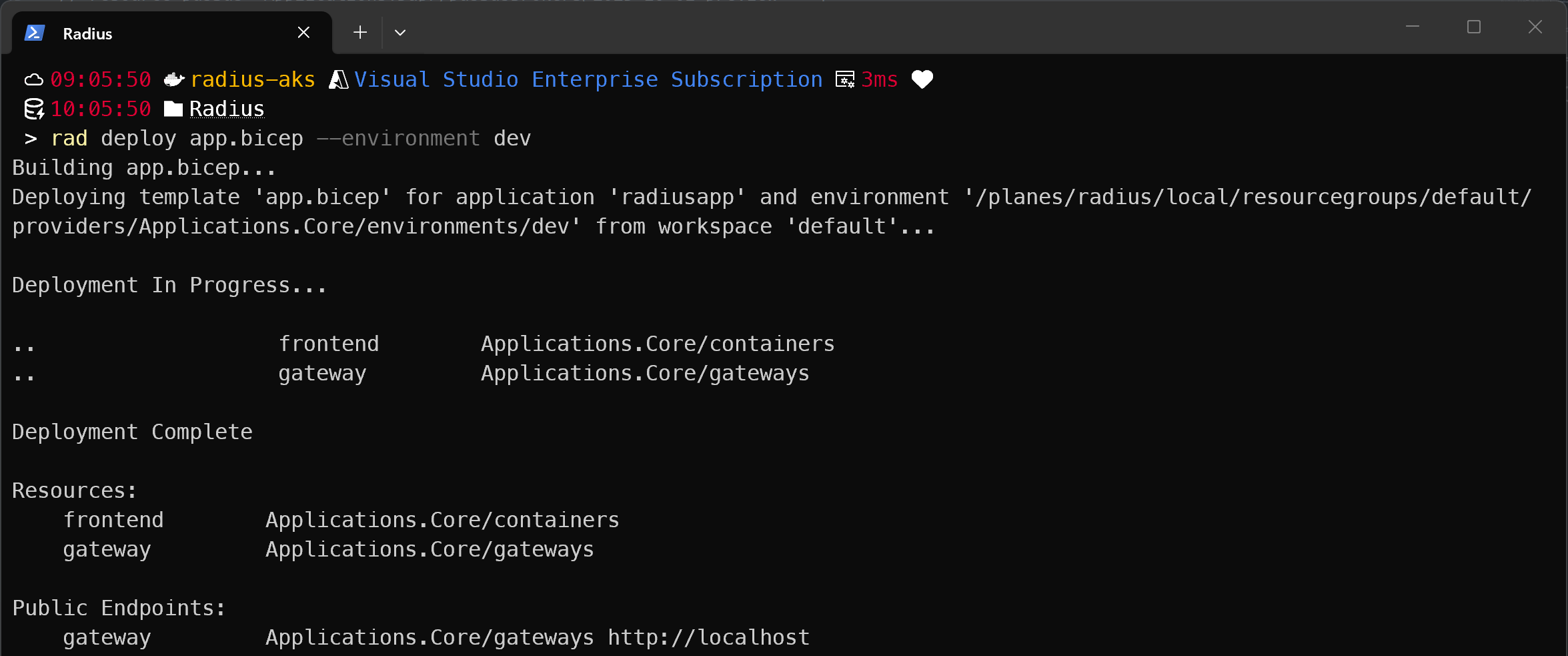
At this point, no recipes fired because no portable resources were declared. The frontend and gateway deployed as regular Kubernetes containers, not through the recipe system. The environment files are registered but waiting to be used.
Stage 2: Add a pub/sub backend
Now add a backend service that publishes/subscribes to events. Add three things to app.bicep:
- A
pubSubBrokersportable resource that declares “I need a pub/sub broker” - A
backendcontainer wired to the broker viaconnections - Updated
frontendthat gains a Dapr sidecar andCONNECTION_BACKEND_APPID
extension radius

param environment string
param application string

// MARK: Pub/Sub
resource pubsub 'Applications.Dapr/pubSubBrokers@2023-10-01-preview' = {
  name: 'pubsub'
  properties: {
    environment: environment
    application: application
    resourceProvisioning: 'recipe'
  }
}

// MARK: Backend
resource backend 'Applications.Core/containers@2023-10-01-preview' = {
  name: 'backend'
  properties: {
    application: application
    container: {
      image: 'ghcr.io/radius-project/samples/dapr-backend:latest'
      ports: { api: { containerPort: 3000 } }
    }
    connections: {
      pubsub: { source: pubsub.id }  // Radius injects DAPR_PUBSUB_COMPONENTNAME etc.
    }
    extensions: [{ kind: 'daprSidecar', appId: 'backend', appPort: 3000 }]
  }
}

// MARK: Frontend
resource frontend 'Applications.Core/containers@2023-10-01-preview' = {
  name: 'frontend'
  properties: {
    application: application
    container: {
      image: 'ghcr.io/radius-project/samples/dapr-frontend:latest'
      env: {
        CONNECTION_BACKEND_APPID: { value: 'backend' }
        ASPNETCORE_URLS:          { value: 'http://*:8080' }
      }
      ports: { ui: { containerPort: 8080 } }
    }
    extensions: [{ kind: 'daprSidecar', appId: 'frontend' }]
  }
}

// MARK: Gateway
resource gateway 'Applications.Core/gateways@2023-10-01-preview' = {
  name: 'gateway'
  properties: {
    application: application
    routes: [{ path: '/', destination: 'http://frontend:8080' }]
  }
}

output url string = gateway.properties.urlDeploy to dev:
rad deploy app.bicep --environment dev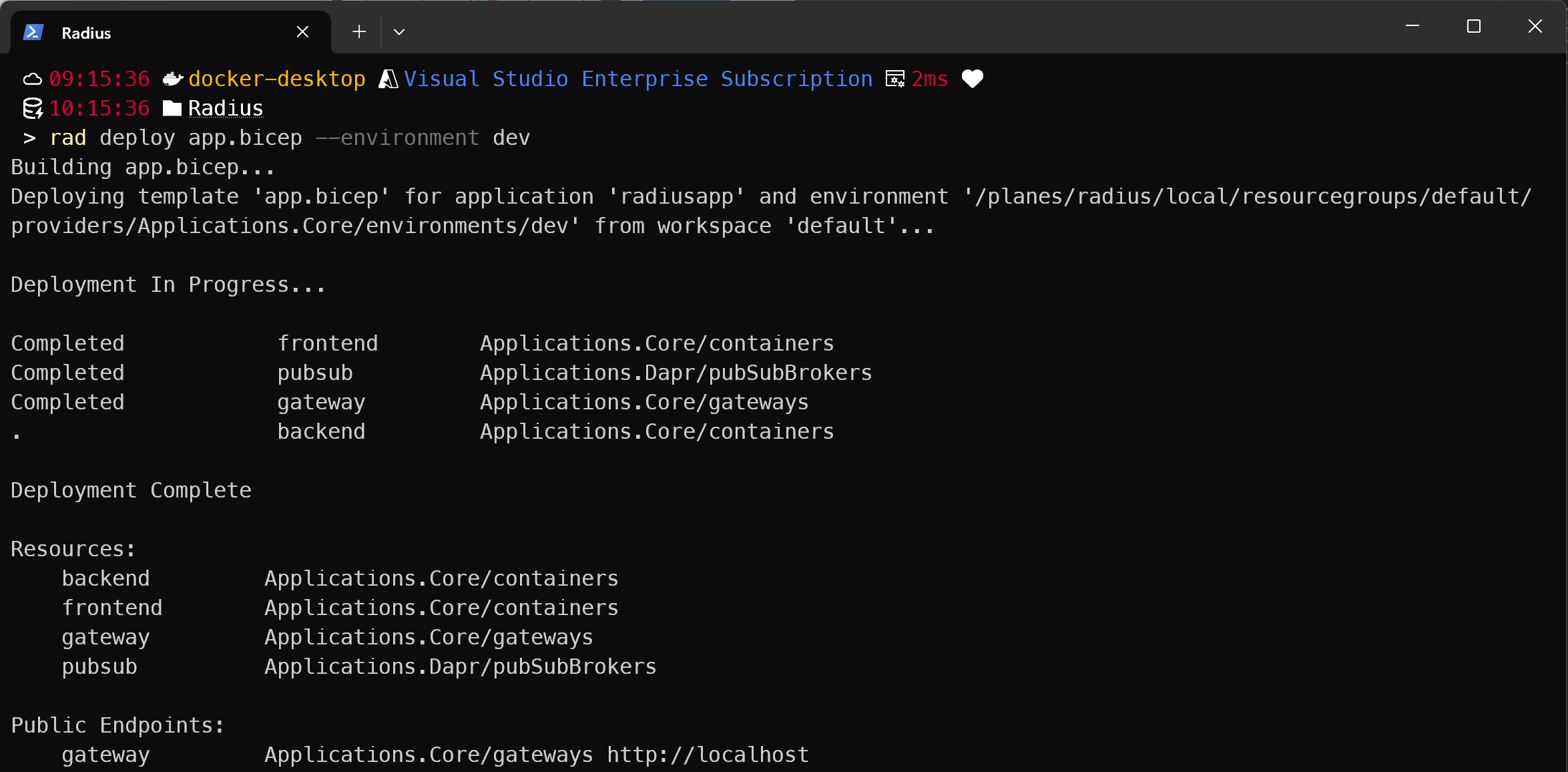
What happens:
- Radius sees
resourceProvisioning: 'recipe'onpubsub - It looks up
Applications.Dapr/pubSubBrokersin thedevenvironment’s recipe catalogue dev.bicepregistered:ghcr.io/radius-project/recipes/local-dev/pubsubbrokers:latest- A container spins up in the cluster
- Radius creates the Dapr Component and injects connection info into the
backendpod
Now I’ll deploy the exact same app.bicep to prod with no changes:
rad deploy app.bicep --environment prod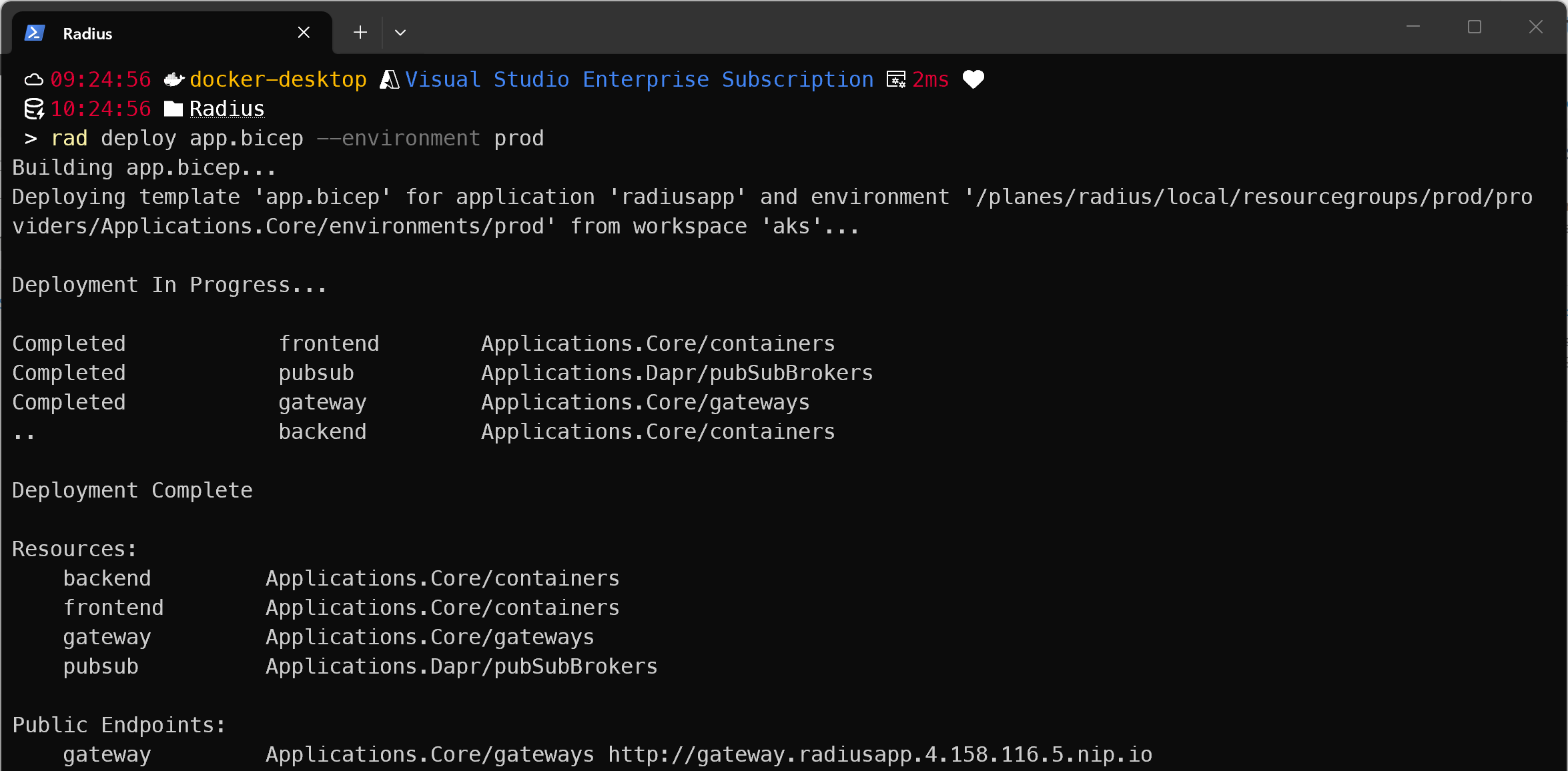
This time:
- Radius sees the same
resourceProvisioning: 'recipe'onpubsub - It looks up
Applications.Dapr/pubSubBrokersin theprodenvironment’s recipe catalogue prod.bicepregistered:<your-acr>.azurecr.io/recipes/servicebus:1.0.0- Radius calls ARM, and an Azure Service Bus namespace is provisioned
- Radius creates the Dapr Component with the Service Bus connection string
The developer just declared what they needed. The environment decided what got created.
Stage 3: Add state store and SQL database
Now the backend needs to persist state and read from a database. Add two more portable resources and wire them to the backend:
extension radius

param environment string
param application string

// MARK: Pub/Sub
resource pubsub 'Applications.Dapr/pubSubBrokers@2023-10-01-preview' = {
  name: 'pubsub'
  properties: {
    environment: environment
    application: application
    resourceProvisioning: 'recipe'
  }
}

// MARK: State
resource statestore 'Applications.Dapr/stateStores@2023-10-01-preview' = {
  name: 'statestore'
  properties: {
    environment: environment
    application: application
    resourceProvisioning: 'recipe'
  }
}

// MARK: SQL DB
resource db 'Applications.Datastores/sqlDatabases@2023-10-01-preview' = {
  name: 'db'
  properties: {
    environment: environment
    application: application
    resourceProvisioning: 'recipe'
  }
}

// MARK: Backend
resource backend 'Applications.Core/containers@2023-10-01-preview' = {
  name: 'backend'
  properties: {
    application: application
    container: {
      image: 'ghcr.io/radius-project/samples/dapr-backend:latest'
      ports: { api: { containerPort: 3000 } }
    }
    connections: {
      pubsub:  { source: pubsub.id }      // ← Radius injects Dapr pub/sub component
      orders:  { source: statestore.id }  // ← Radius injects Dapr state store component
      db:      { source: db.id }          // ← Radius injects CONNECTION_DB_* env vars
    }
    extensions: [{ kind: 'daprSidecar', appId: 'backend', appPort: 3000 }]
  }
}

// MARK: Frontend
resource frontend 'Applications.Core/containers@2023-10-01-preview' = {
  name: 'frontend'
  properties: {
    application: application
    container: {
      image: 'ghcr.io/radius-project/samples/dapr-frontend:latest'
      env: {
        CONNECTION_BACKEND_APPID: { value: 'backend' }
        ASPNETCORE_URLS:          { value: 'http://*:8080' }
      }
      ports: { ui: { containerPort: 8080 } }
    }
    connections: {
      backend: { source: 'http://backend:3000' }
    }
    extensions: [{ kind: 'daprSidecar', appId: 'frontend' }]
  }
}

// MARK: Gateway
resource gateway 'Applications.Core/gateways@2023-10-01-preview' = {
  name: 'gateway'
  properties: {
    application: application
    routes: [{ path: '/', destination: 'http://frontend:8080' }]
  }
}

output url string = gateway.properties.urlThe frontend still calls the backend through Dapr using CONNECTION_BACKEND_APPID. The extra Radius service connection is there so the frontend -> backend dependency appears in Radius’ application graph (I’ll show this later in the blog).
Deploy to dev:
rad deploy app.bicep --environment devSame deployment but different recipe implementations:
- Dev: Redis container for state store, SQL Server container for database
- Prod: Azure Cache for Redis and Azure SQL Database
The environment files explained
The two environment files are a recipe catalogue:
environments/dev.bicep is deployed once by the operator against the dev cluster (e.g., Docker Desktop or an AKS cluster):
recipes: {
  'Applications.Dapr/pubSubBrokers': {
    default: {
      templateKind: 'bicep'
      templatePath: 'ghcr.io/radius-project/recipes/local-dev/pubsubbrokers:latest'
    }
  }
}environments/prod.bicep is deployed once by the operator to AKS:
providers: { azure: { scope: azureScope } }

recipeConfig: {
  bicep: {
    authentication: {
      '<your-acr>': { secret: acrSecret.id }
    }
  }
}

recipes: {
  'Applications.Dapr/pubSubBrokers': {
    default: {
      templateKind: 'bicep'
      templatePath: '<your-acr>/recipes/servicebus:1.0.0'
    }
  }
}
Same resource type defined but a different value on a different cluster. The same app.bicep file.
When a dev writes environment: environment in their Bicep, they’re saying: use the environment I’m deploying to. Radius then looks up what recipes that environment has registered.
Understanding Recipes
A Recipe is the implementation for a Resource Type. Devs declare the resource and the operator decides what gets provisioned.
Dev recipes vs prod recipes
For local development, the Radius project publishes ready made community recipes as local-dev recipes. These are public, no credentials required. The dev recipe for pub/sub spins up a containerised message broker and registers it as a Dapr component. You don’t have to write or maintain these, they’re maintained by the Radius team.
For production, you can write your own recipes. Your prod recipe for pub/sub provisions Azure Service Bus instead of a container for example, or Azure SQL Database for database. You publish these to your private ACR and only your prod environment references them. Dev and prod point to completely different template paths in your environment files, but your app.bicep doesn’t know or care about this.
Discovering Recipes
Check what recipes are available in an environment:
rad recipe list --environment dev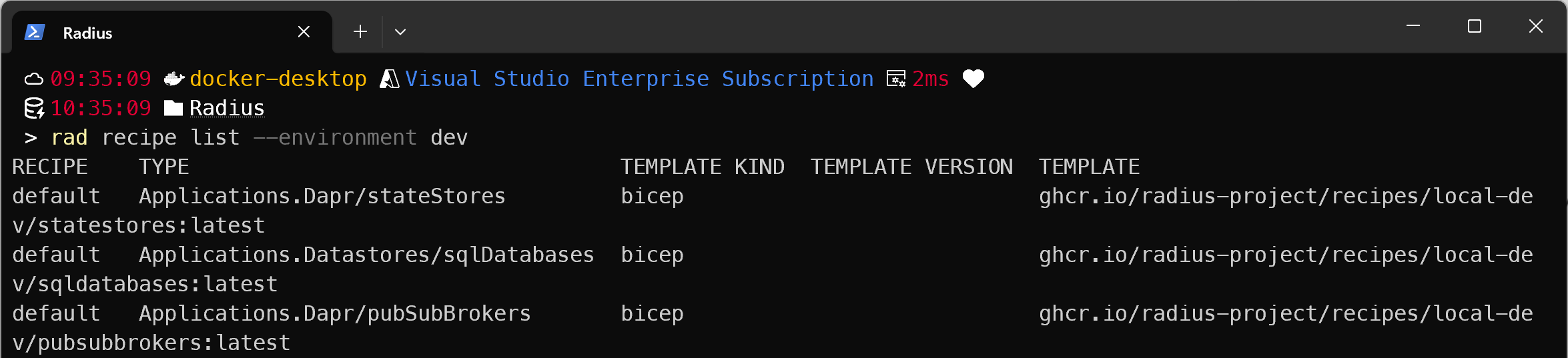
To see parameters:
rad recipe show default --resource-type 'Applications.Dapr/pubSubBrokers' --environment dev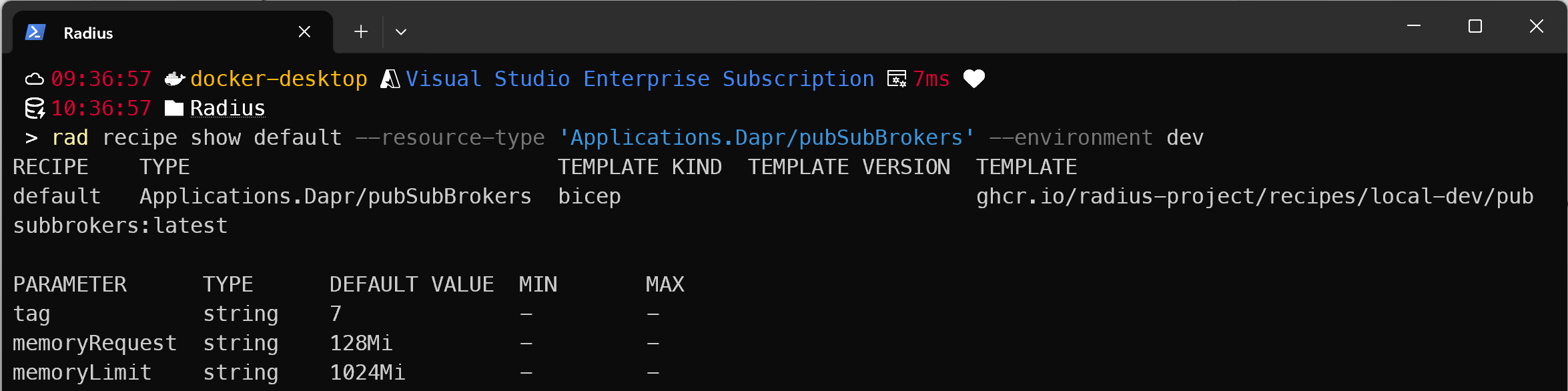
Override Recipe Parameters
Pass parameters directly in app.bicep:
resource pubsub 'Applications.Dapr/pubSubBrokers@2023-10-01-preview' = {
  name: 'pubsub'
  properties: {
    environment: environment
    application: application
    resourceProvisioning: 'recipe'
    recipe: {
      name: 'default'
      parameters: { skuName: 'Standard' }
    }
  }
}Writing a Recipe
Recipes are Bicep templates. Radius also supports Terraform modules as recipes (set templateKind: 'terraform' in your environment file: see rad-bank’s operations.bicep for an example). Radius always injects a context parameter that contains the application metadata and runtime information. Here’s a production demo recipe for Azure Service Bus:
// RECIPE: servicebus
// Provisions an Azure Service Bus namespace and registers it as a
// Dapr pub/sub broker Component in Kubernetes.

param context object
param location string = resourceGroup().location

@allowed(['Standard', 'Premium'])
param skuName string = 'Standard'

var namespaceName = 'sb-${uniqueString(context.resource.id, resourceGroup().id)}'

// MARK: Azure Service Bus Namespace
resource serviceBusNamespace 'Microsoft.ServiceBus/namespaces@2024-01-01' = {
  name: namespaceName
  location: location
  sku: {
    name: skuName
    tier: skuName
  }
  properties: {
    minimumTlsVersion: '1.2'
  }
}

// MARK: Shared access rule used by Dapr to connect (Send + Listen + Manage).
resource daprAuthRule 'Microsoft.ServiceBus/namespaces/AuthorizationRules@2024-01-01' = {
  parent: serviceBusNamespace
  name: 'DaprAccess'
  properties: {
    rights: ['Send', 'Listen', 'Manage']
  }
}

extension kubernetes with {
  kubeConfig: ''
  namespace: context.runtime.kubernetes.namespace
} as kubernetes

// MARK: Dapr Component - uses the topics-based pub/sub component
resource daprComponent 'dapr.io/Component@v1alpha1' = {
  metadata: { name: context.resource.name }
  spec: {
    type: 'pubsub.azure.servicebus.topics'
    version: 'v1'
    metadata: [
      { name: 'connectionString', value: daprAuthRule.listKeys().primaryConnectionString }
    ]
  }
}

output result object = {
  resources: [serviceBusNamespace.id]
}
The recipe creates two things:
- Azure Service Bus: provisioned in your subscription (because
prod.bicepsets the Azure scope) - Dapr Component: registered in Kubernetes so the backend pod can publish/subscribe
The context parameter contains the resource name, the app name, the namespace the resource belongs to, and the Azure subscription. You use these to generate unique names, link up connections, and ensure isolation between teams.
Publishing and Using Your Recipe
Publish to your registry:
az acr create --resource-group rg-radius-demo --name <your-acr> --sku Basic
az acr login --name <your-acr>
rad bicep publish --file recipes/servicebus.bicep --target br:<your-acr>.azurecr.io/recipes/servicebus:1.0.0Register it in your prod environment:
// environments/prod.bicep
resource prodEnvironment 'Applications.Core/environments@2023-10-01-preview' = {
  name: 'prod'
  properties: {
    compute: { kind: 'kubernetes', namespace: 'prod' }
    providers: { azure: { scope: azureScope } }
    recipes: {
      'Applications.Dapr/pubSubBrokers': {
        default: { templateKind: 'bicep', templatePath: '<your-acr>/recipes/servicebus:1.0.0' }
      }
    }
  }
}Deploy the environment:
$sub = az account show --query id -o tsv
rad deploy environments/prod.bicep --parameters azureScope="/subscriptions/$sub/resourceGroups/your-rg"Now when you deploy your app to prod, Radius uses your recipe. The app code doesn’t change.
For production ready recipe examples, check zachcasper/recipes.
One Recipe, Many Teams
Your platform team writes one Service Bus recipe with enterprise standards. When security policy requires a change, such as a higher minimum TLS version, the operator publishes a new recipe version, updates prod.bicep to reference that version, and redeploys the environment. Every team’s next deployment to that environment then uses the new recipe version. Update the environment once, every team benefits automatically.
How Radius Works Internally
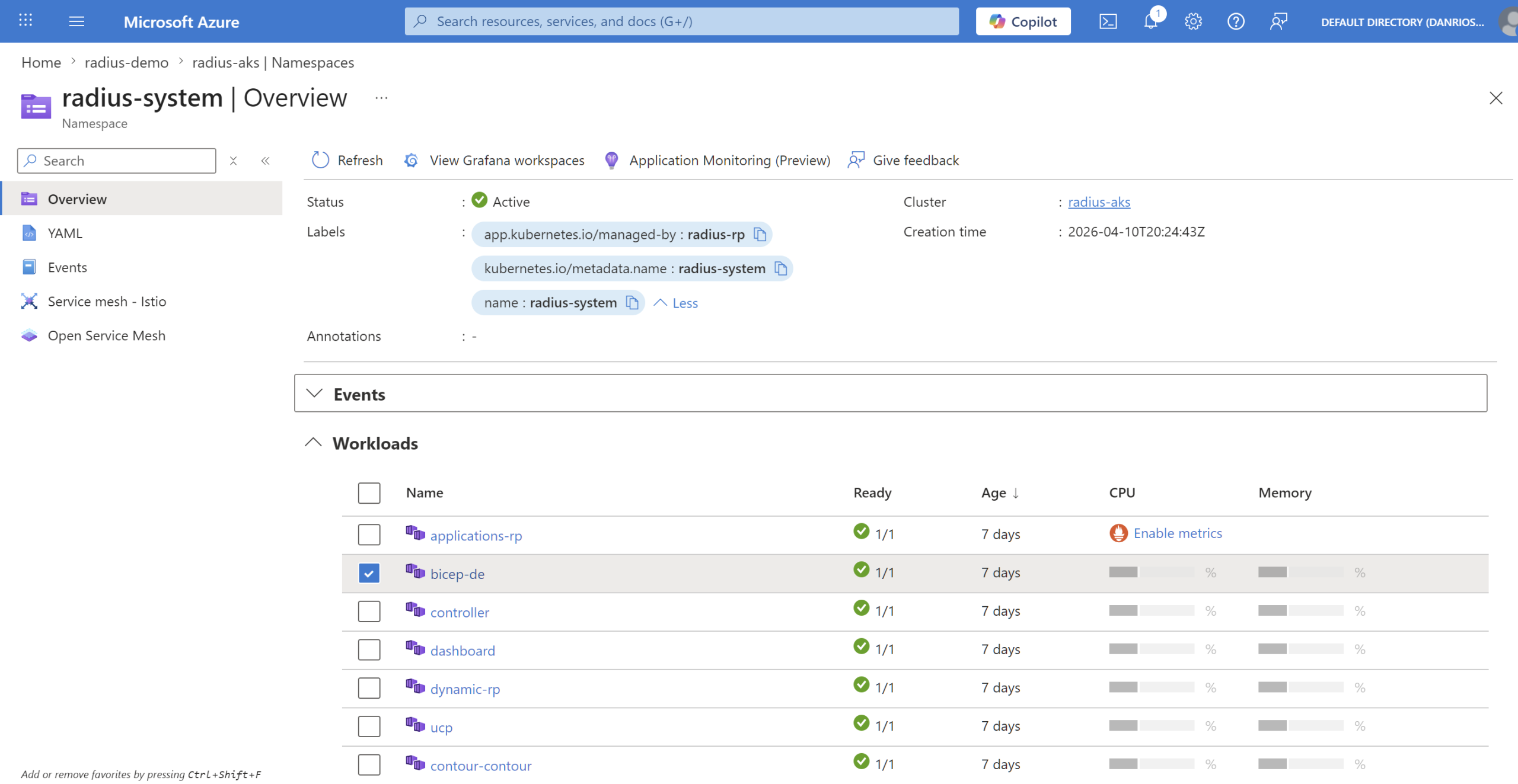
When you deploy, bicep-de (Bicep Deployment Engine) processes your Bicep templates, resolves dependencies, and calls back to Radius for each resource through the appropriate provider(s).
The whole environment config gets stored as a Kubernetes custom resource, backed by the Radius environment CRD. The recipes catalogue, Azure scope, credential refs, everything:
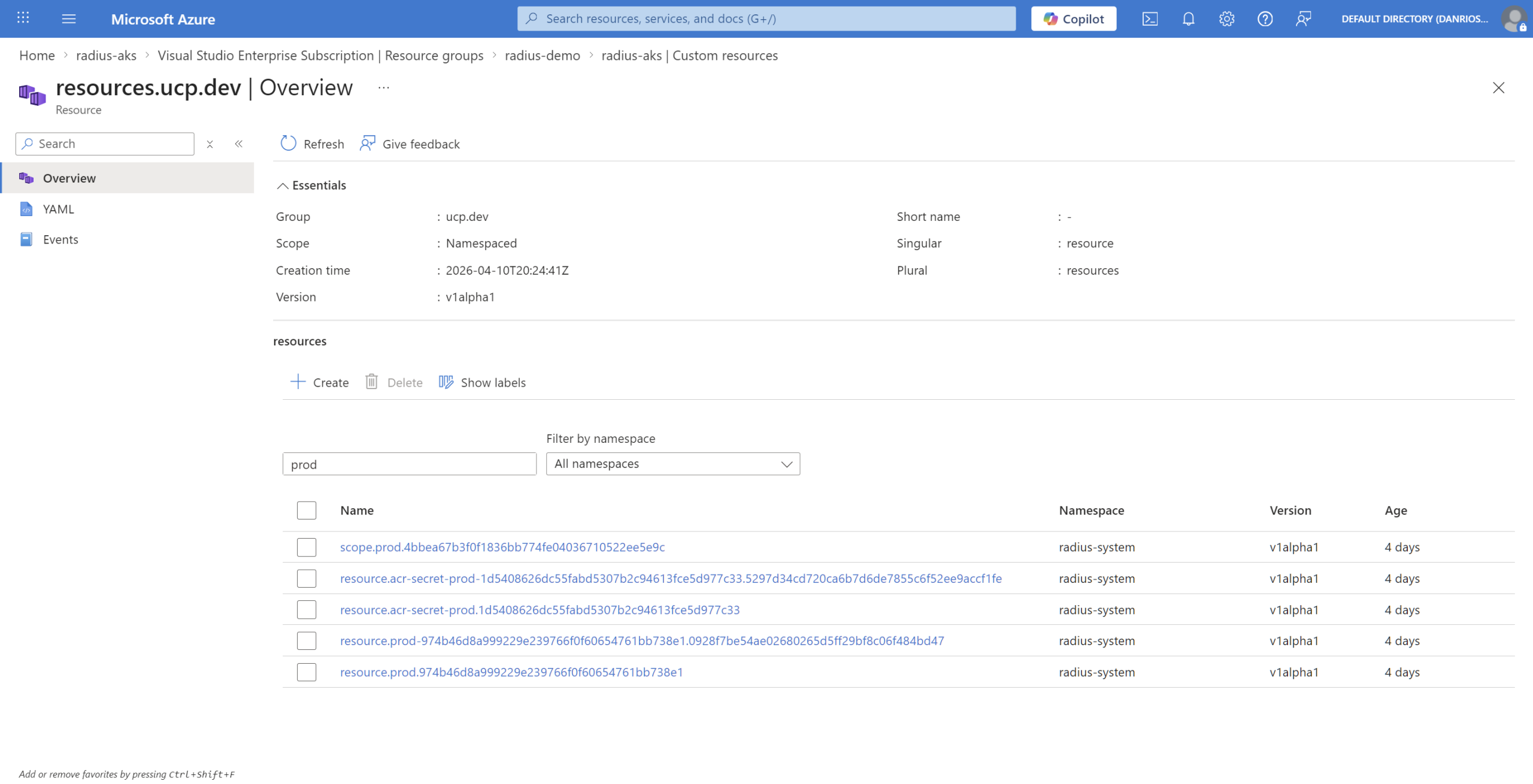
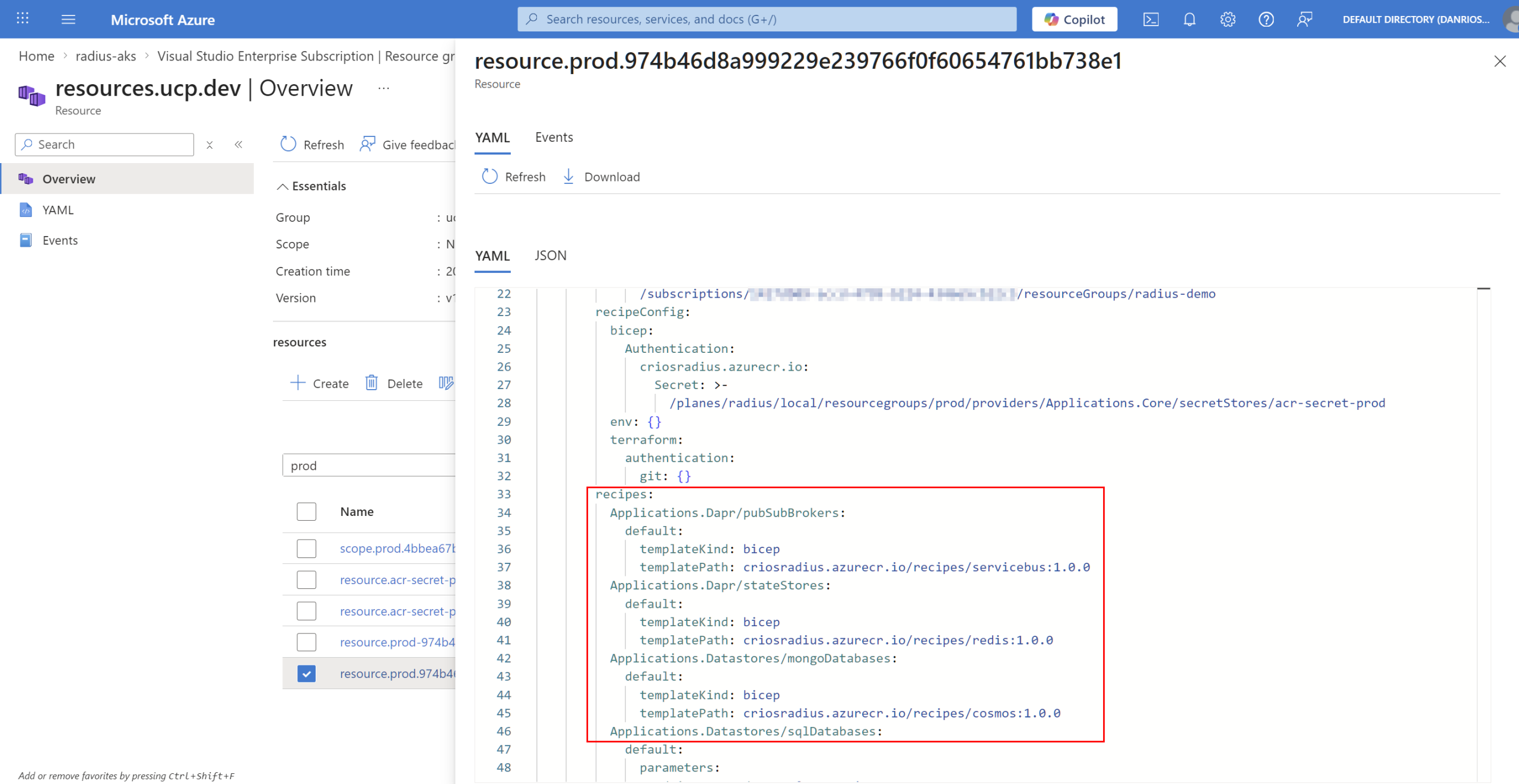
This is the prod environment custom resource in AKS after rad deploy environments/prod.bicep, showing the Azure scope and recipe catalogue.
See What’s Running
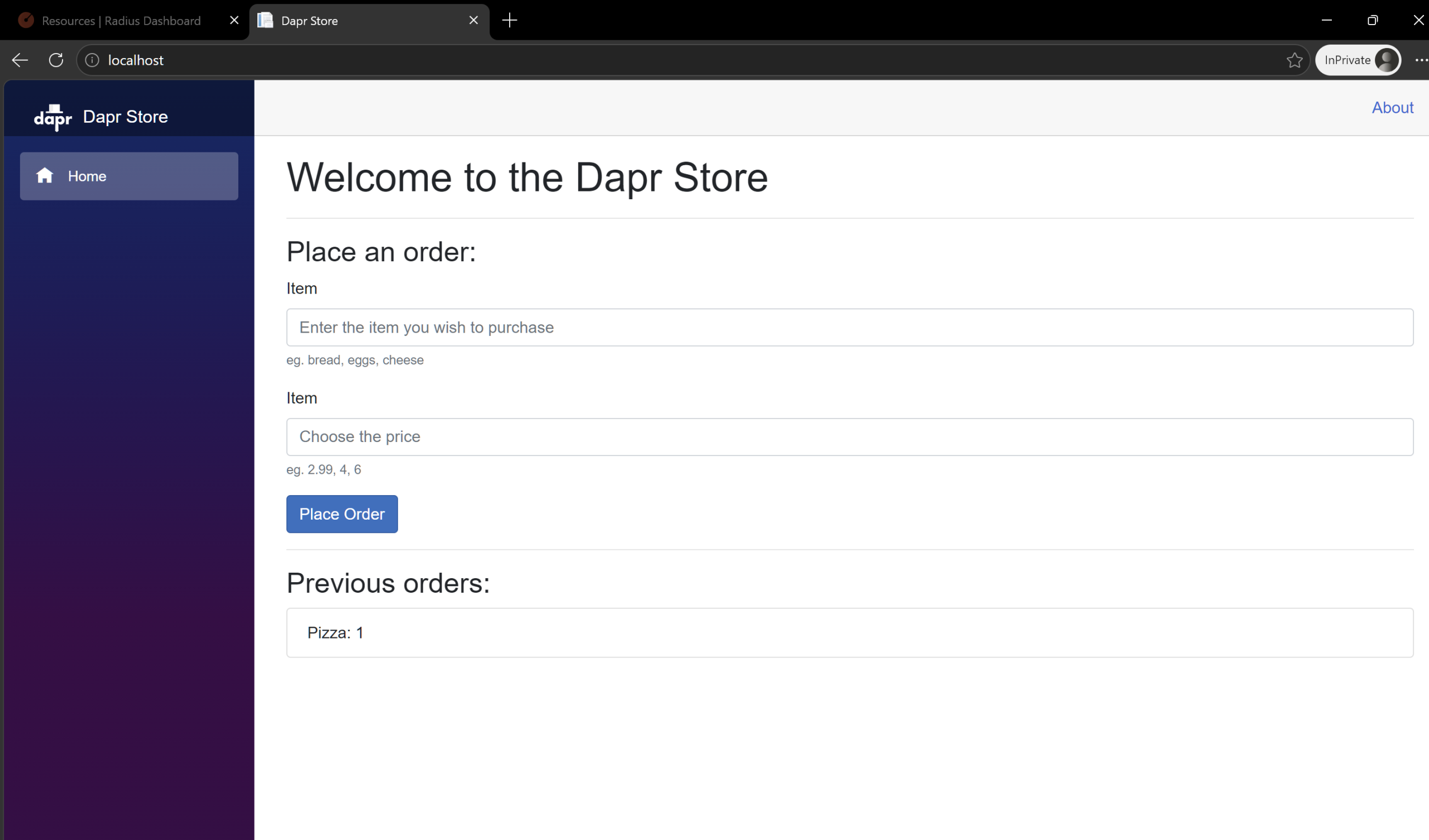
The app is running with everything connected through Dapr.
Visualise the app graph with the Dashboard
The Radius Dashboard (built on Backstage) shows your entire application topology, resource dependencies, and which recipes provisioned what.
kubectl port-forward -n radius-system deployment/dashboard 7007:80Then open http://localhost:7007.
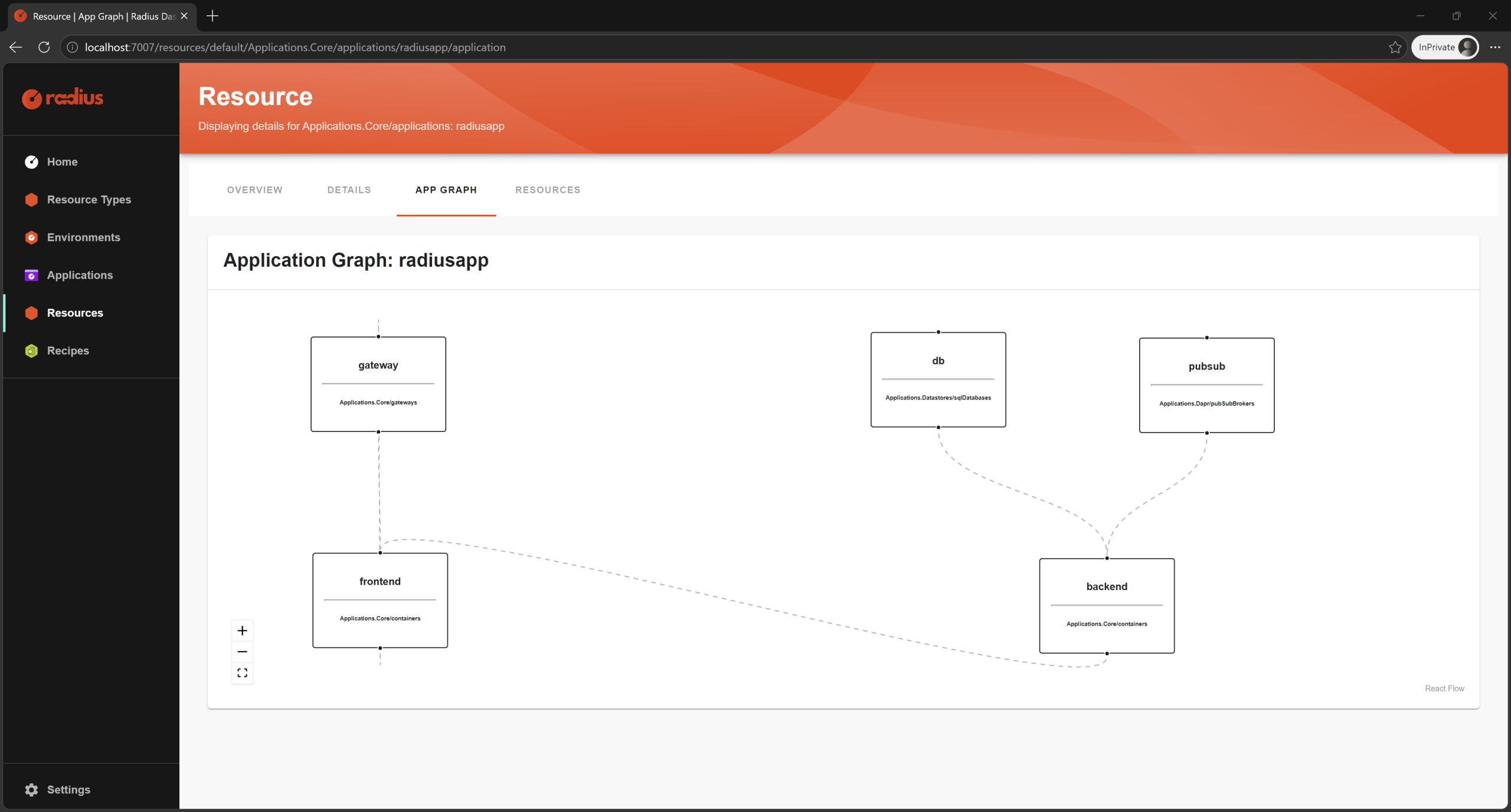
From the dashboard you can see:
- Application graph: Visual dependency diagram (frontend -> backend -> state store -> database)
- Resource types: Portable resources you declared (
pubSubBrokers,stateStores,sqlDatabases) - Resources: Each container and infrastructure component with live status
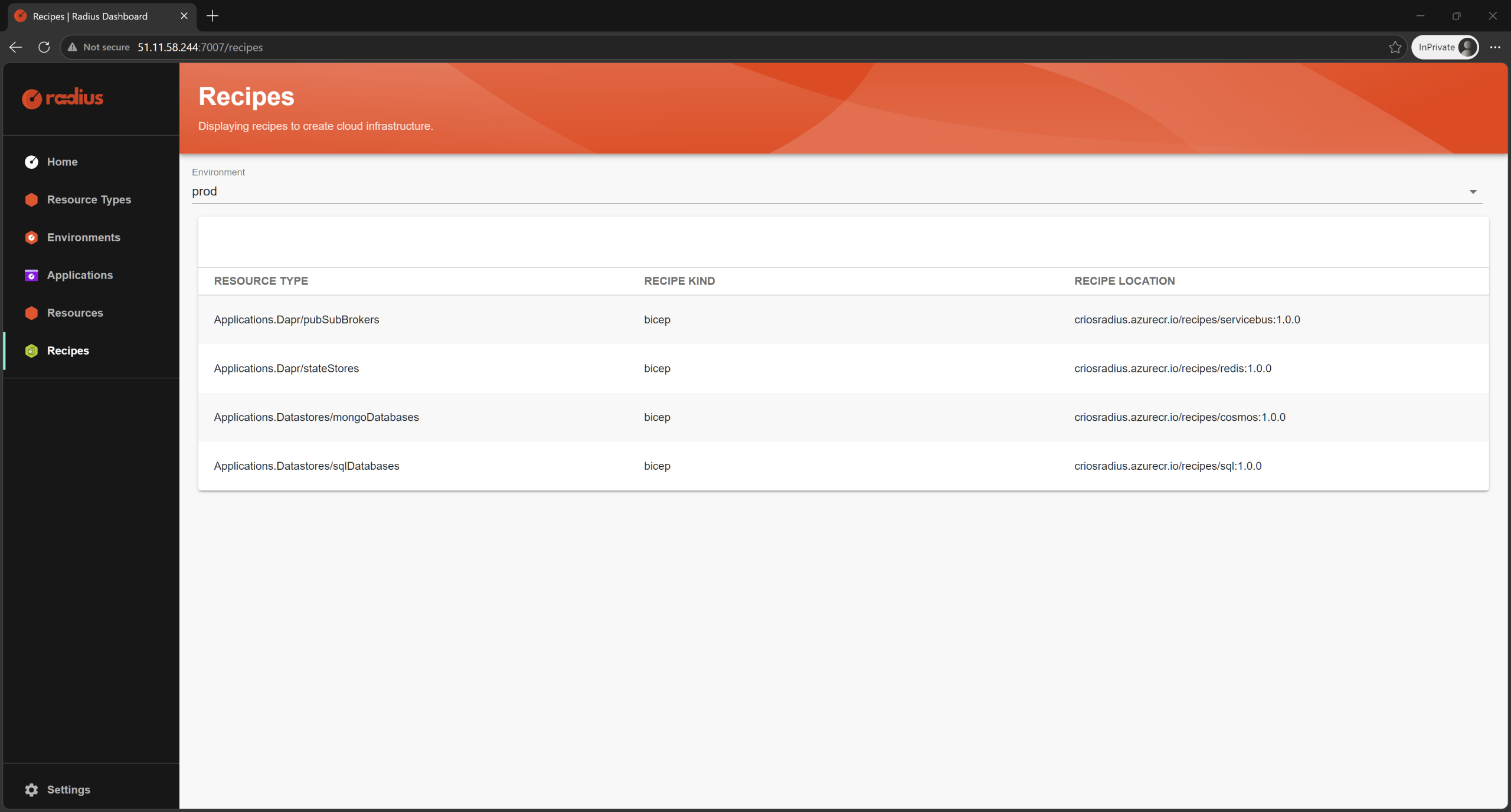
- Recipes: Which recipe provisioned which resource
To discover what recipes are available and what parameters they accept, use the CLI:
rad recipe list --environment dev
rad recipe show default --resource-type 'Applications.Dapr/pubSubBrokers' --environment devYou can also query application data and logs via the CLI:
rad app graph
rad resource list Applications.Core/containers
rad resource logs Applications.Core/containers backend --application <your-app-name>Azure resources created by recipes
When you deploy to prod, Radius provisions real Azure infrastructure via ARM. Here’s what gets created:
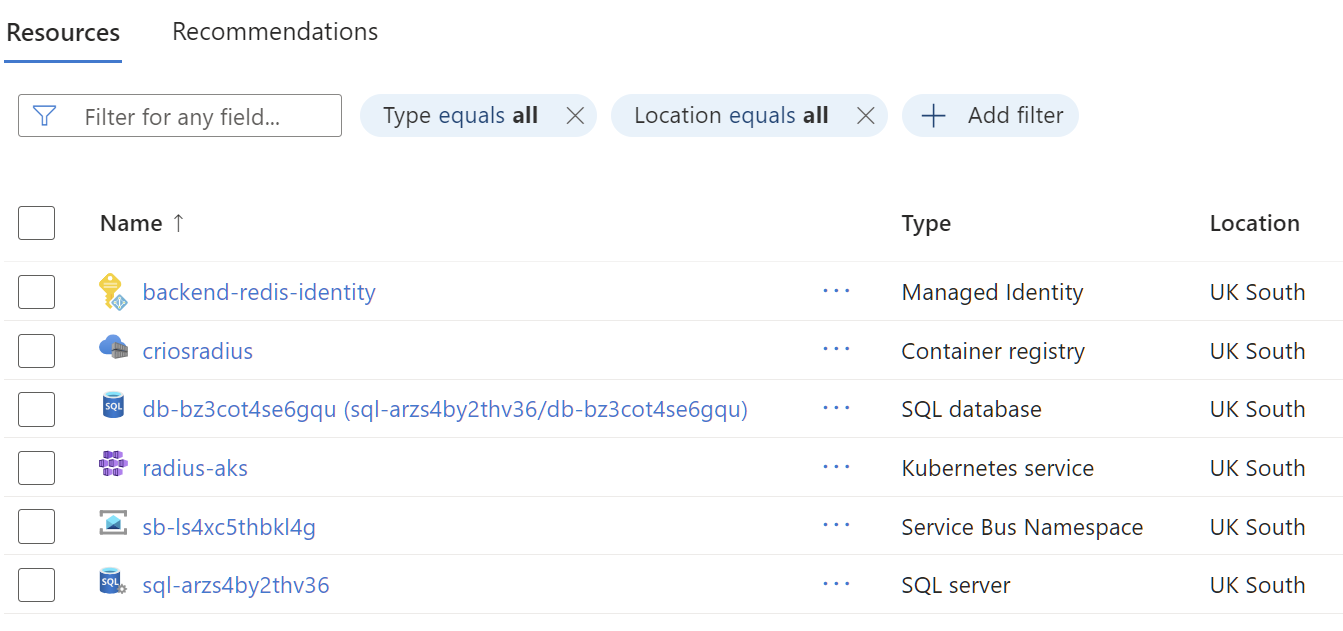
Each resource corresponds to a recipe. Service Bus for pub/sub, SQL Database for persistence, Redis for state store. Radius automatically creates Dapr Components in the cluster that connect these Azure resources as sidecar bindings, so your backend pod connects via localhost:3500 to Dapr, which handles authentication and routing to the actual Azure services.
Conclusion
I had a really fun time deploying and learning how Radius works, and I hope this breakdown was useful. Radius is a powerful orchestration tool for platform teams managing multiple application teams with standardised infrastructure needs.
For small teams or projects, traditional IaC will be more straightforward. It’s not a tool for every scenario, but for the right organisation and maturity level, it’s a genuine step forward in separating what developers declare from what operators implement. I’m keen to see how the project evolves as more features get added!
Check the GitHub repo, rad-bank, and zachcasper/recipes for reference examples, or join the Radius Discord if you want to explore it further. Happy Radius..ing? 😁