


Contents
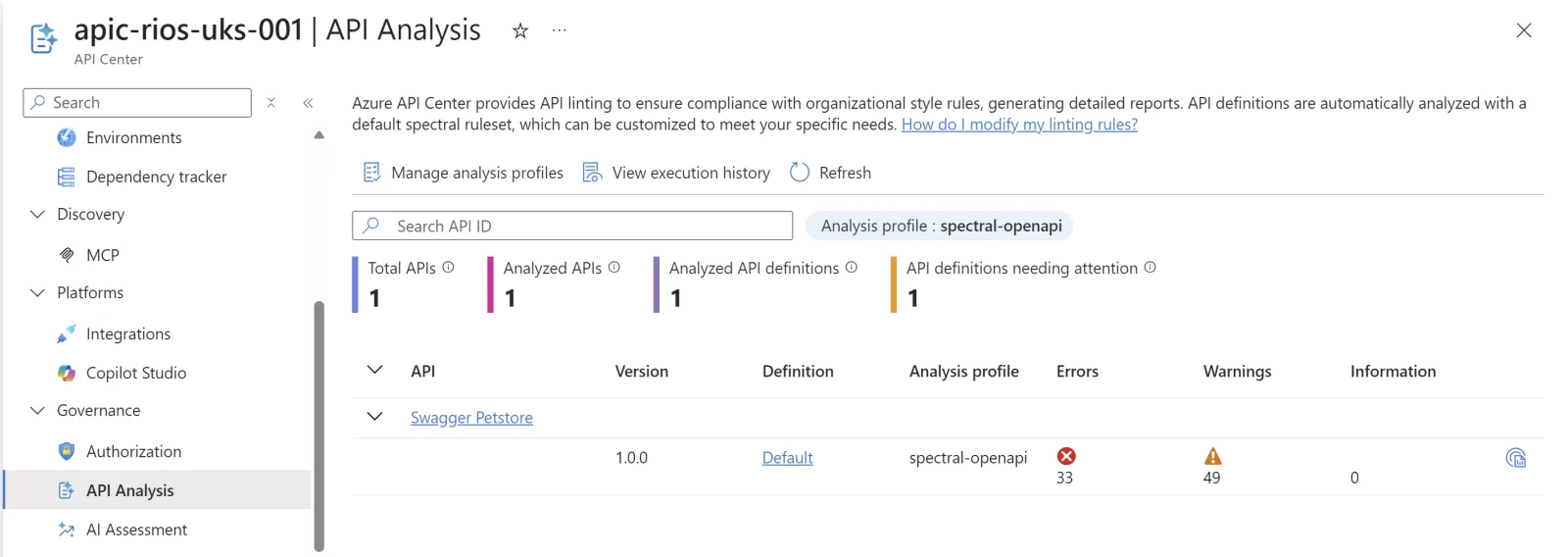
Spectral is one of the standard tools for API linting and governance. It’s an open-source linter that lets you define rules for your API specifications, then validate them consistently across your estate and your automation workflows (CI/CD, etc.).
With Spectral, you can:
- Shift security left: Catch API vulnerabilities before they reach production
- Enforce governance: Make sure APIs follow your organisation’s standards and the OpenAPI specification
- Maintain consistency: Apply the same patterns and best practices across all API definitions
Integrating Spectral with Azure API Center makes sense. API Center already gives you the central inventory of APIs across your organisation. Adding Spectral gives you a practical view of how well those APIs line up with your governance standards, where the gaps are, and which teams need to clean things up.
Note
If you want to see Spectral on its own before implementing it into API Center, I’ve got a Spectral demo repo on GitHub. It has good and bad OpenAPI examples, an OAS + OWASP + custom ruleset, and a GitHub Action so you can see the same linting pattern running in a PR.
Linting every definition automatically
API Center runs the Spectral linting engine against your OpenAPI and AsyncAPI definitions and produces a report each time a definition is added or updated. There are two ways to run it:
- Managed (default): Microsoft runs the engine for you. Zero infrastructure. Lints automatically with the built-in
spectral:oasruleset. But you can create a custom ruleset also. - Self-managed: you run the engine in your own Azure Function and trigger it with Event Grid. More control, but more to maintain. Microsoft documents that enabling self-managed analysis overrides the built-in linting features, so treat it as an either/or choice rather than running both.
For most teams, managed is the right starting point. Self-managed is for when you need custom engine behaviour or air-gapped control so it is more niche. I’ve had no issues with managed myself.
Managed analysis has no Bicep surface that I could see: profiles and rulesets are data-plane objects you manage from VS Code or the CLI, not ARM resources. Self-managed is the part that lives in IaC, and the seam is an Event Grid subscription on the API center that fires whenever a definition is added or updated:
param functionResourceId string

// Existing API center
resource apic 'Microsoft.ApiCenter/services@2024-06-01-preview' existing = {
  name: 'apic-rios-uks-001'
}

// Route definition change events to your analyser Function
resource lintingEvents 'Microsoft.EventGrid/eventSubscriptions@2022-06-15' = {
  name: 'api-analysis'
  scope: apic
  properties: {
    destination: {
      endpointType: 'AzureFunction'
      properties: {
        resourceId: functionResourceId
      }
    }
    filter: {
      includedEventTypes: [
        'Microsoft.ApiCenter.ApiDefinitionAdded'
        'Microsoft.ApiCenter.ApiDefinitionUpdated'
      ]
    }
  }
}
The APICenter-Analyzer repo can do most of this for you with azd up, including the Function and Event Grid subscription. I still like seeing the Bicep shape though. The useful bit is the event filter: API definition added, API definition updated. That’s the trigger that makes your own Spectral engine run when the catalogue changes. Although the repo seems abandoned and archived – it provides some insight.
Analysis profiles
Managed analysis uses profiles which is basically a ruleset plus optional filter conditions for which APIs it applies to. The default profile runs spectral:oas against everything. You might add a stricter profile for production APIs and a looser one for things still in development. The API Center limits give you one analysis profile on Free and up to three on Standard.
Customise the ruleset in VS Code
For this bit, I’d stay in VS Code. Pull the ruleset down, make the change, open a real API spec, and let Spectral complain at you locally. Once it behaves, push the ruleset back up to API Center. You’ll need the Azure API Center extension and the Spectral extension installed.
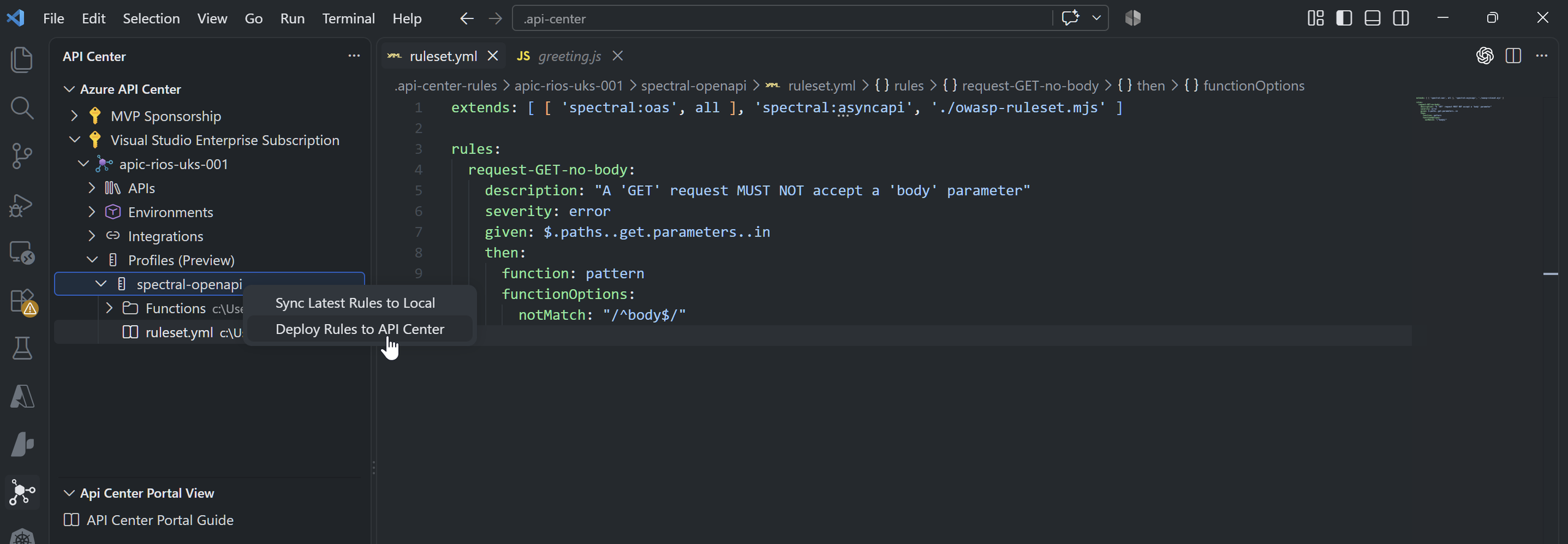
- In the API Center activity bar, expand your API center, then Profiles, then your profile, and open
ruleset.yaml. - Edit the rules and save.
- Set it as your active style guide for local linting. Open the Command Palette (Ctrl+Shift+P), run Azure API Center: Set active API Style Guide, choose Select Local File, and point at your
ruleset.yaml. - Open any OpenAPI file. Linting runs inline, with results in the editor and the Problems window (Ctrl+Shift+M). Iterate until it behaves.
- Push it. Right-click the profile and select Deploy Rules to API Center.
A trimmed ruleset that extends the defaults and adds a custom rule looks like this:
extends:
  - ["spectral:oas", "recommended"]
  - spectral:asyncapi
  - ./owasp-ruleset.mjs

rules:
  request-GET-no-body:
    description: A GET request must not accept a body parameter.
    severity: error
    given: $.paths..get.parameters..in
    then:
      function: pattern
      functionOptions:
        notMatch: /^body$/
Once deployed, the managed engine uses your ruleset and the reports update. It’s worth handing that same ruleset to your API developers as well, so they catch issues in VS Code before it gets anywhere near the catalogue.
If you’re doing APIOps for APIM, this is where Spectral fits nicely as well. Run it in CI against the OpenAPI specs before they get promoted into Azure API Management. Use the same ruleset your devs see locally and the same one API Center reports on.
Pushing rulesets with the Azure CLI
You can also push a ruleset with the CLI rather than the extension:
az apic api-analysis import-ruleset \
  --resource-group rg-apic \
  --service-name apic-rios-uks-001 \
  --analysis-profile-name default \
  --source-folder ./rulesets
There’s one gotcha here that cost me a good chunk of time. If your ruleset references external URLs in extends, the VS Code deploy can look like it worked while silently doing nothing, and the CLI import throws a backend ValidationError. My assumption is the API Center backend can’t fetch the external dependency during import, which makes sense from a locked-down service point of view.
This didn’t work:
extends:
  - ["spectral:oas", "recommended"]
  - https://unpkg.com/@stoplight/spectral-owasp-ruleset/dist/ruleset.mjs
This did:
extends:
  - ["spectral:oas", "recommended"]
  - ./owasp-ruleset.mjs
Drop the dependency into the folder you upload and reference it with a relative path, and your imports come out the same way every time. The thing to steer clear of is pulling external extends over the wire during an import. I can only assume the APIC instance managed by Microsoft has restrictions on outbound resolutions on why this failed.
View the results
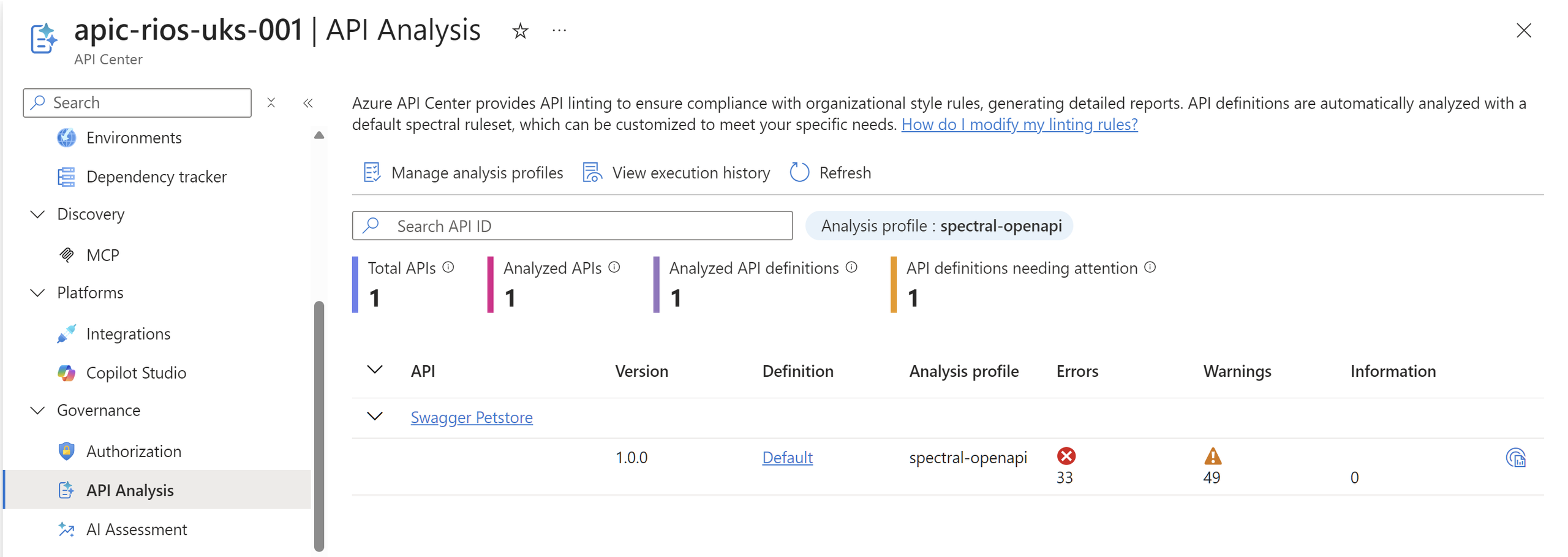
In the portal, Governance > API Analysis gives you the summary across every definition, and each definition has its own Analysis tab with the errors, warnings, and info raised against the active ruleset.
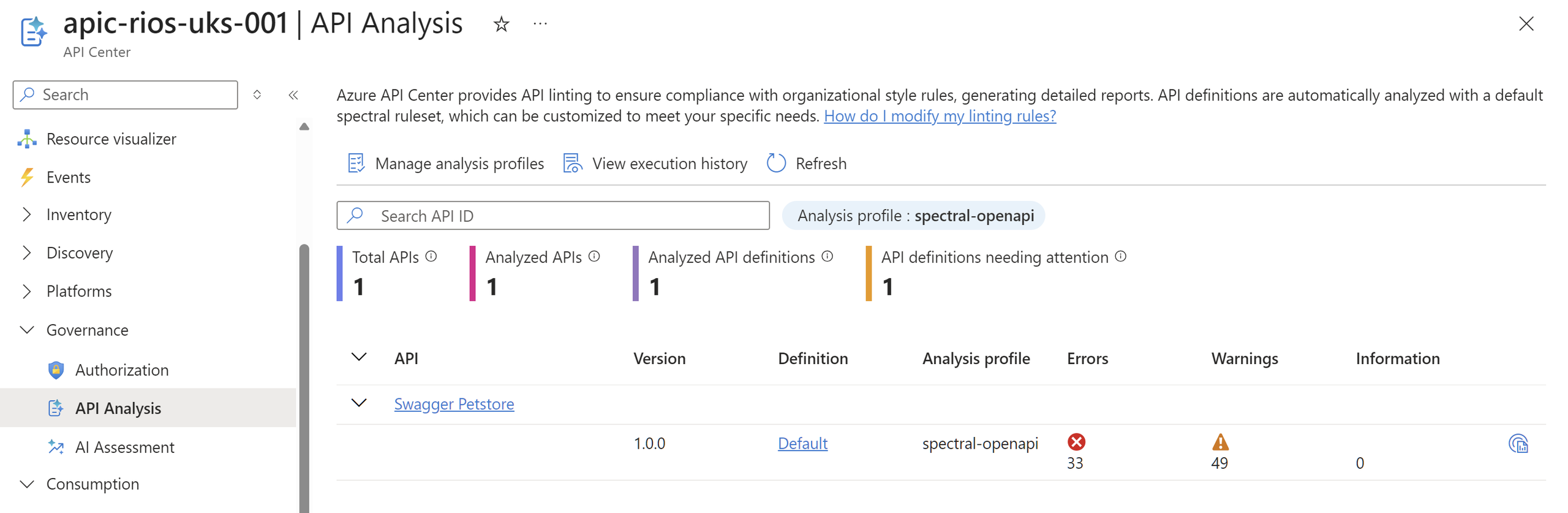
The API Analysis summary under Governance, scoring each definition against the active ruleset, with a per-definition report listing every error and warning.
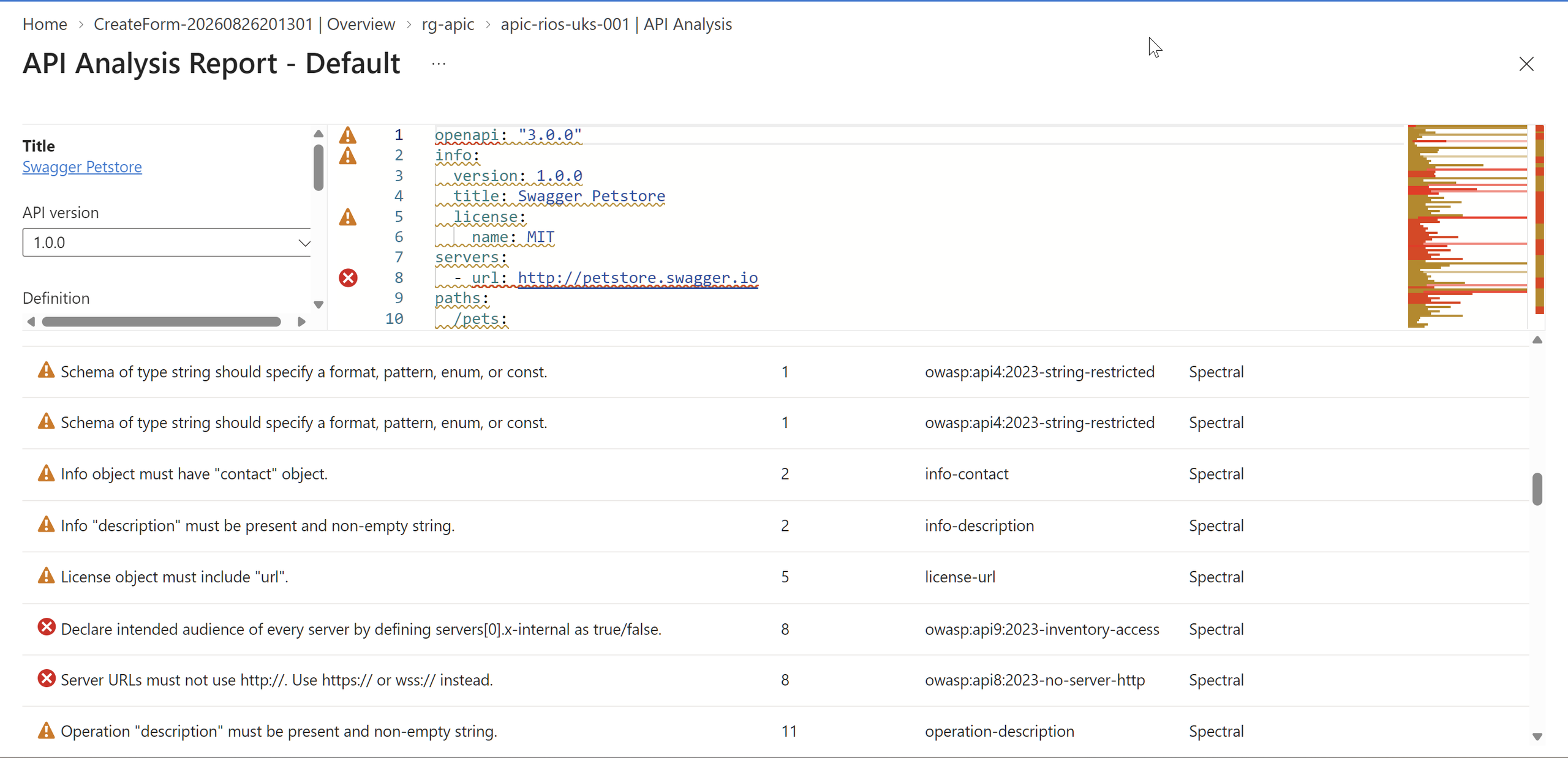
The useful bit here is that API standards stop being a wiki page nobody reads or updates. They can now become something you can actually measure across the organisation and your entire enterprise API estate.
Platform teams get a central view of where APIs are drifting from the standard, the reports give you an audit trail, and the rules can live in Git with the rest of your platform code. Devs also get the same feedback locally that API Center applies centrally, so the standard is consistent from editor to catalogue.
References
Some useful references:
reply